Best Home Stereo System Under $500 (Tested Picks & Buying Guide)
We compared seven of the most popular budget-friendly stereo and soundbar systems on the market to find out which ones actually earn their keep in a real living room.
Why $500 Is the Sweet Spot for Home Audio
There’s a very specific, very frustrating moment that happens in almost every living room: you finally get a big, beautiful new TV mounted on the wall, you sit down to watch something, and the audio coming out of it sounds like it’s being broadcast through a tin can. Modern TVs are thinner than ever, which looks fantastic, but it leaves almost no room for speakers that can move real air. Dialogue gets muddy, explosions sound flat, and music has all the depth of a laptop speaker.
That’s exactly the gap a home stereo system under $500 is built to close. This price range sits in a genuinely interesting spot in the market. Go much cheaper and you’re often stuck with a single small driver and no real bass extension. Spend a few hundred dollars more and you’re paying for premium finishes, app ecosystems, and marginal gains that most people in a normal living room will never notice. Right around the $300 to $500 mark, you start seeing real engineering: multi-driver arrays, dedicated or wireless subwoofers, Dolby Atmos decoding, and amplification that can actually fill a mid-sized room without distorting.
We put together this guide by looking closely at seven of the most popular systems that fall into or near this budget, spanning all-in-one soundbars with built-in bass, 2.1 and 5.1 systems with dedicated subwoofers, and compact options built for apartments. Whether you’re upgrading a bedroom TV, finishing a basement media room, or just tired of straining to hear dialogue, one of these picks should fit. If you want the bigger picture first, our guide to the best home audio systems covers every price tier, and if $500 ends up feeling limiting, our roundup of the best home theater systems under $10,000 shows what’s possible once budget stops being the constraint.
One thing worth setting straight before diving in: nobody in this price range is trying to replicate a dedicated home theater room with in-wall speakers and a rack-mounted receiver. That’s a different hobby with a different budget. What we’re solving for here is the much more common scenario, a normal living room, bedroom, or den where the TV is the centerpiece and the audio just needs to stop being an afterthought. Every system in this guide was chosen because it does that job convincingly, not because it chases spec-sheet bragging rights that don’t translate into a better experience once the couch cushions settle and the lights go down.
We also paid close attention to the kind of details that only show up after living with a product for a while: whether the remote actually makes sense on the first try, whether the companion app nags you to create an account before you can adjust bass, and whether the promised wireless subwoofer pairing actually stays paired after a power outage. Those unglamorous details separate a soundbar you’ll enjoy for years from one that ends up back in its box after a frustrating weekend.
Quick Comparison: Our Top Picks
If you’re short on time, here’s the short version. Each of these systems earned its spot for a different reason, so pick based on the category that matches how you’ll actually use it.
| Model | Best For | Configuration | Dolby Atmos | Wireless Sub |
|---|---|---|---|---|
| JBL Bar 300MK2 | Best All-in-One | 5.0 channel | Yes | No (built-in bass) |
| Bose Smart Soundbar 600 | Best Voice Control | 5.0 channel | Yes | Optional add-on |
| VIZIO M-Series 5.1 | Best Value 5.1 Bundle | 5.1 channel | Yes | Yes |
| Sony HT-S2000 | Best Compact Footprint | 3.1 channel | Yes | Built-in dual sub |
| Samsung HW-B550F | Best Budget Bass | 2.1 channel | No | Yes |
| Polk MagniFi Mini AX | Best for Small Rooms | 2.1 channel | Yes | Yes |
| VIZIO 5.1 Soundbar SE | Best True Surround Bundle | 5.1 channel | Yes | Yes |
How We Evaluated These Systems
Rather than relying purely on spec sheets, we cross-referenced manufacturer documentation, professional audio reviews, and verified owner feedback for each of these seven systems, then weighed them against five practical criteria that matter most in a real living room.
| Criteria | Why It Matters |
|---|---|
| Dialogue Clarity | The single most common complaint about TV audio; a system that muddies speech fails at its core job regardless of how impressive the bass is. |
| Bass Extension & Control | Whether bass is built-in or delivered by a wireless sub, it needs to feel controlled rather than boomy or one-note. |
| Soundstage Width | How convincingly the system throws sound beyond its physical boundaries, which is especially important for Atmos and surround content. |
| Setup Friction | How many steps stand between opening the box and actually watching something, including app account requirements and firmware updates. |
| Long-Term Reliability | Wireless subwoofer pairing consistency, remote durability, and how well the brand supports firmware updates over time. |
None of these seven systems scored poorly across the board, which is exactly why they made this list in the first place. Where they differ is in which of these five criteria each one prioritizes, and that’s the lens we used to sort them into the categories you’ll see below: best all-in-one, best voice control, best value 5.1 bundle, and so on.
It’s also worth acknowledging that “best” is inherently a bit personal when it comes to audio. Two people sitting in the same room listening to the same system will sometimes walk away with different opinions about whether the bass is too heavy or the dialogue is clear enough. That’s part of why we leaned on a mix of criteria rather than a single overall score, and why the rankings below are organized by use case rather than forcing every system to compete head-to-head on identical terms.
What to Look For in a Stereo System Under $500
Not every “5.1” or “Dolby Atmos” label means the same thing across brands, and marketing copy tends to blur the details that actually matter once the box is open. Here’s what we weighed most heavily when comparing these systems.
Channel Configuration
The numbers you’ll see, like 2.1, 3.1, or 5.1, describe how many discrete audio channels a system reproduces. The first number is the count of main speakers, and the number after the decimal is the subwoofer. A 2.1 system has left and right channels plus a sub. A 5.1 system adds a dedicated center channel and two rear surrounds, which is why systems like the VIZIO M-Series and VIZIO 5.1 Soundbar SE feel noticeably more enveloping than a simple 2.1 bar, especially for movies with a lot of directional sound.
Dolby Atmos and DTS:X Support
These are competing formats for object-based, height-aware audio. In practice, most budget and mid-range soundbars simulate the “height” effect through upward-firing drivers or software processing rather than true ceiling-bounced sound, since real Atmos hardware setups cost thousands. Still, even simulated Atmos adds a noticeable sense of space compared to flat stereo, and it’s worth prioritizing if you watch a lot of blockbuster movies or play atmospheric games.
Power Output and Room Size
Total system wattage gets thrown around a lot, but it’s a rough proxy at best. A system rated at 250 watts with well-matched drivers and cabinet tuning can sound louder and cleaner than a 400-watt system with cheap components. As a general rule, anything in the 200 to 300 watt range is enough for a standard living room; go higher only if you’re covering an open-concept space or a larger basement.
Connectivity
Look for HDMI eARC or ARC for the cleanest connection to your TV, Bluetooth for casual phone streaming, and an optical input as a fallback for older televisions. A few of the systems here add Wi-Fi based streaming through Apple AirPlay 2, Spotify Connect, or Chromecast built-in, which is a genuine upgrade if you stream music often, since it avoids Bluetooth’s compression and range limits.
Wireless vs. Built-In Subwoofers
A wireless subwoofer, like the ones bundled with the Samsung HW-B550F or Polk MagniFi Mini AX, gives you a physically separate box that moves real air and can be positioned wherever bass sounds best in your room. Built-in bass, as used in the JBL Bar 300MK2, keeps the footprint smaller and setup simpler, at some cost to maximum low-end extension. Neither approach is objectively better; it comes down to whether you have the floor space and patience for a second component.
Remote and App Experience
This is one of the most overlooked factors in soundbar shopping, and one of the first things that starts to matter after the honeymoon period wears off. Some remotes pack a dozen tiny, unlabeled buttons that require memorization; others stick to a handful of clearly marked controls for power, volume, input, and bass. Companion apps vary just as widely. A few, like the JBL One app, get you calibrated and streaming in a couple of minutes. Others insist on an account signup and a firmware update before you can adjust even basic settings. If you’re the kind of household where multiple people, including kids or guests, need to operate the system without a tutorial, lean toward the simpler remote and app combinations we call out in each review below.
Warranty and Return Policy
Standard warranty coverage across this price tier runs one year for most brands, which is fairly typical for consumer electronics. What varies more is how forgiving the return window is if the system simply doesn’t suit your room. Since acoustic performance is so room-dependent, buying from a retailer with a generous return policy, and actually testing the system with your own content before that window closes, is one of the smartest things you can do regardless of which model you choose.
Amplifier Efficiency and Distortion at Volume
Two systems rated at similar wattage can behave very differently once you push past conversational volume. Cheaper amplifier designs start to clip and distort as they approach their power ceiling, which shows up as harshness in vocals or a muddy, congested feel during loud action scenes. Every system in this guide was chosen partly because it holds its composure at higher volumes rather than falling apart the moment you actually need the extra headroom for a movie night with friends.
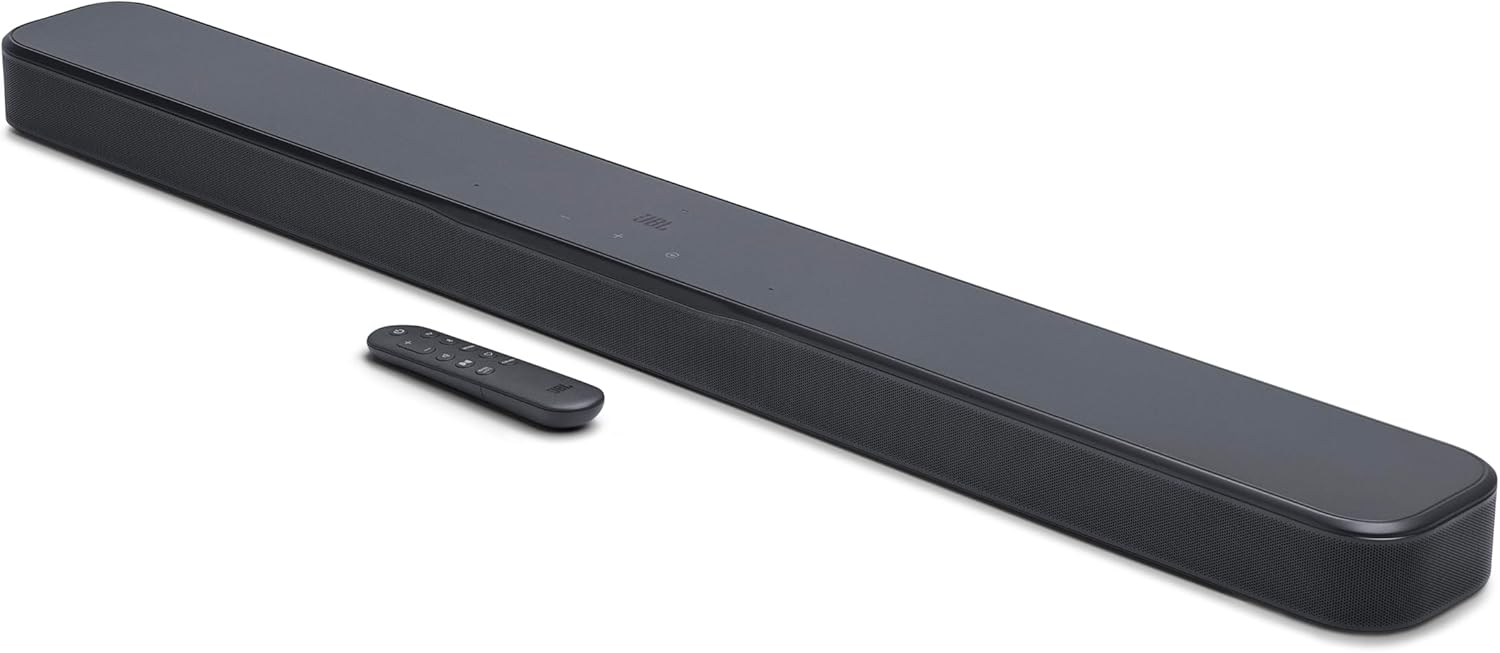
JBL Bar 300MK2
The JBL Bar 300MK2 is the pick we’d hand to someone who wants a genuine upgrade without adding a second box to their entertainment center. It’s a 5.0-channel, all-in-one soundbar that packs its drivers, amplification, and bass ports into a single unit, so there’s no wireless subwoofer to place, pair, or find an outlet for. JBL rates the system at 450 watts of max output, and in everyday use it has no trouble filling a mid-sized living room without sounding strained.
What stands out most is how JBL balances that single-cabinet design. The built-in bass ports do a surprisingly good job of producing weight and punch for movies and bass-forward music, especially considering there’s no separate sub doing the heavy lifting. JBL’s MultiBeam 3.0 technology uses angled drivers to widen the soundstage, which helps dialogue and effects feel like they’re coming from beyond the physical width of the bar itself, and Dolby Atmos support adds a real sense of height on supported content.
Who it’s for: Renters and anyone who wants to avoid a second component entirely will appreciate that this is a true one-box solution. Set it on the console, run a single HDMI cable, and you’re done. It’s also a strong fit for people who move apartments periodically, since there’s no wireless sub to re-pair or extra cabling to manage each time.
Pros
- No separate subwoofer to place or wire
- 450W of max output fills larger rooms easily
- Dolby Atmos with a genuinely wide soundstage
- Simple one-cable setup via HDMI eARC
- JBL One app makes calibration painless
Cons
- Bass can’t quite match a true wireless subwoofer
- No rear surround speakers included
- Larger footprint than compact bars like the Polk MagniFi Mini
| Spec | Details |
|---|---|
| Channels | 5.0 (no dedicated sub channel; built-in bass ports) |
| Max Output | 450W |
| Formats | Dolby Atmos |
| Connectivity | HDMI eARC/ARC, Bluetooth, JBL One app |
| Best For | Apartments and living rooms wanting one clean unit |
Bose Smart Soundbar 600

Bose has a reputation for squeezing more performance out of a small cabinet than the specs sheet suggests, and the Smart Soundbar 600 continues that tradition. At just 27.5 inches wide and barely over two inches tall, it tucks beneath almost any TV without blocking the screen, yet it packs five speakers, including two upward-firing transducers, into that compact shell to create Bose’s proprietary TrueSpace surround effect.
TrueSpace is genuinely one of the more effective upmixing technologies we’ve heard at this price. It analyzes non-Atmos content, including regular stereo audio and 5.1 tracks, and intelligently spreads it across the soundbar’s array to create a wider, more three-dimensional soundstage. Combine that with built-in Amazon Alexa and Bose’s Voice4Video feature, which lets you control your TV and cable box by voice through the soundbar itself, and this is the most “smart home” ready pick in our lineup. Setup runs through the Bose Music app, and the soundbar can expand later with an optional Bass Module subwoofer or Bose surround speakers if you want to build toward a full system over time.
Who it’s for: Households already leaning on Alexa or Google Assistant will get the most out of this pick, since voice control extends beyond just the soundbar to the TV and cable box. It’s also the right call if you’d rather start compact and add a subwoofer and surrounds down the line rather than committing to a full bundle upfront.
Pros
- TrueSpace does an excellent job upmixing non-Atmos content
- Amazon Alexa built-in, plus Google Assistant compatibility
- Extremely compact, low-profile cabinet
- Expandable with an optional Bass Module and rear speakers
- Wi-Fi streaming via AirPlay 2, Spotify Connect, and Chromecast
Cons
- Bass is noticeably light without the optional subwoofer
- Initial Wi-Fi setup can be finicky on some networks
- Sits at the higher end of this price bracket
| Spec | Details |
|---|---|
| Channels | 5.0 (2 upward-firing) |
| Dimensions | 27.5″ wide, ultra low-profile |
| Formats | Dolby Atmos with Bose TrueSpace upmixing |
| Connectivity | Wi-Fi, Bluetooth, AirPlay 2, Spotify Connect, Chromecast, HDMI eARC/ARC |
| Best For | Alexa households wanting a compact, expandable system |
VIZIO M-Series 5.1 Home Theater Sound Bar

If your priority is true surround sound rather than a virtual approximation of it, the VIZIO M-Series is the most complete package here for the money. This is a genuine 5.1-channel system, meaning it ships with a soundbar, a wireless subwoofer, and a pair of physical rear surround speakers rather than relying purely on processing tricks to fake a wraparound feel. That matters most for movie nights, where sound effects moving from front to back make a real, obvious difference.
Dolby Atmos and DTS:X support round out the format compatibility, so it handles whatever your streaming service throws at it. VIZIO has consistently made setup one of the easier parts of the experience, with wireless pairing between the subwoofer, rears, and bar that takes just a few minutes out of the box. For anyone who’s been holding off on surround sound because they assumed it meant running speaker wire across the living room, this system removes that objection entirely.
Who it’s for: Anyone who has specifically wanted a real 5.1 setup but assumed it was out of reach under $500. It’s also a smart pick for households upgrading from an older, wired surround system, since replacing that setup with a fully wireless equivalent tends to feel like a genuine relief rather than a lateral move.
Pros
- True 5.1 setup with physical rear surrounds included
- Wireless subwoofer with real low-end extension
- Dolby Atmos and DTS:X support
- Wireless pairing between all components, no speaker wire
- Excellent value for a full surround bundle
Cons
- Rear speakers still need their own power outlets
- More components to place than a single soundbar
- App and remote feel less polished than premium brands
| Spec | Details |
|---|---|
| Channels | 5.1 (soundbar + wireless sub + 2 rear surrounds) |
| Formats | Dolby Atmos, DTS:X |
| Connectivity | HDMI eARC/ARC, Bluetooth, optical |
| Best For | Movie-focused rooms wanting true rear-channel surround |
Sony HT-S2000

Sony took a different approach with the HT-S2000: instead of bundling a separate subwoofer box, it built dual subwoofers directly into the bar itself, alongside three front-facing speakers and a dedicated center channel. The result is a genuinely compact, 3.1-channel system that measures just 31.5 inches wide and about five inches deep, small enough to sit in front of almost any TV without hanging over the edges.
Total output lands at 250 watts across five active drivers, which is more than enough for small to mid-sized rooms. Sony’s Vertical Surround Engine and S-Force PRO Front Surround processing simulate Dolby Atmos and DTS:X height effects without any upward-firing drivers, which keeps the cabinet slim while still producing a surprisingly spacious soundstage. If you decide you want more later, Sony sells optional wireless subwoofers and rear speakers that pair automatically, so the HT-S2000 can grow into a larger system down the road without starting over.
Who it’s for: Anyone with a shallow media console or a TV stand where every inch of depth is already spoken for. It’s also a great match for BRAVIA TV owners, since Acoustic Center Sync lets the soundbar work in tandem with the TV’s own speakers for a slightly fuller sound without any extra setup.
Pros
- Dual built-in subwoofers, no separate box needed
- Very compact, fits tight TV stands easily
- Dedicated center channel for clear dialogue
- Expandable with optional Sony wireless subs and rears
- Simple plug-and-play setup, no lengthy app onboarding
Cons
- No built-in Wi-Fi streaming or voice assistant
- Bluetooth only, version 5.0/5.2
- Bass is good, but not as deep as a large external sub
| Spec | Details |
|---|---|
| Channels | 3.1 (built-in dual subwoofer) |
| Max Output | 250W across 5 active drivers |
| Formats | Dolby Atmos, DTS:X (virtual height via S-Force PRO) |
| Connectivity | HDMI eARC/ARC, optical, USB, Bluetooth 5.0/5.2 |
| Best For | Tight TV stands and dialogue-heavy viewing |
Samsung HW-B550F

The Samsung HW-B550F is proof that you don’t need a five-figure channel count to solve the most common complaint about TV audio, which is simply not being able to understand what people are saying. This is a straightforward 2.1-channel system: left and right channels in the bar, plus a wireless subwoofer that handles the low end. Combined output lands around 300 watts, which is plenty for small to medium living rooms.
What makes it stand out at this price is what’s included versus what’s usually an upsell. Most soundbars in the sub-$250 range make you choose between having a subwoofer at all, but the HW-B550F bundles one in standard. Samsung’s Voice Enhance mode does a genuinely good job of pulling dialogue forward in the mix, and DTS Virtual:X adds a wider, more surround-like feel even without physical rear speakers. It lacks Dolby Atmos, which is a fair trade-off at this price, and it pairs especially well with Samsung TVs thanks to unified remote and Q-Symphony style integration, though it works fine with any brand.
Who it’s for: Buyers who mainly want the “I can’t hear what they’re saying” problem solved without paying for features they won’t use. It’s also a sensible starter system if you’re planning to build up to a full Samsung Q-Series surround setup eventually, since the wireless rear speaker kit is compatible across the lineup.
Pros
- Wireless subwoofer included standard, not an upsell
- Excellent dialogue clarity via Voice Enhance mode
- Easy 10-minute setup, especially with Samsung TVs
- DTS Virtual:X adds surprising spatial width
- One of the most affordable systems in this guide
Cons
- No Dolby Atmos support
- Basic remote with limited controls
- 300W total output can feel light in larger, open spaces
| Spec | Details |
|---|---|
| Channels | 2.1 (soundbar + wireless subwoofer) |
| Max Output | 300W combined |
| Formats | Dolby Audio, DTS Virtual:X |
| Connectivity | HDMI ARC/eARC, optical, Bluetooth |
| Best For | Budget-conscious buyers who still want real bass |
Polk Audio MagniFi Mini AX

Not every living room has space for a full-width soundbar, and the MagniFi Mini AX is Polk’s answer for exactly that scenario. It’s one of the most compact systems in this guide, but it doesn’t cut corners on features. The five-driver array is paired with Polk’s patented SDA (Sound Distance Amplification) technology, and it still carries Dolby Atmos and DTS:X certification, which is genuinely impressive for something this small.
A wireless subwoofer with a 10-inch down-firing driver comes standard, filling in the low end that a compact bar physically can’t produce on its own. Polk’s VoiceAdjust technology, powered by the integrated center channel, keeps dialogue crisp even at lower volumes, which is one of the more practical everyday benefits of this system. Streaming options are broad, covering Wi-Fi, Bluetooth, AirPlay 2, Chromecast, and Spotify Connect, and the system can expand later with optional Polk SR2 wireless surround speakers for a full 5.1 setup if your room grows or your priorities shift.
Who it’s for: Bedroom and apartment setups with a 32 to 55-inch TV are the sweet spot here. If your current soundbar looks comically oversized next to your screen, the MagniFi Mini AX solves that proportion problem while still delivering Atmos-certified sound and a proper subwoofer, which smaller bars from other brands often skip entirely.
Pros
- Extremely compact, ideal for small TVs and tight spaces
- Dolby Atmos and DTS:X certified despite the small size
- Wireless 10-inch subwoofer included
- Broad wireless streaming support
- Expandable to 5.1 with optional Polk SR2 surrounds
Cons
- Smaller cabinet means a narrower max soundstage than full-width bars
- Surround speakers are sold separately
- Bass Adjust needs a little tuning to avoid boominess in small rooms
| Spec | Details |
|---|---|
| Channels | 2.1 (5-driver array + wireless sub) |
| Formats | Dolby Atmos, DTS:X certified |
| Connectivity | Wi-Fi, Bluetooth, AirPlay 2, Chromecast, Spotify Connect, HDMI eARC/ARC, optical |
| Best For | Bedrooms, apartments, and compact TV setups |
VIZIO 5.1 Soundbar SE

The VIZIO 5.1 Soundbar SE rounds out this guide as another full surround package, but it leans a bit harder into raw output than the M-Series above. Three full-range speakers sit inside the main bar, joined by two dedicated surround speakers and a wireless compact subwoofer, and VIZIO rates the combined system at 96dB of sound pressure, which translates to genuinely dynamic, room-filling audio for medium to larger spaces.
Dolby Atmos and DTS:X are both supported, so overhead effects and object-based audio come through as intended on compatible content. VIZIO’s QuickFit mounting system is a nice touch for anyone pairing this with a compatible VIZIO TV, letting the bar attach directly to the television with a few thumbscrews rather than a separate wall mount. Setup for everyone else is just as simple: connect via the included HDMI eARC cable, stream over Bluetooth, and manage advanced settings through the VIZIO mobile app.
Who it’s for: Larger rooms and open-concept layouts where a smaller 2.1 system would struggle to fill the space. It’s also worth a close look if you already own a VIZIO TV, since the QuickFit mounting removes one of the more annoying parts of soundbar installation, finding a mount that actually fits both the bar and the TV cleanly.
Pros
- True 5.1 layout with physical surround speakers
- Rated 96dB output, strong for medium-to-large rooms
- Dolby Atmos and DTS:X support
- QuickFit mounting for compatible VIZIO TVs
- Simple one-cable HDMI eARC setup
Cons
- Physical remote sold separately on some bundles
- Requires a VIZIO account for app-based firmware updates
- More components to place than a single all-in-one bar
| Spec | Details |
|---|---|
| Channels | 5.1 (3 speakers in bar + 2 surrounds + wireless sub) |
| Rated Output | 96dB |
| Formats | Dolby Atmos, DTS:X |
| Connectivity | HDMI eARC, Bluetooth, VIZIO mobile app |
| Best For | Medium-to-large rooms wanting true surround at higher volume |
Stereo System vs. Soundbar vs. Shelf System: What’s the Difference?
These terms get used interchangeably online, but they describe genuinely different setups, and knowing the distinction helps you understand what you’re actually buying.
| Type | What It Is | Best For | Setup Effort |
|---|---|---|---|
| Traditional Stereo | Separate receiver/amp driving standalone left and right speakers | Music purists, vinyl setups | Higher, requires speaker wire |
| Soundbar System | All-in-one or 2-piece bar with amp and drivers built in, often with a wireless sub | TV audio, movies, casual music | Low, mostly plug-and-play |
| Shelf/Bookshelf System | Compact powered speakers or an integrated mini system | Bedrooms, offices, smaller spaces | Low to moderate |
Every product covered in this guide falls into the soundbar system category, which is where the vast majority of the sub-$500 market lives today. That’s not an accident. Soundbars solve the two biggest pain points people run into with traditional stereo gear: they don’t require running wire across the room, and the amplification is already matched to the drivers, so there’s no guesswork about pairing components. If you’re specifically chasing a traditional two-channel stereo experience for critical music listening, that’s a different and generally pricier category, but for TV-centered rooms, a soundbar system is almost always the more practical choice. Our guide on how to set up a home audio system walks through both approaches in more detail if you want to compare setup complexity side by side.
There is a middle category worth mentioning too: powered bookshelf speakers connected to a small streaming amplifier. This setup can outperform a soundbar for pure two-channel music fidelity, since dedicated stereo drivers and cabinets are generally better optimized for accurate reproduction than a soundbar’s compact, multi-purpose enclosure. The tradeoff is that these setups are usually built around music first and video second, so they often lack the surround processing, Atmos support, and HDMI passthrough features that make soundbars so convenient for a TV-centered room. If your primary use case really is music rather than movies and TV, it’s worth cross-shopping this category before settling on a soundbar purely out of habit.
Brand Support and Long-Term Reliability
Beyond the specs, how a brand handles firmware updates and customer support after the sale matters more than most buyers expect going in. Here’s a quick snapshot of what to expect from each manufacturer represented in this guide.
| Brand | Typical Warranty | App/Firmware Support |
|---|---|---|
| JBL | 1 year limited | Regular updates via JBL One app |
| Bose | 1 year limited | Frequent updates via Bose Music app |
| VIZIO | 1 year limited | Updates via SmartCast/VIZIO mobile app, account required |
| Sony | 1 year limited | Updates via Sony Home Entertainment Connect app |
| Samsung | 1 year limited | Updates via SmartThings/Samsung Soundbar app |
| Polk | 1 year limited (parts), longer on select components | Updates via Polk Connect app |
All six brands represented here maintain active support infrastructure and haven’t shown a pattern of abandoning firmware updates shortly after launch, which unfortunately isn’t true of every budget audio brand on the market. If you’re comparing a system from this guide against something outside it, checking how recently a brand pushed a firmware update for its existing product line is one of the fastest ways to gauge whether it’s likely to keep supporting what you buy today.
Audio Terms Explained
Soundbar marketing copy leans heavily on acronyms and trademarked technology names, and it’s easy to lose track of what actually affects your listening experience versus what’s just a brand’s internal name for a fairly common feature. Here’s a plain-language breakdown of the terms that come up most across this guide.
Dolby Atmos vs. DTS:X
Both are competing object-based surround formats that add a height dimension to audio, letting individual sounds, like a helicopter or rainfall, be placed and moved independently rather than locked to a fixed channel. Dolby Atmos is more widely supported across streaming services and Blu-ray discs, while DTS:X tends to show up more in gaming and certain 4K disc releases. Most systems in this guide, including the VIZIO M-Series and Polk MagniFi Mini AX, support both, so you’re covered regardless of the source.
Upmixing
This refers to software processing that takes non-Atmos content, like a regular stereo or 5.1 track, and intelligently spreads it across a system’s available drivers to simulate a wider, more immersive soundstage. Bose’s TrueSpace and Sony’s S-Force PRO Front Surround are both examples of proprietary upmixing technology. It’s not the same as true object-based audio, but a good upmixer meaningfully improves the sense of space on the vast majority of content you’ll actually watch, since most TV shows and older movies aren’t mixed in Atmos to begin with.
eARC vs. ARC vs. Optical
These are the three most common ways to connect a soundbar to a TV. Optical is the oldest and most universal but caps out at compressed 5.1 audio. ARC, found on most HDMI ports since around 2010, carries a bit more bandwidth and lets you control the soundbar with your TV remote. eARC, the newest standard, supports uncompressed high-bitrate formats including full Dolby Atmos and lossless audio. If your gear supports it, eARC is always the better choice.
Channel Configuration (2.1, 3.1, 5.1)
As covered earlier in this guide, the first number counts discrete main speaker channels and the number after the decimal counts subwoofers. A 5.1 system, like the VIZIO 5.1 Soundbar SE, includes left, center, right, and two rear surround channels plus one subwoofer channel, for genuine directional sound rather than a virtual approximation.
Bluetooth Codec (SBC vs. AAC)
Bluetooth audio gets compressed to some degree no matter what, but the codec used affects how much quality is lost. SBC is the baseline codec every Bluetooth device supports, while AAC, used by Apple devices and supported on the Sony HT-S2000 among others, generally preserves more detail. For casual listening the difference is subtle, but audio-focused listeners connecting from an iPhone will get slightly better results with AAC-compatible gear.
Which System Fits Your Room? Three Real-World Scenarios
Scenario 1: Studio Apartment With a 43-Inch TV
Space is the deciding factor here, both for the TV stand itself and for how much sound a small room can comfortably absorb before it feels overwhelming. A compact 2.1 system like the Polk MagniFi Mini AX or Sony HT-S2000 is the better fit; both deliver Atmos-certified sound and real bass extension without dominating a small console, and their more modest output ratings are actually an advantage in a room where a 450-watt system would be more than anyone needs.
Scenario 2: Standard Living Room, Roughly 250 Square Feet
This is the scenario most of these systems were designed around, and it’s genuinely a toss-up between several strong options. The JBL Bar 300MK2 covers this size comfortably as a single unit, while the Samsung HW-B550F offers a more budget-friendly route if Atmos isn’t a priority. If true surround sound matters more than saving the last hundred dollars, the VIZIO M-Series bundle is the standout choice for this size room.
Scenario 3: Open-Concept Living Room and Kitchen, 400+ Square Feet
Larger, open spaces need more raw output and, ideally, real rear channels to keep sound from feeling thin as it disperses across a bigger area. The VIZIO 5.1 Soundbar SE, rated at 96dB with physical surround speakers, is built for exactly this kind of room, and the Bose Smart Soundbar 600 becomes a stronger contender once paired with its optional Bass Module for the extra low-end reinforcement a bigger space demands.
Understanding Sound Modes and When to Use Them
Nearly every system in this guide ships with multiple listening modes, and knowing when to switch between them makes a real difference in day-to-day use rather than leaving everything on a single default setting.
Movie or Cinema Mode
Optimized for dynamic range, this mode preserves the contrast between quiet dialogue and loud action sequences, which is what most people want for evening movie watching when the room is otherwise quiet.
Night Mode
Compresses that same dynamic range so loud moments don’t spike as dramatically, useful for late viewing when you don’t want to wake up other people in the house or apartment. Expect a slight loss of impact on explosions and action scenes in exchange for more consistent volume overall.
Music or Stereo Mode
Bypasses surround upmixing to deliver a more direct, front-focused stereo image, generally the better choice when streaming music rather than watching video content, since heavy surround processing can sometimes muddy a well-mixed song.
Dialogue or Voice Enhance Mode
Boosts the frequency range where human speech lives, typically between 1kHz and 4kHz, making voices easier to pick out from background music and effects without raising the overall volume. This is the single most useful mode for news, talk shows, and dialogue-driven dramas.
Maintenance and Long-Term Care
These systems are largely maintenance-free, but a few habits will keep them performing well for years rather than just months.
Keep Vents Clear
Both soundbars and subwoofers rely on passive airflow to keep internal amplifiers cool. Avoid stacking items on top of the soundbar or pushing the subwoofer flush against a wall in a way that blocks its ports, since restricted airflow can lead to thermal shutdowns during extended high-volume use.
Dust Regularly
A dry microfiber cloth is enough for the exterior grille and cabinet. Avoid liquid cleaners or sprays applied directly to the unit, since moisture can work its way into the driver openings or vents.
Update Firmware Periodically
Manufacturers occasionally push updates that fix Bluetooth stability issues or add new codec support. Checking the companion app every few months for available updates is a low-effort way to keep the system running smoothly, especially after connecting a new phone or streaming device for the first time.
Protect the Subwoofer From Moisture
Wireless subwoofers are often placed on the floor near windows, entryways, or basement walls, which puts them at higher risk of humidity or accidental spills. Keeping the subwoofer up off the floor even slightly, using a small stand or rug, helps avoid long-term moisture exposure in humid climates.
Setup Tips to Get the Best Sound From Your New System
Use HDMI eARC If Your TV Supports It
Whenever both your TV and soundbar support eARC, use that connection over standard ARC or optical. eARC carries uncompressed, higher-bandwidth audio, which matters most for getting full-quality Dolby Atmos from streaming apps running directly on your TV.
Center the Bar, Not Just the TV
It sounds obvious, but soundbars perform best when centered directly below or above the screen rather than pushed to one side to make room for a cable box or console. Off-center placement skews the stereo image and makes dialogue sound like it’s coming from one side of the room.
Give the Subwoofer Some Breathing Room
Wireless subwoofers sound their best a few inches away from walls and furniture rather than jammed into a corner or behind a couch. If bass sounds boomy or one-note, try pulling the sub out a bit or nudging it a foot in either direction; small placement changes make a surprisingly large difference.
Run the Auto-Calibration If It’s Offered
Several of these systems, including the JBL Bar 300MK2 and Polk MagniFi Mini AX, include an app-based room calibration feature. It takes a couple of minutes and genuinely improves tonal balance by accounting for how your specific room’s walls and furniture affect sound reflections.
Update Firmware Before Your First Movie Night
Soundbars ship with firmware that’s sometimes months old by the time it reaches your living room. Connecting to the manufacturer’s app and checking for updates before you settle in for the first real listening session can resolve Bluetooth pairing quirks and unlock features that weren’t active out of the box.
Test With a Range of Content, Not Just One Movie Trailer
It’s tempting to plug in a new system and immediately throw on the loudest action scene you can find, but that only tells you part of the story. Spend a little time with a quiet dialogue scene, a full song with vocals and bass, and a typical TV show episode as well. Systems that sound impressive on a trailer don’t always handle quieter, more nuanced content as gracefully.
Label Your Remote or Use the TV Remote Where Possible
If your household has more than one remote control living on the coffee table, most of these systems support CEC pass-through, which lets your existing TV remote control the soundbar’s volume directly over the HDMI connection. Enabling this in the settings menu cuts down on remote clutter and is especially helpful for guests or less tech-savvy family members.
Common Mistakes People Make When Buying a Budget Stereo System
Chasing Watts Over Everything Else
It’s tempting to sort by the biggest wattage number and call it a day, but as we covered above, total power output is only one piece of the puzzle. Driver quality, cabinet tuning, and whether there’s a proper subwoofer matter just as much, if not more, for how a system actually sounds in your room.
Ignoring Room Size Entirely
A compact system like the Polk MagniFi Mini AX is fantastic in a bedroom but can feel underpowered in a large, open-concept living space. Match the system’s rated output and channel count to your actual square footage rather than assuming bigger is always better or smaller is always cheaper and fine.
Skipping the Return Window Check
Audio gear is one of those categories where a product can look perfect on paper and still not suit your ears or your room once it’s actually set up. Always confirm the return policy before buying, and use that window to actually test the system with a mix of content: dialogue-heavy shows, action movies, and music.
Overlooking Wall-Mount Compatibility
If you plan to wall-mount your TV, check whether the soundbar you’re considering has a matching mounting solution, or enough clearance to sit on a shelf below the screen without blocking the picture. Some slim soundbars are designed specifically for wall-mounted setups, while bulkier 5.1 bars work better on a stand or console.
Assuming More Speakers Always Means Better Sound
A well-tuned 2.1 system with genuinely good bass and dialogue clarity, like the Samsung HW-B550F, can be more satisfying day-to-day than a poorly balanced 5.1 setup, especially if you mostly watch TV shows and news rather than big-budget action movies. Channel count is a useful data point, not the whole story.
Buying Based on Wattage Comparisons Between Different Brands
Manufacturers don’t always measure and report wattage the same way, so a straight numerical comparison between, say, a JBL rating and a Polk rating isn’t always apples to apples. Treat published wattage as a rough guide within a single brand’s lineup rather than a precise cross-brand benchmark, and weigh it alongside actual listening impressions and room size guidance instead.
Budget Breakdown: Where Your Money Goes
It helps to understand what you’re actually paying for as prices climb through this range, since the jump from $200 to $500 doesn’t buy the same kind of upgrade at every step.
| Price Range | What You Typically Get | Example From This Guide |
|---|---|---|
| Under $250 | 2.1 channel, wireless sub often included, no Atmos | Samsung HW-B550F |
| $250 to $400 | Compact Atmos-certified bars, sometimes with sub | Polk MagniFi Mini AX, Sony HT-S2000 |
| $400 to $500 | Full 5.1 bundles or larger all-in-one bars with Atmos | JBL Bar 300MK2, VIZIO M-Series, VIZIO 5.1 SE |
| $500+ | Premium finishes, deeper app ecosystems, voice assistants | Bose Smart Soundbar 600 |
The most noticeable jump in this whole range happens right around $250, where Dolby Atmos certification starts appearing consistently. The second meaningful jump is around $400, where true 5.1 bundles with physical rear speakers become common instead of relying purely on virtual surround processing. Past $500, you’re mostly paying for polish, brand ecosystem features, and marginal build quality improvements rather than a fundamentally different listening experience.
Accessories Worth Adding
None of these accessories are strictly required to enjoy any of the seven systems above, but each one solves a small, common annoyance that tends to show up a few weeks into ownership rather than on day one.
Wall Mount Brackets
If you’re wall-mounting your TV, a matching soundbar wall mount keeps the whole setup looking intentional rather than having a bar perched awkwardly on a shelf below a floating screen. Universal brackets work with most of the bars in this guide, though VIZIO’s QuickFit system on the 5.1 Soundbar SE eliminates the need for a separate mount entirely when paired with a compatible VIZIO TV.
HDMI eARC Cable
Not every soundbar includes a cable rated for full eARC bandwidth. If you’re chasing the best possible Dolby Atmos quality from streaming apps, a certified high-speed HDMI cable is a cheap upgrade that removes any doubt about whether you’re getting the full signal.
Power Strip With Surge Protection
Between the soundbar, subwoofer, and any rear speakers, you can end up needing three or more outlets clustered around your entertainment center. A quality surge-protected power strip keeps cable clutter under control and protects your new system from power fluctuations.
Cable Management Sleeves
Wireless subwoofers cut down on wiring significantly, but the soundbar itself still needs power and an HDMI or optical connection. A simple cable sleeve or raceway keeps things tidy, especially on a wall-mounted setup where dangling cables are the first thing anyone notices.
Troubleshooting Common Setup Issues
Subwoofer Won’t Pair
This is the single most common complaint across nearly every brand in this guide. The fix is almost always the same: power cycle both the soundbar and the subwoofer, ideally by unplugging them for about 30 seconds, then power the soundbar on first and let the subwoofer join afterward. Most subwoofers have a small pairing button that force-reconnects them if the automatic pairing doesn’t kick in.
No Sound After Connecting HDMI
Double-check that your TV’s audio output setting is actually routed to external speakers or ARC/eARC rather than the TV’s internal speakers. This setting lives in different menus depending on the TV brand, but it’s the most frequent culprit when a freshly connected soundbar stays silent.
Bluetooth Keeps Disconnecting
Interference from other 2.4GHz devices, including older Wi-Fi routers and some smart home hubs, can cause intermittent Bluetooth dropouts. Moving your phone or streaming device closer to the soundbar, or switching your router to a 5GHz band where possible, usually resolves it.
Dialogue Still Sounds Unclear
If speech still feels buried after setup, check whether a dialogue or voice enhancement mode is available and enabled, since most of these systems ship with it turned off by default. It’s usually labeled something like Voice Enhance, Dialogue Mode, or Night Mode within the companion app or on the remote itself.
Head-to-Head: Our Top Three Picks Compared
If you’ve narrowed things down but still can’t decide between our top picks, here’s a closer look at how the JBL Bar 300MK2, VIZIO M-Series 5.1, and Samsung HW-B550F actually compare when placed side by side.
JBL Bar 300MK2 vs. VIZIO M-Series 5.1
This comes down to a simple tradeoff: simplicity versus true surround. The JBL wins on setup speed and footprint, since there’s nothing to place beyond the single bar itself. The VIZIO wins decisively on immersion for movies, thanks to its physical rear speakers, which no amount of virtual processing on the JBL can fully replicate. If you’ve never dealt with a subwoofer and rear speakers before and want to ease in, start with the JBL. If you’ve already decided surround sound is worth the extra setup step, the VIZIO bundle delivers more for a similar price.
JBL Bar 300MK2 vs. Samsung HW-B550F
These sit at different points on the spec ladder, and the price gap reflects that. The Samsung is the more budget-conscious pick, skipping Dolby Atmos in favor of a genuinely good, no-frills 2.1 experience with excellent dialogue clarity. The JBL costs more but adds Atmos support, higher rated output, and a wider virtual soundstage. If your main goal is simply fixing bad TV dialogue on a tight budget, the Samsung gets there for less money. If you want a noticeably more cinematic experience and don’t mind spending closer to the top of this price range, the JBL is worth the difference.
VIZIO M-Series 5.1 vs. Samsung HW-B550F
This is the widest gap in the lineup, both in price and in what you’re getting. The VIZIO is a full 5.1 surround bundle with true rear channels and Atmos support, aimed at people who prioritize movie immersion above all else. The Samsung is a leaner 2.1 setup focused on dialogue clarity and solid bass at a lower price point. Neither is the “better” system in absolute terms, it depends entirely on whether surround immersion or budget efficiency matters more for your household.
Should You Wait for a Sale?
Soundbars and audio bundles are some of the most heavily discounted electronics categories around major shopping events, and it’s fair to ask whether patience will save meaningful money. In our experience tracking pricing patterns across this category, models tend to see their steepest discounts around major retail holidays, when even premium picks like the Bose Smart Soundbar 600 can drop closer to the middle of this price bracket.
That said, waiting isn’t free. If your current TV audio is bad enough that you’re missing dialogue or turning subtitles on out of frustration, the value of fixing that immediately often outweighs a modest future discount. A reasonable middle ground is to set a price alert on your preferred model and buy as soon as it dips into a range you’re comfortable with, rather than holding out indefinitely for the single lowest price of the year, which is impossible to predict with certainty.
Long-Term Value: Cost Per Year of Ownership
It’s worth reframing the purchase price in terms of how long you’ll realistically use the system. A $400 soundbar that lasts eight years works out to $50 a year, or less than the cost of a single dinner out, for daily use that touches nearly every viewing session in your home. Viewed that way, the difference between a $250 system and a $450 system is often just a few dollars a year in practice, which makes it easier to justify spending a bit more upfront for features like true surround sound or better dialogue clarity if they genuinely matter to how you use your TV.
The exception is if you expect your needs to change soon, such as moving to a much larger home or building out a dedicated media room down the line. In that case, a more modest purchase now, paired with the flexibility to add a subwoofer or rear speakers later, as several of these systems allow, tends to be the more financially sensible path.
Frequently Asked Questions
Can you actually get good sound for under $500?
Yes. The $300 to $500 range is one of the strongest value zones in home audio right now. It’s where you start seeing real Dolby Atmos decoding, dedicated subwoofers, and multi-driver arrays instead of the single small speaker crammed into a budget bar. You won’t match a $2,000 separates system, but you will get a dramatic, night-and-day upgrade over any built-in TV speaker.
Is a soundbar the same thing as a stereo system?
Not exactly, but the line has blurred a lot. A traditional stereo system uses a separate receiver or amplifier driving standalone left and right speakers. A modern soundbar packs the amplification and multiple drivers into one enclosure, often paired with a wireless subwoofer. For most people replacing weak TV audio, a soundbar system delivers similar or better real-world performance for a fraction of the cost and hassle.
Do I need a separate subwoofer, or is built-in bass enough?
It depends on your room and habits. Built-in bass ports, like those on the JBL Bar 300MK2, work fine for apartments and smaller living rooms. If you watch a lot of action movies, play games, or listen to bass-heavy music, a model with a dedicated wireless subwoofer will give you noticeably deeper, more physical low end without turning up the overall volume.
What is Dolby Atmos and do I need it under $500?
Dolby Atmos adds a height dimension to sound, so effects like rain, aircraft, or explosions feel like they’re coming from above rather than just left and right. Most soundbars in this price range simulate that height effect through upward-firing or virtual processing rather than true ceiling-bounced audio. It still makes a real difference for movies and shows, so we’d call it a nice-to-have rather than a must-have at this budget.
How much power (watts) do I actually need for a living room?
For most living rooms under roughly 300 square feet, somewhere between 150 and 300 total watts is plenty to fill the space at comfortable to loud listening levels. Watts matter less than driver count, cabinet design, and whether there’s a dedicated subwoofer. A well-engineered 250-watt system can sound bigger than a poorly designed 400-watt one.
Can I connect a soundbar to a turntable or an old stereo receiver?
Most modern soundbars accept audio over Bluetooth, optical input, or an analog aux input, so yes, you can usually route a turntable through a phono preamp and into the soundbar’s optical or aux port. Older receivers can often output via optical as well. Check the specific inputs on the model you choose, since not every soundbar includes an analog jack.
HDMI ARC vs eARC, what’s the practical difference?
HDMI ARC (Audio Return Channel) sends compressed audio like standard Dolby Digital back from your TV to the soundbar over one cable. eARC (enhanced ARC) supports higher bandwidth formats, including uncompressed Dolby Atmos and higher-resolution audio. If your TV and soundbar both support eARC, use it for the best possible quality; ARC still works fine for everyday viewing.
Will a $500 soundbar system work well for music, not just movies?
Most of the systems in this guide handle music streaming over Bluetooth, and several add AirPlay, Spotify Connect, or Chromecast. Sound quality for music is generally very good in this price range, though dedicated stereo speakers with a proper amplifier will still edge out a soundbar for critical music listening. For casual and even fairly serious listening, these systems perform well above their price point.
How long should a home stereo or soundbar system last?
With normal use, a well-built soundbar or shelf system should easily run for 7 to 10 years or more. The electronics themselves rarely wear out; obsolescence usually comes from missing newer connectivity standards rather than actual hardware failure. Keeping vents clear of dust and avoiding moisture near the subwoofer will help maximize lifespan.
Where should I place the subwoofer for the best bass?
Corners tend to reinforce bass the most because sound waves reflect off two walls at once, but that can also make bass boomy or uneven. A good starting point is along the front wall near the soundbar, a few inches out from the wall. From there, walk the room while music plays and note where the bass sounds tightest, then nudge the subwoofer toward that spot.
Do these soundbars work with any TV brand, or only the same brand?
All the systems in this guide connect to any TV with HDMI ARC/eARC or optical audio output, regardless of brand. Same-brand pairings, like a Sony soundbar with a Sony BRAVIA TV or a Samsung soundbar with a Samsung TV, can unlock extra convenience features such as unified remote control or synced sound modes, but they are not required for the system to work.
Matching System Output to Room Size
While it’s not an exact science, this rough guide can help you avoid under-buying for a large space or over-spending on power you’ll never use in a smaller one.
| Room Size | Recommended Output | Good Fit From This Guide |
|---|---|---|
| Under 150 sq ft (bedroom, small den) | 100 to 200W | Polk MagniFi Mini AX, Sony HT-S2000 |
| 150 to 300 sq ft (standard living room) | 200 to 350W | Samsung HW-B550F, JBL Bar 300MK2 |
| 300 to 450 sq ft (large living room) | 350 to 450W | VIZIO M-Series 5.1, Bose Smart Soundbar 600 |
| 450+ sq ft (open concept, finished basement) | 450W+ or 96dB+ rated | VIZIO 5.1 Soundbar SE |
These are starting points rather than hard rules. Ceiling height, how much soft furniture is absorbing sound, and how open the space is to adjoining rooms all shift the math. If your space sits right on the border between two categories, it’s generally safer to size up slightly, since running a capable system at a lower volume sounds better than pushing an underpowered one to its limit.
Alternatives If None of These Quite Fit
Seven strong options should cover most situations, but a couple of edge cases are worth a quick mention. If your absolute top priority is true wireless multi-room audio, where the same system can play synced audio in multiple rooms of your home, look specifically for models advertising Wi-Fi-based multi-room support rather than Bluetooth alone; the Bose Smart Soundbar 600 in this guide is the closest fit among our picks, since its Wi-Fi connectivity supports grouping with other compatible Bose speakers.
If you’re set on a genuinely traditional stereo setup with a separate amplifier and standalone bookshelf speakers rather than an integrated soundbar, that’s a worthwhile direction for committed music listeners, but it typically requires a slightly higher budget once you account for an amp, a pair of speakers, and the cabling to connect them properly. It’s a different category from anything reviewed here, and worth researching separately if pure two-channel music fidelity is your main goal rather than TV and movie audio.
Future-Proofing Your Purchase
Audio formats and connectivity standards evolve more slowly than, say, phone charging ports, which is good news for anyone worried about buying something that feels dated in a year or two. HDMI eARC, Dolby Atmos, and Bluetooth are all mature, stable standards that aren’t going anywhere soon, so a system built around them today should stay fully relevant for the better part of a decade.
Where future-proofing matters more is in expandability. Systems that support official add-on subwoofers or rear speakers, like the Sony HT-S2000, Bose Smart Soundbar 600, and Polk MagniFi Mini AX, give you a clear upgrade path if your needs grow, without forcing you to replace the whole system from scratch. If there’s a real chance you’ll want fuller surround sound down the line, favoring one of these expandable options over a similarly priced but closed-ended system is a smart hedge, even if you don’t plan to add anything right away.
One area that does shift over time is app ecosystem support. Brands occasionally sunset older app versions or shift features behind account requirements. None of the six manufacturers featured in this guide have a track record of doing this aggressively, but it’s a reasonable thing to keep an eye on if brand loyalty and long-term software support matter to you as much as the hardware itself.
Buying One of These as a Gift
Home audio systems make genuinely well-received gifts, since almost everyone watches TV but relatively few people prioritize upgrading their sound on their own. If you’re buying for someone else, lean toward the simpler, single-box options like the JBL Bar 300MK2 or Samsung HW-B550F rather than a full 5.1 bundle, since fewer components means a smoother unboxing experience and less chance of a frustrating setup call on a holiday weekend. Gift receipts and extended return windows are especially worth confirming around major shopping holidays, since acoustic preferences are personal enough that even a well-chosen gift sometimes needs to be exchanged for a different model.
A Note on How We Approach These Recommendations
Pricing on electronics shifts constantly, and what qualifies as “under $500” today may drift slightly in either direction depending on sales, seasonal promotions, and supply. We’ve focused this guide on systems that consistently land in or near this range rather than chasing a single snapshot price, since a system worth recommending at $480 is still worth recommending if it briefly dips to $420 or climbs to $520 during a temporary shortage. If you’re shopping during a major sale event, several of these picks, particularly the Bose Smart Soundbar 600, can move meaningfully within this bracket, so it’s always worth checking current pricing before finalizing a decision.
Final Verdict: Which Should You Buy?
All seven of these systems earn their place in this guide, but they’re not interchangeable. If you want the simplest possible upgrade with no second box to place, the JBL Bar 300MK2 is our top overall pick. If true rear-channel surround matters more than anything else, the VIZIO M-Series 5.1 or VIZIO 5.1 Soundbar SE will get you there without running speaker wire. Tight on space? The Polk MagniFi Mini AX or Sony HT-S2000 pack a lot of performance into a small footprint. And if budget-friendly bass with rock-solid dialogue clarity is the priority, the Samsung HW-B550F is hard to beat for the price.
Before you check out, run through a quick mental checklist: confirm your TV has an available HDMI ARC or eARC port, measure your TV stand or console to make sure the bar you’re eyeing will actually fit, and decide upfront whether you have the floor space and patience for a wireless subwoofer and rear speakers or would rather keep things to a single box. Getting those three details right before you buy will save you a return shipment and get you enjoying better sound faster.
Whichever direction you go, every option here represents a genuine step up from built-in TV speakers, and none of them will strain a $500 budget. Home audio doesn’t have to be complicated or expensive to make a real difference in how you experience movies, shows, and music every single day. For a broader look across every price tier, browse our full guide to the best home audio systems, or dig into the step-by-step home audio setup guide once your new system arrives.
See Our #1 Pick on Amazon