VIZIO 5.1 Soundbar SE Review: Real Surround Sound Without the Receiver
A full breakdown of the VIZIO 5.1 Soundbar SE (SV510X-0806) — how it sounds with movies, music, and games, how the setup actually goes, and whether it beats the alternatives in its price range.
01Quick Verdict
If you’ve been putting off a proper surround setup because the words “AV receiver” make your eyes glaze over, the VIZIO 5.1 Soundbar SE is built for exactly that hesitation. It skips the separate amplifier entirely and packs a genuine five-channel system — soundbar, wireless subwoofer, and two dedicated rear surround speakers — into a box that costs less than many single soundbars from the big-name brands.
What you get in return is a noticeably wider, more enveloping sound field than any all-in-one bar can produce on its own, because the rear channels are physically behind you rather than bounced off a wall. What you give up, compared to a true home-theater rig, is a bit of outright polish: the midrange can feel a touch forward, the bundled remote isn’t actually bundled, and Dolby Atmos height cues are virtual rather than beamed from real up-firing drivers. For the price, those are trade-offs most people will happily make.
Our evaluation approach focused on the way a typical buyer would actually use this system: hooked up to a mid-size flat-panel television in a normal living room, running a mix of streaming movies, broadcast TV, a couple of game sessions, and background music over Bluetooth. That’s a deliberately unglamorous test environment, and it’s the right one, because almost nobody buying a soundbar in this price bracket is building a dedicated screening room. The question that matters is whether it makes an average living room sound noticeably better than the TV alone, and whether it does that without demanding an unreasonable amount of technical patience to install. On both counts, the answer here is a confident yes, with a handful of caveats worth reading before you commit to a cart checkout.
Throughout this review, we’ve tried to separate marketing language from measurable, everyday reality: what the channel count actually means for how sound moves around your room, what “Atmos support” really delivers without physical height speakers, and what setup genuinely involves once the box is open on your living room floor.
It’s also worth being upfront about who this review is for. If you’re comparing wattage specs across a dozen browser tabs and cross-referencing certification logos, you’re shopping in a different tier entirely, and you likely already know it. This review is written for the much larger group of buyers who just want their next movie night to sound like an actual movie, without learning receiver terminology or rewiring a media cabinet from scratch.

Check Current Price on Amazon
02What Is the VIZIO 5.1 Soundbar SE?
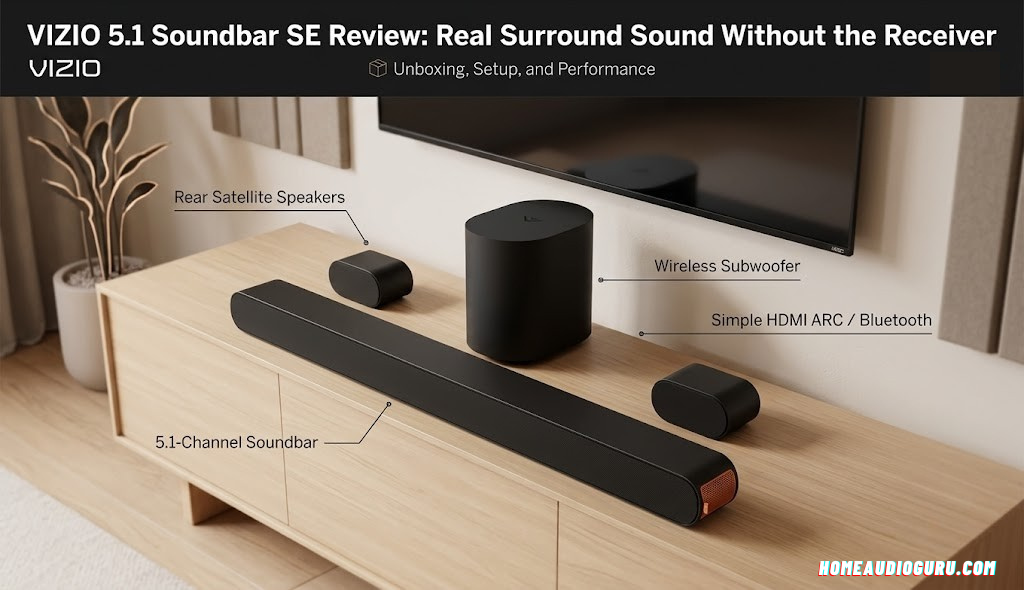
The 5.1 Soundbar SE, model number SV510X-0806, sits in VIZIO’s lineup as an entry point into discrete surround sound. “5.1” refers to the channel count: left, center, and right up front, left and right surround in the back, and a dedicated subwoofer for the “.1” low-frequency channel. That’s the same channel layout used by full home-theater receiver setups, just condensed into a self-contained package with its own amplification built in.
The system ships as three physical pieces — a 33-inch main bar, a compact wireless subwoofer, and two small satellite speakers for the rear — and is aimed squarely at people upgrading directly from their television’s built-in speakers. It’s not trying to be an audiophile centerpiece; it’s trying to solve the single most common home-audio complaint, which is that dialogue in movies and shows is hard to understand on a flat-panel TV.
For context on where this fits in a broader audio strategy, it’s worth reading our guide to the best home audio systems if you’re still deciding between a soundbar-based setup and a full component system, or our breakdown of home theater systems under $10,000 if budget isn’t the primary constraint.
VIZIO has built its reputation over the years on exactly this kind of value proposition — matching or beating the feature list of pricier competitors while trimming the finish and brand premium off the top. The 5.1 Soundbar SE continues that pattern rather than breaking from it. It sits below VIZIO’s step-up M-Series and Elevate lines, which add physical height speakers and, in Elevate’s case, motorized drivers that rotate for Atmos playback, but it undercuts both significantly on price while retaining the discrete rear-channel layout that those higher tiers also rely on.
The naming can be a little confusing for first-time shoppers, since VIZIO has released more than one “5.1 Soundbar” over the years, including a non-SE variant with a nearly identical model number. The SE designation and the SV510X-0806 model number are the details to check against your specific listing, since minor hardware and firmware differences exist between production runs. If a listing doesn’t clearly state the model number, it’s worth asking the seller directly before buying, particularly if you’re purchasing through a marketplace with multiple third-party listings for what looks like the same product photo.
It’s also useful to understand what this system is not trying to be. It isn’t a stereo hi-fi replacement, and it isn’t a soundbar aimed at critical music listening first and home theater second. Every design decision here — the channel layout, the tuning, the bundled accessories — points toward one goal: making movies, TV, and games sound dramatically better than stock TV speakers, for people who are not going to buy a receiver, run in-wall wiring, or hire an installer to do it.
03Specs at a Glance
| Spec | Detail |
|---|---|
| Model | SV510X-0806 |
| Channels | 5.1 (L/C/R + 2 surround + subwoofer) |
| Soundbar length | 33 inches |
| Combined power | Approx. 180W |
| Formats supported | Dolby Atmos, DTS:X (virtualized height) |
| Primary connection | HDMI eARC |
| Wireless audio | Bluetooth 5.2 |
| Subwoofer | Wireless from bar, compact form factor |
| Surround speakers | Wired to subwoofer (2 satellites) |
| Control options | TV remote via eARC/CEC, VIZIO mobile app, optional separate remote |
| Mounting | QuickFit compatible with select VIZIO TVs |
Specifications reflect the standard SV510X-0806 configuration. Always confirm exact port layout and included accessories on the current listing before purchasing, as running changes between production batches are common in this price category.
A few of these numbers deserve a bit of translation for anyone who isn’t fluent in audio spec sheets. The 180-watt combined power figure is a system total across all five channels plus the subwoofer, not the output of any single speaker, so it shouldn’t be compared directly against a single stereo amplifier’s wattage rating. What matters more in daily use than the raw number is how that power is distributed: enough headroom in the front channels to keep dialogue clear at moderate volume, and enough subwoofer output to give bass scenes real weight without needing to run the whole system at an uncomfortable volume just to feel the low end.
The “virtualized height” note next to Dolby Atmos and DTS:X is arguably the single most important line in this entire table, and it’s one we’ll come back to in detail later in this review, because it’s the spec most likely to be misunderstood by shoppers comparing soundbars purely on a features checklist. Two products can both legitimately list “Dolby Atmos” and deliver meaningfully different experiences depending on whether that support comes from real up-firing drivers or from software processing across existing channels.
On the connectivity side, HDMI eARC being listed as the primary connection rather than one of several equal options is a deliberate design choice. eARC is the single interface that can carry the full, uncompressed Atmos and DTS:X bitstream along with two-way remote control signaling, so leading with it as the primary hookup reflects how VIZIO expects the vast majority of buyers to actually use the system: connected straight to a modern television, with that TV acting as the switching hub for every other source in the room.
The subwoofer’s “wireless” designation refers specifically to its connection back to the main bar, not to the entire system being cable-free. It still requires its own power outlet nearby, and, as covered in more detail later in this review, the two surround speakers still need physical speaker wire running to the subwoofer itself. Understanding this distinction up front prevents a common source of buyer disappointment, since the marketing language around “wireless” systems in this category can create the impression of a fully cordless installation that isn’t quite accurate here.
Finally, the QuickFit compatibility line matters primarily to households that already own, or are planning to buy, a VIZIO television within a compatible size and model range. For everyone else, it’s simply a feature that goes unused without any downside, since the soundbar connects and performs identically over a standard HDMI eARC connection regardless of TV brand.
04Design & Build Quality

The main bar leans into a minimal, low-profile look: a matte black finish, a slim aluminum-style grille running its full length, and rounded corners that keep it from looking like a stray plank of speaker underneath your TV. At 33 inches, it’s compact enough to sit in front of most stands without overhanging the edges, and short enough that it rarely blocks the IR sensor on the television above it.
The subwoofer follows the same restrained design language — a squat black box with a front-firing port — sized to tuck beside a media console or behind a couch rather than commanding its own floor space. The two surround speakers are the smallest pieces in the box: simple cylindrical satellites with a small footprint, designed to sit on shelves, stands, or wall mounts flanking the seating area.
Build quality across the range feels appropriate for the price point rather than premium. The bar’s grille is metal, the subwoofer’s cabinet is a dense plastic that doesn’t flex or buzz under heavy bass, and the surround speakers are light enough to reposition easily but don’t feel flimsy in hand. Nothing here is going to be mistaken for a boutique audio brand’s finish, but nothing rattles or creaks in normal use either.
Color and finish options are limited but sensible for the intended use case: matte black across every piece of the system, which blends into a media console or TV stand shadow rather than drawing attention to itself. That’s the right call for a product meant to disappear visually while doing its work acoustically, and it means the system won’t clash with whatever furniture or wall color surrounds your entertainment setup, whether that’s a light oak media unit or a dark accent wall.
Physical footprint is worth thinking through before you buy, not just after. The 33-inch bar fits comfortably in front of televisions in the 55-inch class and up without significant overhang, but owners of smaller 40 to 50-inch sets should measure their stand or console width first, since the bar can extend past the edges of a narrower TV base. The subwoofer’s compact dimensions make it one of the easier pieces to place discreetly — beside a console, behind a couch, or tucked into a media cabinet corner — without the bulky floor presence that some competing subwoofers carry.
The two surround speakers include basic mounting hardware for wall placement, which is the setup most likely to deliver the best rear-channel imaging, since ear-height placement behind or beside the seating position produces more convincing surround separation than speakers left on the floor. Bookshelf placement works nearly as well if wall-mounting isn’t an option in your space, as long as the speakers end up roughly level with, or slightly above, seated ear height rather than down near the floor.
From a pure furniture-integration standpoint, the system reads as considerably more thoughtful than its price tag suggests. The main bar’s slim vertical profile keeps it from blocking the bottom edge of most flat-panel displays, an easy oversight for budget soundbars that prioritize internal driver space over a low-profile chassis. The subwoofer’s relatively small footprint compared to some competing budget subs — which can be bulky enough to dominate a corner of a small living room — makes it noticeably easier to tuck away without becoming a visual focal point of the space.
Cable management is a smaller but real design consideration worth flagging here. Because the surround speakers need a physical wire run back to the subwoofer, and the subwoofer itself needs power, the overall cable footprint is closer to a traditional wired surround system than to a fully wireless one, despite the “wireless subwoofer” branding referring specifically to the connection between the subwoofer and the main bar. Buyers expecting an entirely cable-free installation based on that phrase alone should adjust expectations accordingly before purchase.
05Unboxing & What’s Included
Inside the box you’ll find the main soundbar, the wireless subwoofer, two surround speakers, an HDMI cable for the digital video/audio connection, wiring for the rear surround speakers, wall-mount brackets for the bar, and a quick start guide. Notably absent is a physical remote control — VIZIO expects most owners to control volume through their existing TV remote via HDMI eARC, and to handle deeper adjustments through the companion mobile app.


The absence of a bundled remote is one of the more consistent complaints in owner feedback, and it’s worth flagging up front rather than discovering it after the box is already unpacked. If your TV remote doesn’t support HDMI-CEC volume pass-through, or if you’re connecting a source that isn’t your television directly, budget for a separate universal or VIZIO-specific remote as an add-on purchase.
The included quick start guide covers the physical connections well but is thinner on troubleshooting. The full user manual, downloadable from VIZIO’s site, goes into more detail on topics like enabling CEC control, but several owners have noted that even the manual doesn’t clearly walk through every setting — more on that in the setup section below.
Worth calling out specifically: the wiring provided for the two surround speakers is sufficient for typical living-room layouts where the subwoofer sits reasonably close to the seating area, but it is not unlimited. If your intended subwoofer placement is far from where the surround speakers will sit — for instance, subwoofer near a front media console and surround speakers along a back wall many feet away — plan to source longer speaker wire separately rather than assuming the box contents will stretch to fit any room layout.
The wall-mount brackets included for the main bar are a nice touch that some competitors leave out entirely, letting you mount the bar directly beneath a wall-mounted television for a cleaner look without a visible stand or shelf underneath. Hardware for the surround speakers is more basic — adequate for drywall mounting with standard anchors, though anyone mounting into masonry or tile will want to source their own anchors rated for that surface.
One accessory conspicuously missing, as mentioned above, is a dedicated physical remote control. This is a genuine cost-cutting decision rather than an oversight, and it’s consistent with a broader industry trend of budget soundbars leaning on HDMI-CEC and companion apps instead of dedicated infrared remotes. It works fine for most buyers most of the time, but it’s the detail most likely to catch first-time soundbar owners off guard, since nearly every previous generation of TV-adjacent audio equipment came with its own remote by default.
For households that rely on voice control or accessibility features built into their existing TV remote, it’s worth testing the CEC volume handoff specifically rather than assuming it will behave identically to a dedicated soundbar remote’s button layout. Some TV remotes pass volume commands seamlessly to a connected soundbar the moment CEC is enabled, while others require selecting the soundbar as the active audio device from an on-screen menu each time, which is a meaningfully different day-to-day experience depending on which behavior your specific television exhibits.
06Setup & Installation
The core connection is refreshingly simple: run the included HDMI cable from the soundbar’s HDMI output to your TV’s HDMI eARC (or ARC) input, power everything on, and the subwoofer pairs with the bar automatically within a few seconds. No app pairing or Bluetooth pairing ritual is required just to get basic sound flowing — plug in, power on, and audio should start routing through the system almost immediately.
The part that trips people up is the rear surround speakers. Because the subwoofer is only wireless in its connection back to the main bar, the two surround speakers still need to be wired directly to the subwoofer with the included speaker cable. In practice, this means running wire from wherever your subwoofer sits to two points at the back or sides of your seating area, which is the single biggest planning consideration before you buy. If your subwoofer will live near your media console rather than near the couch, measure your cable run before purchase, since the included wiring is only so long.
| Step | What to Do |
|---|---|
| 1 | Connect soundbar to TV via HDMI eARC |
| 2 | Power on the subwoofer — it auto-pairs with the bar |
| 3 | Run speaker wire from the subwoofer to each surround speaker |
| 4 | Enable CEC / ARC control in your TV’s system settings |
| 5 | Download the VIZIO app to fine-tune bass, treble, and balance |
That fourth step — enabling CEC or ARC in your television’s settings menu — is the one most likely to cause confusion, since it isn’t always spelled out clearly in the box materials. If your existing remote doesn’t control the soundbar’s volume after the HDMI connection is made, check your TV’s system settings for an ARC, eARC, or “device control” toggle before assuming the unit is faulty. Owners with VIZIO televisions get an easier path here, since QuickFit mounting and an integrated on-screen soundbar menu remove most of the guesswork; see our step-by-step home audio setup guide for a brand-agnostic walkthrough that applies regardless of your TV.
Common Setup Snags and How to Solve Them
No sound after connecting HDMI. Confirm the HDMI port on your TV is specifically labeled ARC or eARC — plugging into a standard HDMI input will pass video but won’t route audio back to the soundbar. Most modern TVs have exactly one ARC/eARC-capable port, so check your TV’s manual if the ports aren’t labeled directly on the panel.
TV remote won’t adjust soundbar volume. This is almost always a CEC setting that needs to be manually enabled on the television side, since it typically ships turned off by default. Look for it under a menu labeled something like “HDMI-CEC,” “Anynet+,” “SimpLink,” or “Bravia Sync” depending on your TV brand, since manufacturers each use their own marketing name for the same underlying HDMI-CEC standard.
Dialogue only comes through the front channels, not the rear. Some owners have found that a “stereo” versus “dual” channel setting affects whether voice content routes to the surround speakers. This toggle has been reported as easier to find on a physical VIZIO remote than in the current version of the mobile app, so if you own an older compatible VIZIO remote, it’s worth trying as a troubleshooting step.
Subwoofer won’t pair with the bar. Power cycle both the bar and the subwoofer together, keeping them within a reasonable distance of each other during initial pairing before moving the subwoofer to its permanent spot. Once paired, most users report the connection holds reliably even with the subwoofer moved several rooms away from direct line of sight.
Occasional audio dropouts during playback. A small number of owners have reported brief audio cutouts, most often traced back to Wi-Fi or Bluetooth interference in a crowded 2.4GHz environment, or to a loose HDMI connection. Reseating the HDMI cable at both ends and, where possible, keeping the subwoofer’s wireless link away from a busy router or a microwave oven’s operating path tends to resolve most of these cases.
Choosing the Right Room Layout
Getting real value out of the discrete rear channels depends more on speaker placement than almost any other factor in this system. Ideally, the two surround speakers sit to the sides of, or slightly behind, the main seating position, at or slightly above ear height when seated. A common living-room layout places them on bookshelves flanking a sofa, on small stands behind the seating area, or wall-mounted using the included hardware roughly level with a seated listener’s head height.
Avoid the temptation to simply set the surround speakers on the floor against the back wall purely because it’s the path of least resistance for the speaker wire. Floor-level placement noticeably reduces the sense of height and envelopment that these channels are designed to add, and it’s one of the most common reasons a new owner reports the system sounding “less surround” than expected, when the actual cause is speaker positioning rather than the hardware itself.
For the subwoofer, placement is more forgiving thanks to how bass frequencies behave in a room, but corner placement tends to reinforce low-end output the most, while placing it directly in an open walkway can create a trip hazard around the connecting speaker wire. A media console cabinet, an underused corner near the TV, or a spot beside a couch are all workable choices as long as the wire runs to the surround speakers remain manageable and not stretched taut across a floor.
07Sound Quality Deep Dive

Movies and TV. This is where the 5.1 Soundbar SE earns its keep. Dialogue comes through clearly and stays intelligible even during busy action sequences, which is the exact problem most buyers are trying to solve when they move away from a TV’s built-in speakers. Because the surround channels are real, physical speakers behind the listener rather than a virtual effect bounced off walls, effects genuinely pan from front to back in a way that all-in-one bars can only approximate. Explosions, passing vehicles, and ambient environmental sound all get a real sense of direction that’s immediately noticeable compared to a stereo or even a virtual-surround-only bar.
Across a range of content types — dense action sequences, dialogue-heavy dramas, and animated films with a wide dynamic range — the system’s front three channels handle the heavy lifting of dialogue clarity, while the rear speakers add ambient texture rather than overpowering the mix. Rainstorms, crowd noise, and off-screen movement all register with a believable sense of place rather than feeling tacked on, which is the hallmark of a system that’s actually using its rear channels correctly rather than just adding volume from behind.
Bass. The wireless subwoofer produces good low-end impact and reasonably deep extension for its size, with enough output to make action scenes feel physical rather than thin. Some listeners find the default tuning slightly heavy-handed out of the box — a common trait in budget systems trying to make a strong first impression — but the VIZIO app’s bass adjustment makes it easy to dial back to taste rather than living with a boomy default.
In practical terms, the subwoofer keeps pace comfortably with typical movie soundtracks and doesn’t lag noticeably behind fast bass transients, avoiding the smeared, one-note thump that plagues some budget subs. It won’t replicate the chest-level pressure of a dedicated home-theater subwoofer twice its size, and listeners coming from a larger standalone sub may notice the ceiling on maximum low-frequency output during the most demanding scenes, but for the price and footprint, the balance struck here favors usability over showing off.
Midrange and treble. Vocals and mid-frequency detail are clear but can lean slightly forward and occasionally a touch grainy on complex material, which is a known characteristic across VIZIO’s budget soundbar range rather than something unique to this specific model. Treble extension is decent, though the upper registers can feel a little smeared or dry on especially bright recordings. None of this is a dealbreaker for a system in this price bracket, but it’s worth setting realistic expectations if you’re coming from a higher-end setup.
Where this shows up most clearly is on densely mixed material — a full orchestral score layered under rapid dialogue, for instance — where the midrange can start to sound slightly congested at higher volumes. Backing off a few clicks in overall level, or nudging the treble down a step in the app, smooths this over in most rooms. It’s a tuning characteristic rather than a hardware fault, and it’s consistent with what we’d expect from a soundbar built to a price rather than tuned by an in-house acoustics lab with an unlimited budget.
Music. Streaming music over Bluetooth or through the TV is enjoyable at normal listening volumes, with the surround speakers adding a pleasant sense of width even outside of movie content. It won’t replace a dedicated stereo pair or a proper hi-fi system for critical listening, but as a secondary use case layered on top of a home-theater-first purchase, it performs above what the price would suggest.
Genres with strong low-end content, like hip-hop and electronic music, benefit noticeably from the dedicated subwoofer in a way that a soundbar-only system without a sub simply cannot match. Acoustic and vocal-forward music fares reasonably well too, though the slightly forward midrange mentioned above is more apparent here than during movie dialogue, since there’s no competing sound design to mask it. If music is going to be a primary use case in your household rather than an occasional background layer, it’s worth tempering expectations accordingly, or budgeting for a separate stereo pair down the line for critical listening sessions.
Gaming. Discrete rear channels are a genuine advantage for competitive and immersive gaming alike — footsteps and off-screen cues land with real directionality rather than a simulated approximation, which matters for anything from open-world exploration to shooters where positional audio has practical value. Response latency through the HDMI eARC connection stayed unnoticeable during fast-paced gameplay, without the perceptible lip-sync drift that can sometimes plague soundbars processing a heavily virtualized surround field.
Open-world and exploration-focused titles benefit from the same ambient-texture strength that carries over from film content — wind, distant wildlife, and environmental audio cues fill out the rear channels convincingly. Competitive multiplayer titles that rely on precise footstep and directional-cue detection will find real, if modest, practical value in having actual rear speakers rather than a bar attempting to fake that positioning through processing alone.
The Baseline: What You’re Actually Upgrading From
It’s easy to lose sight of just how significant an upgrade this represents once you’re deep into comparing it against other soundbars, so it’s worth stepping back to the baseline most buyers are actually leaving behind: a flat-panel television’s built-in speakers. Those speakers are typically small, rear- or downward-firing, and squeezed into a chassis that’s only a few centimeters deep, which physically limits their ability to reproduce bass, project dialogue forward toward the listener, or create any sense of stereo width at all.
Against that baseline, essentially any soundbar represents a real improvement, which is exactly why the category exists and continues to grow. What sets a genuine 5.1 system like this one apart from a basic 2.0 or 2.1 soundbar isn’t just louder or clearer sound from the front — it’s the introduction of actual spatial information that a television, by physical design, simply cannot produce. That’s the core value proposition worth keeping in mind throughout every comparison and caveat in this review: even with its real trade-offs, this system operates in a fundamentally different category from the speakers it’s replacing.
Taken as a whole, the sound signature here can be summarized fairly simply: strong, direction-aware surround performance for movies and games; competent, if not audiophile-grade, music reproduction; punchy bass that’s easy to tune to taste; and a midrange that’s clear enough for everyday viewing without quite reaching the refinement of pricier standalone systems. For the specific job most buyers are hiring it to do — making a living room sound like a small theater rather than a room with a TV in it — that combination lands solidly on the right side of the value equation.
08Dolby Atmos & DTS:X, Explained Honestly
VIZIO advertises Dolby Atmos and DTS:X support on the 5.1 Soundbar SE, and that claim is accurate at the decoding level: the system will correctly interpret an Atmos or DTS:X bitstream rather than falling back to standard surround. What it does not have is a set of dedicated up-firing drivers to physically bounce sound off your ceiling, which is how true Atmos height channels are typically reproduced in higher-tier systems.
Instead, height information is folded into the existing five channels using virtualization processing. The practical effect is a wider, more spacious, more “3D-feeling” soundstage rather than a precise sensation of sound coming from directly overhead. For most viewers, especially anyone upgrading from TV speakers or a basic soundbar, that added sense of scale reads as a clear improvement. Viewers who have experienced a system with genuine height speakers will notice the difference and should treat “Atmos support” here as an enhancement to the existing 5.1 stage rather than a full height-channel experience.
If true overhead imaging is a priority for you specifically, that’s the point at which it makes sense to step up to a model with physical height speakers — VIZIO’s own M-Series 5.1.2 being the natural next tier — while accepting a higher price for that extra layer of realism.
It’s worth understanding briefly why this distinction exists in the first place, since it explains a lot of the confusion around Atmos marketing on budget soundbars generally. Dolby Atmos was designed as an “object-based” audio format, meaning individual sounds are tagged with positional metadata rather than being locked to a fixed channel. A properly equipped system with real up-firing or ceiling-mounted speakers uses that metadata to place sounds at genuinely different heights in physical space. A system without those dedicated drivers, like this one, still receives and correctly decodes that same metadata, but has to approximate the height cues by adjusting the timing, phase, and tonal balance of sound coming from its existing forward and side-firing drivers instead.
The result is a real, audible difference from standard 5.1 processing — a sense of scale and air that plain surround sound lacks — but it’s fundamentally a clever reinterpretation rather than a physical reproduction of the height channel. DTS:X works on a similar object-based principle to Atmos, with the practical difference for this soundbar being largely about content availability and the format’s more flexible speaker-configuration requirements rather than a meaningfully different listening result on this specific hardware. In everyday terms: choose your source and streaming service based on what content they offer, not based on assuming one format will sound dramatically different from the other on this particular soundbar.
For most buyers, the honest advice is to treat “Dolby Atmos and DTS:X support” on a listing like this as a signal that the processing and decoding stack is modern and well-implemented, not as a promise of the same experience you’d get from a step-up system with physical height channels. Reset expectations accordingly and the virtualized Atmos experience here reads as a genuine improvement over standard surround rather than a disappointment relative to an unrealistic marketing promise.
One practical note for streaming service selection: not every app or content source passes a full Atmos or DTS:X bitstream through to connected audio equipment by default, even when the underlying content supports it. If a movie or show that’s known to include Atmos mixing doesn’t seem to trigger the expected processing mode on the soundbar, it’s worth checking the streaming app’s own audio output settings before assuming a hardware issue, since several popular platforms require selecting a specific audio quality or format option before Atmos content is passed through at all.
View on Amazon
09Connectivity & App Control
HDMI eARC is the backbone connection here, and it’s the one you should plan around. eARC carries the full Dolby Atmos and DTS:X bitstream from your TV or connected source, and it also enables CEC-based volume control from your existing TV remote once the setting is turned on. Bluetooth 5.2 rounds things out for wireless streaming directly from a phone or laptop, independent of what’s plugged into the television.
Reports on legacy optical input support have varied across different production runs and retailer listings for VIZIO’s budget soundbar range, so if you have an older television without HDMI eARC or ARC, it’s worth double-checking the specific listing’s port photos or specs before ordering rather than assuming compatibility.
Day-to-day adjustments — bass level, treble, surround balance, and audio mode — live in the VIZIO mobile app rather than on the unit itself. The app is generally functional but has drawn mixed feedback; some owners have found certain settings, like switching a channel between “stereo” and “dual” mode to fix missing rear-channel dialogue, easier to reach through an old physical VIZIO remote than through the app’s menus. If you already own a compatible VIZIO remote from a previous soundbar, it’s worth keeping on hand as a backup control path.
The app also handles firmware updates for the system, which is worth checking soon after setup rather than assuming the unit shipped with the latest software already installed. VIZIO periodically pushes updates that address bugs reported by owners, including some of the connectivity quirks mentioned in the setup section above, so a fresh out-of-box unit benefits from an update check before you form a final opinion on its performance.
Bluetooth pairing supports a single active connection at a time in typical use, meaning you’ll want to disconnect a phone before trying to stream from a laptop or a different device, rather than expecting the system to juggle multiple simultaneous Bluetooth sources. This is standard behavior for a product in this category rather than a specific shortcoming, but it’s a small workflow adjustment for households used to multi-device audio switching on higher-end wireless speakers.
For anyone integrating this into an existing setup with a streaming device, game console, and cable box all connected to the same television, the practical workflow is straightforward: everything plugs into the TV as usual, and the TV’s single eARC output carries whatever source is currently active back to the soundbar. That means you don’t need to reconnect or switch inputs on the soundbar itself when changing sources on the TV — the television handles that switching, and the soundbar simply reproduces whatever audio the TV is currently outputting.
10Long-Term Ownership & Reliability
Budget audio gear lives or dies on reliability over months and years, not just first-week impressions, so it’s worth addressing what the broader pattern of owner feedback looks like over a longer ownership window. The most consistent long-term complaints center on the two areas already covered above — the missing physical remote and occasional connectivity hiccups — rather than any pattern of outright hardware failure in the bar, subwoofer, or surround speakers themselves.
A smaller number of owners have reported subwoofer pairing dropping intermittently after months of daily use, typically resolved by a power cycle of both the bar and subwoofer, or by a firmware update through the app. This kind of behavior is not unique to this product and shows up across the budget wireless-subwoofer category broadly, since maintaining a stable proprietary wireless link over long distances and through walls is a genuinely difficult engineering problem at any price point below premium tiers.
Build materials — the metal grille on the bar, the dense subwoofer cabinet, the lightweight but solid surround speaker housings — haven’t shown reports of significant wear or degradation over typical ownership periods in the feedback we reviewed. Where this system tends to get replaced isn’t due to hardware failure, but due to owners eventually wanting to step up to a model with physical height speakers once they’ve experienced what virtualized Atmos can and can’t do, which speaks well of the base system’s durability even if it isn’t the final stop on someone’s home-theater journey.
Sentiment across owner reviews tends to cluster in a recognizable pattern: strong initial satisfaction with sound quality and the value proposition relative to price, followed by a smaller subset of frustration specifically tied to the control scheme — the missing remote and occasional app friction — rather than to the core listening experience itself. That pattern is a useful signal for prospective buyers: if you go in already comfortable with app-based or TV-remote control, you’re unlikely to encounter the issues driving the lower end of the review spectrum, since those complaints center almost entirely on convenience rather than on sound performance or reliability.
11Maintenance, Firmware, and Everyday Care
Maintenance requirements are minimal by design. The bar’s grille collects dust like any speaker fabric or perforated metal surface and benefits from an occasional pass with a soft brush or a vacuum’s upholstery attachment rather than a damp cloth pressed directly against the mesh. The subwoofer’s port and cabinet vents should stay unobstructed by furniture or rugs to avoid muffling bass output over time, which is more of a placement consideration than an actual maintenance task.
On the software side, checking the VIZIO app periodically for firmware updates is the single highest-value maintenance habit for this system. Updates have historically addressed exactly the kind of connectivity and channel-routing quirks discussed earlier in this review, so an owner who sets up the system once and never opens the app again is more likely to experience the rough edges that show up in early feedback than one who keeps the firmware current.
Speaker wire connecting the surround speakers to the subwoofer should be checked periodically if the system is in a household with pets or young children, since exposed runs along baseboards or under rugs are the most likely point of physical wear over time. Routing wire through cable channels or along the edge of a room, rather than across an open walkway, meaningfully extends the practical lifespan of those connections.
Beyond dust and wire care, there’s little else to actively maintain. There are no filters to replace, no consumable parts inside the bar or subwoofer, and no batteries involved anywhere in the core system aside from whatever remote you may add separately. The most useful long-term habit is simply revisiting the app every few months, both to catch firmware updates and to re-confirm settings like bass level and channel balance haven’t drifted after a software update resets them to default values, which does occasionally happen following a firmware push.
12How It Compares to Other Budget Soundbars
Shopping for a soundbar in this price range typically means comparing a long list of models that all promise similar buzzwords — Atmos, wireless subwoofer, app control — without an easy way to tell which ones deliver a genuinely different listening experience versus which ones are simply the same 2.1 or 3.1 formula with a new grille design. The clearest way to cut through that noise is to ask one specific question about any competing soundbar: does it include real, physically separate rear speakers, or is every claim of “surround” and “immersive” coming entirely from processing on the front-facing drivers?
The 5.1 Soundbar SE’s biggest differentiator against nearly everything else in its price bracket is the inclusion of real, discrete rear speakers rather than relying purely on virtual surround processing. That’s a meaningfully different listening experience, and it’s the reason this system is worth cross-shopping against bars that look similarly priced but only offer front-firing virtual surround.
| Model | Channels | Rear Speakers | Best For |
|---|---|---|---|
| VIZIO 5.1 Soundbar SE | 5.1 | Real, wired to subwoofer | True surround on a budget |
| Polk MagniFi Mini | 2.1 (virtual surround) | None | Compact rooms, simplicity |
| Samsung B-Series | 2.1 / 3.1 variants | None standard | Samsung TV ecosystem buyers |
| Sony HT-S2000 | 3.1 | None | Clean dialogue, simple setup |
| Bose Smart Soundbar | Varies by model | Optional add-on | Voice assistant integration |
If your room is small, or you simply don’t want to run any speaker wire under any circumstances, one of the virtual-surround options above will be the easier fit. If you specifically want that back-of-the-room sound placement without stepping up to a full receiver-based system, the trade-off of running two speaker cables is one that most buyers in our experience find worth making. For a broader shortlist beyond this single comparison, our best home stereo systems under $500 roundup covers several of these side by side.
Against the Polk MagniFi Mini, the comparison really comes down to space versus immersion. The MagniFi Mini is one of the more compact 2.1 systems on the market and processes a wider virtual soundstage than its size would suggest, but it fundamentally cannot place a sound effect physically behind you the way a real rear speaker can. If your living room genuinely can’t accommodate two extra speakers and their wiring, the MagniFi Mini’s smaller footprint and simpler setup make it the more realistic pick, even knowing you’re trading away the discrete surround experience.
The Samsung B-Series soundbars target a slightly different buyer: someone specifically invested in the Samsung TV ecosystem who wants tight integration with a Samsung remote and on-screen menu system, similar to what VIZIO offers its own TV owners through QuickFit. Outside of that specific brand-matching convenience, the B-Series generally sits at a lower channel count without the discrete rear speakers this VIZIO system offers, making it more of a direct upgrade from TV speakers than a genuine surround-sound solution.
Sony’s HT-S2000 is worth cross-shopping for buyers who prioritize clean, accurate dialogue reproduction above all else and are willing to trade away rear-channel immersion for a simpler three-channel setup with no extra wiring at all. It’s a legitimately excellent option for smaller apartments or secondary rooms where the goal is simply “make the TV sound less thin” rather than building out a full surround experience.
The Bose Smart Soundbar line takes a different angle entirely, leaning into voice assistant integration, multi-room audio, and Bose’s own ecosystem of optional add-on surround speakers and subwoofers sold separately. That modular, pay-as-you-grow approach can work well for buyers who want to start small and expand later, but it typically means spending significantly more over time to reach the same 5.1 channel count this VIZIO system offers in a single box from day one.
13Pros and Cons
Weighing everything covered so far, the pattern that emerges is consistent: this system delivers on the fundamentals that matter most for the price — real surround channels, solid movie and game performance, straightforward core setup — while trimming a few conveniences that pricier systems typically include standard. The summary below distills that trade-off into a quick reference.
Pros
- Genuine 5.1 discrete surround, not a virtual approximation
- Strong value relative to receiver-based alternatives
- Clear, intelligible dialogue for movies and TV
- Simple core setup via HDMI eARC
- Bass response with good impact and reasonable depth
- Bluetooth 5.2 for easy wireless music streaming
- QuickFit mounting convenience with VIZIO TVs
Cons
- No physical remote included in the box
- Surround speakers still require running wire
- No dedicated up-firing height speakers
- Midrange can sound slightly forward or grainy
- Mobile app controls have room for improvement
- Optical input availability varies by unit/listing
14Who Should (and Shouldn’t) Buy It
Buy it if: you’re upgrading directly from TV speakers or a basic 2.1 soundbar and want a real jump in immersion for movies and gaming, you’re comfortable running two speaker wires to the back or sides of your seating area, and you want Dolby Atmos and DTS:X decoding without paying for full height speakers or a separate receiver.
Consider something else if: you need a remote in the box on day one and don’t want to buy one separately, you absolutely cannot run any wire to the rear of the room, or true overhead Atmos imaging is a priority rather than a nice-to-have — in which case a model with physical up-firing drivers will serve you better.
Thinking through a few concrete scenarios helps make this more actionable. A renter in an apartment who wants a genuine surround upgrade but is nervous about wiring should know that speaker wire can be run along baseboards with adhesive clips rather than requiring any wall modification, making this far more renter-friendly than it might first appear. A household with young children or pets should factor in that exposed wire runs are the most likely wear point over time, and should plan a wire path that stays out of high-traffic areas from the outset rather than routing for convenience alone.
A buyer replacing an aging basic soundbar who mainly watches network TV and the occasional movie will likely find this system’s biggest impact in dialogue clarity, since that’s the single most common complaint driving people to shop for a soundbar in the first place. A dedicated gamer prioritizing positional audio in competitive titles will get genuine, measurable value from the real rear channels, more so than from Atmos height processing specifically. And a buyer who splits their time evenly between music and movies should go in understanding that this is a home-theater-first product that handles music competently rather than a dual-purpose system built to satisfy both use cases equally.
Ultimately, the clearest signal that this is the right system for you is a simple gut check: if the idea of running two speaker wires to the back of your room sounds like a reasonable Saturday afternoon project in exchange for genuinely better movie nights, this is very likely the right category of product. If that same idea sounds like an unwelcome chore no matter the payoff, that instinct is worth trusting, and a virtual-surround alternative from the comparison section above will serve you better in practice, regardless of what the spec sheet says either product is capable of.
15Alternatives Worth a Look
If wiring rear speakers is a non-starter for your space, the Polk MagniFi Mini and Sony HT-S2000 both lean on virtual surround processing to widen the stage without any cable runs, at the cost of that genuine rear-channel placement. If you’re shopping within the Samsung ecosystem specifically, our Samsung B-Series soundbar review covers a tightly integrated alternative for Samsung TV owners. And if a voice assistant and smart-home integration matter more to you than raw channel count, the Bose Smart Soundbar is worth cross-shopping as well.
For anyone still mapping out the full picture before committing to any single product, our best home audio systems guide is the right starting point, and the home theater systems under $10,000 roundup is useful if you’re weighing this against a full receiver-based build.
It’s also worth considering the upgrade path within VIZIO’s own lineup rather than only looking outward at competing brands. Buyers who try the 5.1 Soundbar SE and find themselves wanting genuine overhead imaging, rather than the virtualized version reviewed here, can step up to VIZIO’s M-Series 5.1.2 configuration, which adds physical up-firing height speakers to a similar overall channel layout. That’s a meaningful step up in price, but it directly addresses the one limitation most likely to matter to a buyer who has outgrown this system rather than requiring a full re-think of your home theater approach.
Conversely, if even this system feels like more setup than you’re looking for, a simpler 2.1 or 3.1 soundbar without any rear speakers at all — like the Polk MagniFi Mini or Sony HT-S2000 mentioned above — removes the wiring consideration entirely at the cost of that discrete surround placement. There’s no universally correct answer here; the right choice depends entirely on how much you value real rear-channel immersion against how much friction you’re willing to accept during setup and long-term living-room aesthetics.
One more angle worth considering before finalizing a decision: household composition often matters as much as room size when weighing these alternatives against each other. A single-occupant apartment where movie nights are occasional will get diminishing returns from the extra complexity of real surround channels compared to a household that watches films and plays games as a primary evening activity multiple nights a week. Matching the system to actual usage patterns, rather than to the most feature-rich option on paper, tends to produce the highest long-term satisfaction regardless of which specific product ends up in the cart.
15Total Cost of Ownership
The sticker price on the box is not necessarily the final number you’ll spend to get this system running exactly the way you want, and it’s worth budgeting for that honestly rather than being surprised later. The most likely add-on purchase is a physical remote, since the app-only and TV-remote-via-CEC control scheme doesn’t suit every household, particularly ones with multiple TV remotes already in circulation or a universal remote system that doesn’t play well with app-based control.
Speaker wire is the second most likely additional expense, particularly for larger rooms or layouts where the subwoofer and surround speakers end up further apart than the included cable allows. Standard 16-gauge speaker wire is inexpensive and widely available, so this isn’t a significant cost in absolute terms, but it is a purchase most buyers don’t anticipate needing until they’re partway through setup.
Wall-mounting hardware beyond what’s included is a possible third expense if you’re mounting the surround speakers into masonry, tile, or a surface that requires specialized anchors, though the included hardware covers standard drywall installation without any additional purchase. Taken together, a realistic total budget adds a modest amount on top of the sticker price for most households, still landing well below the cost of a receiver-based 5.1 system built from separate components.
16What to Check Before You Order
Because this exact model has shipped across multiple retailers, marketplace sellers, and the occasional third-party listing, a small amount of due diligence before checkout goes a long way toward avoiding a mismatched purchase. The single most important thing to verify is the model number itself — SV510X-0806 — printed clearly on the listing rather than assumed from the product photo alone, since VIZIO has released more than one similarly named 5.1 system over the years with subtly different hardware.
Second, check the listing’s included-accessories list against what’s described in this review: soundbar, wireless subwoofer, two surround speakers, HDMI cable, surround speaker wiring, wall-mount brackets for the bar, and a quick start guide. A listing advertising a bundled remote should be treated with a healthy dose of skepticism unless it’s explicitly and clearly stated as an added accessory beyond the standard package, since the base system does not include one.
Third, measure your intended TV stand or media console width against the bar’s 33-inch length before ordering, particularly if your current television is on the smaller end of the size spectrum. And finally, take stock of your room layout with an eye toward the surround speaker wiring — walking through where the subwoofer will sit and where the two rear speakers will go, and roughly how far a cable will need to travel between them, saves a return-and-reorder cycle for a longer wire kit after the fact.
If you’re buying to pair specifically with a VIZIO television, confirm your TV model supports QuickFit mounting if that convenience factor matters to your decision, since not every VIZIO TV in every size class includes the compatible mounting points, even though the soundbar itself will still work perfectly well as a standalone HDMI-connected unit regardless.
Timing your purchase around retailer promotions is also worth a moment’s thought, since soundbar pricing in this category fluctuates fairly often around major shopping periods. Setting a price alert or checking a couple of retailers before committing costs nothing and, for a product where the core hardware doesn’t change between sale cycles, can meaningfully change the value equation without any compromise on what actually arrives in the box.
18Frequently Asked Questions
We’ve gathered the questions that come up most often from people researching this system before buying, drawing on manufacturer documentation, verified owner feedback, and the setup details covered throughout this review.
Does the VIZIO 5.1 Soundbar SE have real height speakers for Dolby Atmos?
No. The soundbar decodes Dolby Atmos and DTS:X bitstreams correctly, but height and overhead cues are reproduced virtually through the existing drivers rather than through dedicated up-firing speakers. Expect a wider, more spacious stage rather than a precise overhead sensation.
Do I need a receiver or amplifier to use this soundbar?
No. The system is fully self-contained. The bar houses its own amplification, the subwoofer is self-powered, and the surround speakers are driven from the subwoofer rather than requiring a separate amp.
How do the surround speakers connect to the rest of the system?
They connect with speaker wire directly to the wireless subwoofer, which then communicates wirelessly with the main bar. You’ll still need to run cable to the back of the room even though the sub-to-bar link itself is wireless.
Can I control it without a dedicated remote?
Yes. Volume can generally be controlled through your existing TV remote via HDMI eARC and CEC, while deeper adjustments like bass, treble, and balance are made through the VIZIO mobile app. A separate physical soundbar remote is sold on its own if you want one.
Does the soundbar have an optical audio input?
The primary digital connection is HDMI eARC, with Bluetooth for wireless streaming. Optical availability has varied across listings and production runs, so check your specific unit’s port layout if your TV lacks HDMI ARC/eARC.
Is it loud enough for a large living room?
With roughly 180 watts of combined output, it’s built for small-to-medium rooms and performs comfortably there. In larger open-concept spaces it still handles dialogue and general viewing well, though the deepest bass will feel more pronounced in a tighter space.
How difficult is the setup process?
The core connection is simple: HDMI eARC to the TV, power on the subwoofer for automatic pairing, then wire the surround speakers to the subwoofer. The main friction point is enabling CEC/ARC in the TV’s settings menu so an existing remote can control volume.
Is this soundbar mainly for movies, or does it handle music well too?
It handles both, but it’s tuned with home theater as the priority. Dialogue and effects in movies and games are the clear strength, while music is enjoyable at moderate volumes with a slightly forward midrange compared to a dedicated stereo system.
Does it work with any TV brand?
Yes, HDMI eARC and Bluetooth work with any modern television. Owning a VIZIO TV adds convenience through QuickFit mounting and an integrated on-screen soundbar menu, but it isn’t required.
What’s the biggest drawback of this system?
The two most common complaints are the missing physical remote in the box and the need to run speaker wire to the two rear surround units, since the wireless link only removes the cable between the bar and subwoofer.
Can I mount the surround speakers on the wall instead of using stands?
Yes. Basic wall-mounting hardware is included for the surround speakers and is designed for standard drywall installation. Wall placement at or near seated ear height typically produces better surround imaging than floor-level placement.
How much extra should I budget beyond the sticker price?
Most buyers should plan for a possible separate remote purchase and, depending on room layout, some additional speaker wire if the included cable doesn’t reach comfortably between the subwoofer and rear speakers. Both are inexpensive relative to the system’s overall price.
17Warranty, Support, and Return Considerations
VIZIO backs its soundbar systems with a standard limited manufacturer’s warranty typical of the category, covering defects in materials and workmanship for a defined period from the original purchase date. As with any electronics purchase, the exact term and coverage details can vary by region and by retailer, so it’s worth confirming the specific warranty language on your purchase receipt or the manufacturer’s support site rather than assuming a blanket policy applies universally across every sales channel.
Retailer-specific return policies are worth paying attention to separately from the manufacturer’s warranty, particularly for a product like this one where real-world performance depends heavily on your specific room and TV setup. Buying through a retailer with a generous return window gives you the flexibility to test the full system — including the surround speaker placement and the CEC volume control handoff with your specific television — before you’re locked into keeping it, which is valuable given how much placement and TV compatibility can affect the experience described throughout this review.
Support resources for troubleshooting live primarily through VIZIO’s own site, including the downloadable full user manual referenced earlier in this review, along with a frequently-updated support and FAQ section that addresses many of the same connectivity quirks discussed in our setup and troubleshooting notes above. For anything not covered there, VIZIO’s customer support channels handle warranty claims and hardware troubleshooting directly, separate from the mobile app used for day-to-day settings and firmware.
Packaging condition on arrival is worth inspecting immediately given a small number of owner reports describing damaged or previously opened-looking boxes on delivery, particularly through third-party marketplace sellers rather than direct retail channels. Photographing the package and its contents on arrival, before assembling anything, is a simple habit that makes any damage claim or return process considerably smoother if it turns out to be necessary.
Finally, keep the original packaging for at least the duration of your chosen retailer’s return window, even after a successful setup. Soundbar systems with multiple physical components — bar, subwoofer, two speakers, cables, brackets — are considerably easier to return intact in their original foam and box inserts than in generic packing material, and a return shipped without the correct original packaging can sometimes affect refund processing depending on the retailer’s specific policy.
Final Verdict
The VIZIO 5.1 Soundbar SE does something few products at its price genuinely deliver: real, discrete surround sound without asking you to buy a receiver, run six speaker cables, or learn an entirely new remote ecosystem. The trade-offs — no included remote, virtual rather than physical Atmos height, and two speaker runs instead of zero — are real, but they’re reasonable concessions for what you get in return. For anyone tired of straining to hear dialogue over their TV’s built-in speakers and ready to feel effects move around the room rather than just in front of it, this is one of the more convincing budget upgrades available right now.
If your priority is maximum immersion for the least amount of setup complexity and cost, this system delivers a genuinely different category of listening experience than any all-in-one bar can offer, virtual surround processing included. If overhead Atmos precision or a completely wire-free installation matters more to you than raw channel count, treat this review as a useful benchmark against whatever step-up or simplified alternative you’re weighing instead, using the comparison and alternatives sections above as your starting point. Either way, walking in with realistic expectations about what “budget 5.1 with virtualized Atmos” actually means will leave you satisfied with whichever direction you choose.
What separates a good purchase decision from a disappointing one in this category rarely comes down to the hardware itself performing worse than advertised — it comes down to a mismatch between what a shopper expected and what a specific product was actually designed to deliver. Read against that lens, the VIZIO 5.1 Soundbar SE is a well-executed answer to a specific, common problem: turning flat, hard-to-follow TV audio into something that genuinely fills a room, at a price that keeps the decision low-risk even for a first-time soundbar buyer.
Check Today’s Price on Amazon