Do Wireless Speakers Lose Quality? Here’s What Actually Happens to Your Sound
A deep, no-nonsense breakdown of Bluetooth codecs, Wi-Fi streaming, compression, and what you can genuinely hear versus what’s just marketing noise.
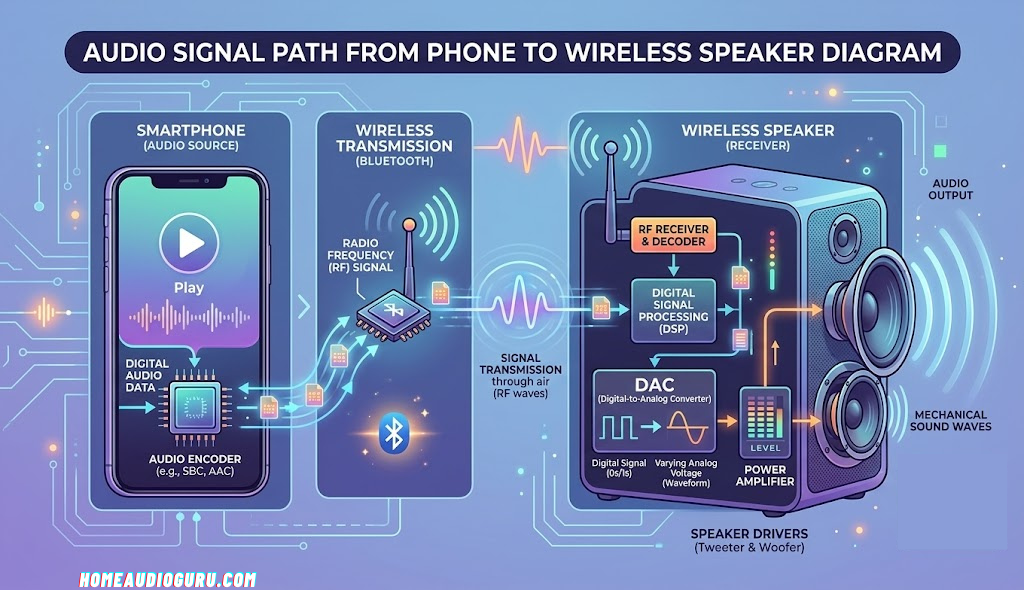
Every wireless speaker relies on a codec to compress and transmit your audio signal — the type of codec matters more than most listeners realize.
The Short Answer: Yes, But It’s Usually Not What You’d Expect
Technically speaking, wireless speakers do lose some sound quality compared to a direct wired connection — but the amount of loss varies enormously depending on the technology involved, the codec being used, and honestly, how picky your ears are. For the vast majority of casual listeners playing music through a modern Bluetooth or Wi-Fi speaker, the difference is subtle enough that it rarely interferes with everyday enjoyment. For audiophiles chasing every last decibel of fidelity, however, the gap is real and measurable.
The confusion around this topic comes from lumping all “wireless” technology into one bucket. A budget speaker using the old SBC Bluetooth codec streaming a compressed Spotify track is a very different animal from a premium Wi-Fi speaker streaming lossless audio over LDAC or a proprietary high-bandwidth protocol. Understanding which kind of wireless you’re dealing with is the key to understanding whether you’ll actually notice any quality loss at all.
If you’re shopping for a new setup and want to see how modern wireless systems stack up against traditional wired options, our guide to the best home audio systems breaks down exactly which technologies deliver audiophile-grade performance without a single cable.
Think of it less as a binary “wireless is worse” question and more as a spectrum. On one end sits a budget speaker from several years ago relying solely on the mandatory SBC codec, streaming a heavily compressed low-bitrate audio file — that setup absolutely will sound noticeably softer, flatter, and less detailed than a solid wired alternative. On the other end sits a current-generation speaker with LDAC or aptX HD support, paired with a phone that supports the same codec, streaming a high-bitrate or lossless source file over a stable, interference-free connection — that setup can be genuinely indistinguishable from wired in blind testing for the average listener. Almost every real-world wireless speaker experience falls somewhere between those two extremes, which is exactly why the honest answer to “do wireless speakers lose quality” has to be “it depends,” rather than a flat yes or no.
This guide walks through every layer of that “it depends” — the codecs, the hardware, the environmental factors, and the practical steps you can take — so that by the end, you’ll be able to look at any specific wireless speaker or setup and know exactly where it falls on that spectrum, rather than relying on generalizations.
A Brief History of Wireless Audio: How We Got Here
To really appreciate where wireless audio quality stands today, it helps to look back at how far the technology has come. Wireless speakers didn’t start as a hi-fi proposition at all — they started as a convenience play, and for the first decade or so of consumer Bluetooth audio, sound quality was very much an afterthought.
The earliest Bluetooth audio profile, A2DP, was standardized in the mid-2000s and paired almost exclusively with the SBC codec. At the time, engineers were far more focused on getting a stable wireless connection to work at all than on squeezing out every bit of fidelity. Early Bluetooth speakers and headphones earned a reputation for sounding thin, compressed, and occasionally glitchy — a reputation that, frankly, still lingers in the minds of some listeners today even though it no longer reflects the current state of the technology.
The turning point came in the early-to-mid 2010s as smartphone adoption exploded and streaming services became the dominant way people consumed music. Suddenly there was massive commercial pressure to make wireless audio sound genuinely good, not just “good enough.” Qualcomm’s aptX codec, originally developed for entirely different broadcast applications, was repurposed and popularized for Bluetooth audio, offering a meaningful step up from SBC. Sony followed with LDAC, explicitly marketed around the idea of near-hi-res wireless transmission, and other manufacturers began investing heavily in better DACs, amplifiers, and driver technology to match.
By the time Bluetooth 5.0 arrived, wireless audio had transformed from a compromise into a legitimate high-fidelity option for a huge percentage of listeners. Wi-Fi-based multi-room audio also matured in parallel during this period, giving households an entirely different, higher-bandwidth path to wireless sound that sidestepped many of Bluetooth’s original limitations altogether. Today’s wireless speaker landscape is the product of nearly two decades of iteration, and the quality gap that once made “wireless” synonymous with “compromise” has narrowed to the point where, for most listeners, it’s essentially closed.
It’s a useful reminder that reputations often lag behind reality in consumer technology. Plenty of people formed their opinions about wireless audio quality based on speakers and headphones they owned years ago, without realizing how significantly the underlying technology has advanced since then. If your last wireless speaker purchase predates widespread aptX HD or LDAC adoption, your personal frame of reference for “what wireless sounds like” may be considerably out of date compared to what current-generation hardware is actually capable of.
How Wireless Audio Actually Works
To understand where quality loss can creep in, it helps to know what’s happening behind the scenes every time you hit play. When you stream music wirelessly, your source device — a phone, tablet, or computer — doesn’t send raw, uncompressed audio data through the air. Instead, it encodes the signal using a codec, transmits that compressed data over a radio connection, and the receiving speaker then decodes it back into an analog signal your ears can process.
This entire pipeline introduces several potential points where fidelity can be reduced. The encoding step itself often throws away some audio information to reduce file size and bandwidth requirements. The transmission step can suffer from interference, distance, or bandwidth limitations. And the decoding step depends on the quality of the chipset inside the speaker doing the work.
Wired connections skip almost all of this. A 3.5mm cable or digital optical connection carries the signal with little to no compression, which is why purists have traditionally preferred hardwired setups. But as wireless technology has matured, the gap has narrowed dramatically — to the point where, in blind listening tests, many people genuinely cannot tell the difference between a high-quality wireless stream and a wired connection using the same source material.
It’s worth breaking the pipeline down into its individual stages, because each one has its own set of engineering tradeoffs. First, there’s the source stage, where your streaming app or media player pulls audio data, often already compressed by the streaming service itself. Second is the encoding stage, where the source device’s Bluetooth or Wi-Fi radio hands the signal to a codec, which analyzes the audio and decides what information to keep and what to discard or approximate. Third is the transmission stage, where the compressed data travels over radio waves, subject to distance, interference, and bandwidth constraints. Fourth is the decoding stage, where the receiving speaker’s chipset reconstructs an approximation of the original signal. And finally there’s the analog stage, where a digital-to-analog converter (DAC) and amplifier turn that reconstructed digital signal into the physical vibrations your speaker drivers produce as sound.
Each of these five stages is a potential point of quality loss, but they’re not equally significant. In well-designed modern systems, the encoding and decoding stages are responsible for the vast majority of any perceptible difference, while the transmission stage mostly affects reliability (dropouts, stutters) rather than steady-state fidelity — assuming a stable connection. Understanding this pipeline makes it much easier to diagnose where a specific quality complaint is actually coming from, rather than blaming “wireless” as a vague, monolithic culprit.
Compression and Psychoacoustics 101: Why Lossy Doesn’t Always Mean Audible
Most Bluetooth codecs are what audio engineers call “lossy” — meaning they permanently discard some portion of the original audio data to reduce file size or bandwidth needs. On paper, this sounds alarming: how can throwing away data ever be a good idea? The answer lies in a field called psychoacoustics, which studies how human hearing actually works, including its very real limitations.
Human ears are remarkably capable, but they’re not perfect measuring instruments. There are specific, well-documented phenomena — like auditory masking, where a louder sound at one frequency makes it difficult or impossible to perceive a quieter sound at a nearby frequency at the same moment — that lossy codecs are specifically engineered to exploit. Rather than randomly deleting audio data, a well-designed codec analyzes which parts of the signal are least likely to be consciously perceived by a human listener and prioritizes removing or simplifying those first.
This is precisely why a well-implemented 256 kbps AAC stream can sound remarkably close to an uncompressed original, even though a huge percentage of the raw data has technically been discarded. The codec isn’t stupidly deleting information — it’s strategically removing the information you were statistically unlikely to notice was missing in the first place. Higher-bitrate codecs like LDAC simply have more headroom to work with, meaning they can afford to keep more of the audio intact rather than relying as heavily on aggressive psychoacoustic modeling.
Understanding this distinction is important because it explains why “lossy doesn’t necessarily mean audibly worse.” The real question isn’t whether compression is happening — it almost always is, wired or wireless, at some point in the modern audio chain — but whether the specific compression scheme in use is aggressive enough, at a low enough bitrate, to cross the threshold into something a typical listener can actually detect.
This same psychoacoustic principle is why streaming services, digital radio, and even many so-called “CD quality” digital distribution formats have relied on lossy compression for decades without most listeners ever noticing a meaningful downgrade in their day-to-day enjoyment of music. Wireless audio codecs are simply applying a well-established, decades-old engineering discipline to a new transmission medium — they didn’t invent the concept of perceptually-informed compression, they inherited it from a much longer history of digital audio engineering.
Bluetooth Codecs Explained: The Real Source of Quality Differences
If there’s one single factor responsible for most perceived quality loss in wireless speakers, it’s the Bluetooth codec being used. Not all Bluetooth connections are created equal, and the codec your phone and speaker negotiate determines how much of your original audio survives the trip.
SBC — The Default Everyone Starts With
SBC (Low Complexity Subband Codec) is the mandatory baseline codec that every Bluetooth audio device must support. It’s reliable and universally compatible, but it’s also the least efficient in terms of preserving audio detail. Music streamed over SBC can sound noticeably compressed, with a slight loss of clarity in the high frequencies and a flatter overall soundstage compared to better alternatives.
AAC — Common on Apple Devices
AAC (Advanced Audio Coding) is widely used, especially on iPhones, and generally sounds better than SBC when implemented well. It’s the same codec used for many streaming services and downloads, so if your source material is already AAC-encoded, there’s less additional quality loss during transmission.
aptX and aptX HD — The Android Favorite
Qualcomm’s aptX codec, and its higher-bitrate sibling aptX HD, are common on Android devices and many premium speakers. aptX HD in particular supports a meaningfully higher bitrate than SBC, which translates to noticeably better detail retention, especially in complex musical passages with lots of simultaneous instruments.
LDAC — Sony’s High-Resolution Powerhouse
LDAC is currently one of the most capable Bluetooth codecs widely available, supporting significantly higher bitrates than SBC or standard aptX. It’s designed to get as close to “hi-res” wireless audio as Bluetooth currently allows, and on supported devices and speakers, it’s genuinely difficult to distinguish from a wired connection in casual listening.
If you’re setting up a full wireless system and want to make sure every device is playing nicely together, our step-by-step home audio setup guide walks through pairing, codec selection, and getting the most out of your hardware.
It’s also worth understanding that codec selection isn’t entirely up to you — it’s negotiated automatically between your source device and your speaker the moment they pair. Both devices announce which codecs they support, and the connection settles on the best mutually supported option. This means a phone that supports LDAC paired with a speaker that only supports SBC will fall back to SBC, regardless of how capable the phone itself is. This is one of the most common reasons people assume “wireless just sounds worse,” when in reality it’s a mismatch between what their source device offers and what their specific speaker can actually receive.
Firmware also plays a bigger role than most people realize. Two speakers built around the exact same Bluetooth chipset can sound meaningfully different depending on how the manufacturer tuned the digital signal processing, equalization curve, and dynamic range compression in software. This is why codec support alone doesn’t tell you everything about how a given speaker will actually sound — it tells you the theoretical ceiling, not the finished product.
Next-Gen Codecs: LE Audio, LC3, and What’s Coming Next
The Bluetooth Special Interest Group has been rolling out a significant overhaul to how wireless audio works under the banner of Bluetooth LE Audio, and it’s worth understanding because it directly targets many of the quality and efficiency limitations of the classic Bluetooth audio profile that’s been in use for nearly two decades.
At the center of LE Audio is a new mandatory codec called LC3 (Low Complexity Communication Codec), designed to replace SBC as the baseline. Early testing and engineering documentation suggest LC3 can deliver comparable or better audio quality than SBC at meaningfully lower bitrates, which means more consistent performance in congested wireless environments and, in many cases, noticeably improved fidelity even at equivalent bitrates to older codecs.
Beyond LC3 itself, LE Audio introduces a feature called Auracast, a broadcast audio capability that allows a single source to transmit to a theoretically unlimited number of receivers simultaneously — useful for scenarios like sharing audio with multiple pairs of headphones from one TV, or public venues broadcasting audio to any compatible device in range. While Auracast is more about flexibility than raw fidelity, the underlying LC3 codec improvements benefit sound quality across the board.
Beyond Bluetooth itself, manufacturer-specific “lossless over Bluetooth” solutions have also started appearing, using higher-bandwidth radio techniques layered on top of or alongside standard Bluetooth to approach truly lossless wireless transmission for the first time in a mainstream consumer product. These remain limited to specific device ecosystems for now, but they represent where the industry is heading: closing the remaining technical gap between wireless and wired until it becomes effectively theoretical rather than practical.
Adoption of these newer standards takes time, since it requires both source devices and speakers to include updated chipsets, and manufacturers tend to roll out support gradually across new product generations rather than all at once. In practice, this means the wireless audio landscape will likely remain a mix of older and newer technology for several more years, with premium devices adopting next-generation codecs first and budget and mid-range products catching up over time. If you’re buying new equipment today, checking which generation of Bluetooth and which specific codecs a device supports is one of the most reliable ways to future-proof your purchase against this ongoing transition.
Bluetooth Codec Comparison Table
| Codec | Typical Max Bitrate | Device Support | Perceived Quality |
|---|---|---|---|
| SBC | ~328 kbps | Universal (mandatory) | Good, some compression artifacts |
| AAC | ~256 kbps | Apple devices, many Android | Very good, especially with AAC source files |
| aptX | ~352 kbps | Most Android, many speakers | Very good, low latency |
| aptX HD | ~576 kbps | Newer Android, select speakers | Excellent, near hi-res |
| LDAC | Up to 990 kbps | Sony devices, many newer Android | Excellent, closest to lossless |
Bitrate figures are approximate and depend on connection conditions; real-world performance can vary by device and environment.

Want a Wireless Speaker That Actually Sounds Great?
See our top pick for balancing convenience with genuinely impressive sound quality.
Check Price on AmazonWi-Fi Streaming vs Bluetooth: A Different League Entirely
Bluetooth isn’t the only way speakers go wireless. Many multi-room and premium systems rely on Wi-Fi instead, which changes the quality equation significantly. Wi-Fi offers dramatically more bandwidth than Bluetooth, which means speakers using it can stream CD-quality or even higher-resolution audio without the same compression constraints.
Systems built around Wi-Fi streaming protocols can often transmit uncompressed or losslessly compressed audio, meaning the theoretical quality ceiling is essentially the same as a wired connection using the same source file. This is one reason many premium multi-room speaker ecosystems favor Wi-Fi over Bluetooth as their primary connection method, reserving Bluetooth as a convenient fallback.
The tradeoff is that Wi-Fi speakers generally need to be connected to your home network rather than paired directly to your phone, which adds a small amount of setup complexity in exchange for the bandwidth headroom. If you’re building out a whole-home system, it’s worth comparing both approaches carefully — our breakdown of the best home theater systems under $10,000 covers several setups that blend both technologies effectively.
Another practical advantage of Wi-Fi systems is that they typically don’t suffer from the same one-to-one pairing limitations as Bluetooth. A Wi-Fi speaker connected to your home network can often be controlled and streamed to from multiple apps and devices without needing to “re-pair,” and multi-room synchronization tends to be tighter and more reliable because all the speakers are communicating over the same network infrastructure rather than negotiating individual Bluetooth connections with a single source device.
The downside is that Wi-Fi speakers depend on the quality and stability of your home network. A congested router, weak signal in a far corner of the house, or an overloaded network with dozens of connected smart devices can introduce its own quality and reliability issues — different from Bluetooth’s limitations, but not necessarily less impactful. In practice, a well-configured home network with a modern router tends to deliver more consistent results than Bluetooth, especially for whole-home listening, but it’s not entirely immune to real-world interference either.
Quality by Speaker Type: Portable, Soundbar, Multi-Room, and Earbuds
Not all wireless speaker categories face the same quality challenges. It’s worth looking at how the wireless-versus-wired question plays out differently depending on what kind of device you’re actually using.
Portable Bluetooth Speakers
These are the category most people picture when they think “wireless speaker.” Compact, battery-powered, and designed for grab-and-go use, portable speakers face the toughest combination of constraints: small drivers, limited cabinet volume for bass response, battery-conscious amplifier design, and near-universal reliance on Bluetooth rather than Wi-Fi. Any quality loss from compression is often the least of their limitations — physical size constraints on the drivers themselves usually matter far more.
Soundbars
Modern wireless soundbars frequently support both Bluetooth and Wi-Fi, along with dedicated wireless links to matching subwoofers and rear surround speakers. Because they’re typically plugged into wall power rather than running on battery, they can afford more capable amplification and DSP processing, and many support higher-fidelity codecs as a result. For home theater use, wireless soundbar systems today are largely capable of matching wired equivalents in perceived quality.
Multi-Room and Whole-Home Systems
These systems, built primarily around Wi-Fi rather than Bluetooth, tend to offer the best wireless fidelity ceiling of any consumer category, since they aren’t constrained by Bluetooth’s bandwidth limitations at all. The tradeoff is more complex setup and a dependency on network infrastructure quality throughout the home.
True Wireless Earbuds
Earbuds face unique challenges because the wireless link often has to travel not just from phone to earbud, but sometimes from earbud to earbud for stereo synchronization. This additional complexity, combined with extremely small drivers and battery constraints, means earbuds are often where codec choice has the most audibly significant impact on perceived quality, particularly regarding treble detail and dynamic range.
Home Theater Wireless Subwoofers and Surrounds
Many wireless soundbar systems use a dedicated, proprietary wireless link — separate from Bluetooth entirely — to connect the main soundbar to a wireless subwoofer or rear surround speakers. These proprietary links are typically engineered specifically for low-latency, high-bandwidth transmission of bass and surround channel information, and are generally not subject to the same compression tradeoffs as a standard Bluetooth music connection, since they’re purpose-built for a single, predictable task rather than general-purpose audio streaming.
Smart Speakers and Voice Assistant Devices
Smart speakers with built-in voice assistants often support both Wi-Fi streaming from music services directly and Bluetooth as a secondary connection option. Because these devices are almost always mains-powered rather than battery-powered, manufacturers can typically afford to include more capable audio hardware and support higher-bandwidth Wi-Fi streaming as the primary, preferred connection method, reserving Bluetooth largely for convenience or backward compatibility with older devices.
What You Can Actually Hear: Separating Fact From Marketing
Here’s where things get genuinely interesting. Audio engineers have run countless blind listening tests comparing wired and wireless playback, and the results consistently show that most listeners struggle to reliably identify which is which when a high-quality codec is in use. The differences that do exist tend to show up in specific, narrow ways rather than an obvious overall quality drop.
Where trained ears sometimes notice something is in the upper treble region, where lossy compression can very slightly soften the crispness of cymbals, strings, or sibilant vocal sounds. Dynamic range — the difference between the quietest and loudest parts of a track — can also be marginally compressed in lower-bitrate codecs, making music feel very slightly less “alive” during dramatic swells.
For the overwhelming majority of listening scenarios — background music, casual listening, podcasts, most streaming service content that’s already compressed before it even reaches your speaker — these differences are essentially imperceptible. You’re far more likely to notice differences in speaker driver quality, room acoustics, or source material quality than you are to notice codec-related compression.
It’s also worth noting that expectation bias plays a significant role in these kinds of comparisons. Studies on audio perception have repeatedly shown that when listeners know which connection type they’re hearing, their reported preferences shift compared to genuinely blind conditions where they don’t know whether they’re listening to a wired or wireless source. This doesn’t mean the differences that do exist are imaginary, but it does mean that a lot of the strong opinions circulating online about wireless sounding “obviously worse” are shaped more by assumption than by controlled listening evidence.
Genre and content type also affect how noticeable any compression artifacts might be. Densely layered orchestral or electronic music with lots of simultaneous high-frequency content tends to be where lower-bitrate codecs are most likely to show their limitations, since there’s simply more information competing for the same limited bandwidth. Sparse acoustic recordings, spoken word content, and podcasts, on the other hand, rarely give a lower-bitrate codec enough complexity to reveal any meaningful weakness.
Volume level plays a role too. At lower listening volumes, subtle compression artifacts and detail loss are considerably harder to notice than at higher volumes, where quieter background elements of a mix become more audible and any missing detail becomes correspondingly easier to detect. This is part of why the same wireless speaker might sound perfectly satisfying as background music at moderate volume, yet reveal more of its limitations when pushed closer to its maximum output during more focused, attentive listening.
Latency vs Quality: Two Different Problems People Often Confuse
A lot of online discussion about wireless audio conflates two entirely separate issues: sound quality and latency. Latency refers to the small delay between when audio is sent from your source device and when it’s actually played back through the speaker — it has nothing to do with fidelity, frequency response, or dynamic range, but it’s often lumped into the same “wireless sounds bad” conversation.
Noticeable latency shows up most obviously when audio and video fall out of sync, such as watching a video where the sound trails slightly behind the picture, or in gaming, where delayed audio feedback can be genuinely disruptive to gameplay. Some codecs, like aptX Low Latency and certain gaming-focused Bluetooth modes, are specifically engineered to minimize this delay, sometimes at a very slight cost to raw audio fidelity in exchange for tighter synchronization.
The important distinction is that a speaker can have imperceptible latency and still have compressed audio quality, or vice versa — noticeable latency with excellent audio fidelity. When troubleshooting a wireless audio complaint, it’s worth figuring out whether the actual issue is a timing problem (latency) or a fidelity problem (compression, distance, interference) since the fixes for each are completely different.
Real-World Factors That Actually Hurt Wireless Sound Quality
While codecs get most of the attention, several other real-world factors have a much bigger practical impact on how your wireless speaker sounds day to day.
Distance and Obstacles
Bluetooth signals weaken with distance and can be disrupted by walls, furniture, and even your own body standing between the phone and speaker. When the connection weakens, some devices automatically drop to a lower bitrate or introduce brief dropouts to maintain stability, both of which are far more noticeable than any codec-level compression.
Interference From Other Devices
Wi-Fi routers, microwaves, baby monitors, and other Bluetooth devices all compete for similar radio frequencies. In crowded environments — apartment buildings, offices, busy homes with lots of smart devices — this interference can cause audible glitches or momentary quality drops that have nothing to do with the codec itself.
This is particularly relevant in dense urban housing, where dozens of neighboring Wi-Fi networks and Bluetooth devices can all be operating in overlapping frequency bands simultaneously. If you’ve noticed your wireless speaker performs noticeably better at a friend’s suburban house than in your apartment building, radio congestion — not the speaker itself — is very likely the culprit. Switching your home Wi-Fi router to a less congested channel, or simply being aware of how many wireless devices are active in your immediate environment, can meaningfully improve consistency.
Streaming Service Compression
Many people blame their wireless speaker for quality issues that actually originate upstream, at the streaming service. If you’re listening to a heavily compressed low-bitrate stream to begin with, no codec or speaker can restore detail that was never there in the first place.
Battery Level and Power Saving Modes
On many portable Bluetooth speakers, a low battery can trigger power-saving behavior that slightly reduces maximum volume or amplifier headroom, which some listeners interpret as a drop in overall sound quality.
Multiple Simultaneous Bluetooth Connections
Many modern speakers support pairing with multiple devices or maintaining simultaneous connections for quick switching between phones, laptops, and tablets. Keeping several connections active at once can, on some chipsets, marginally increase the processing overhead and radio congestion involved, occasionally leading to subtle quality or stability differences compared to a single dedicated connection.
Firmware Bugs and Outdated Software
Speaker firmware, just like phone software, receives updates over time that can fix bugs affecting codec negotiation, audio processing, or connection stability. A speaker running outdated firmware may default to a lower-quality codec than it’s actually capable of, or exhibit connection quirks that get resolved in a later update. Checking for firmware updates through the manufacturer’s companion app is an easy, frequently overlooked troubleshooting step.
Source Device Processing
Some phones and tablets apply their own audio processing — equalization, volume leveling, spatial audio effects — before sending audio to a Bluetooth speaker. These built-in enhancements can sometimes interact unpredictably with a speaker’s own internal DSP, occasionally resulting in an unexpected tonal balance that has nothing to do with the wireless connection itself but gets blamed on it anyway.
Speaker Hardware Matters More Than the Wireless Connection
It’s easy to fixate on codecs and connections, but in practice, the physical hardware inside your speaker has a far bigger impact on how it sounds than whether the signal arrived wirelessly or through a cable. Driver size, cabinet design, amplifier quality, and tuning all play a much larger role in the final sound than the last few percentage points of codec compression.
A well-engineered wireless speaker with quality drivers and a well-tuned enclosure will almost always outperform a cheap wired speaker with poor components, wireless compression or not. This is why some of the best-reviewed compact soundbars and portable speakers on the market today sound genuinely impressive despite relying entirely on wireless connections. Our Samsung B-Series soundbar review and Sony HT-S2000 review both dig into how modern wireless-capable systems balance connectivity with genuinely strong acoustic engineering.
Driver Size and Configuration
Larger drivers generally move more air, which translates to fuller bass response and greater maximum volume without distortion. Multi-driver configurations — separating tweeters, midrange drivers, and woofers so each handles the frequency range it’s best suited for — typically produce more accurate, detailed sound than a single small full-range driver trying to reproduce an entire frequency spectrum on its own. This is true regardless of whether the signal feeding those drivers arrived wirelessly or through a cable.
Amplifier Class and Power Delivery
The amplifier driving the speaker also plays a significant role in final sound quality. More capable amplification generally means cleaner power delivery at higher volumes, with less distortion during dynamic, demanding passages. Battery-powered portable speakers necessarily make some compromises here to preserve battery life, while mains-powered speakers and soundbars can afford more robust amplifier designs, which is part of why plugged-in wireless systems often outperform battery-powered ones even when using identical codecs.
Enclosure Design and Materials
The physical cabinet housing the drivers affects sound quality through resonance control, internal air volume, and port tuning for bass response. Cheap, thin plastic enclosures can introduce unwanted vibration and coloration, while denser, well-braced cabinets allow the drivers to perform closer to their true potential. This is entirely independent of wireless technology, yet it’s one of the biggest differentiators between a speaker that sounds genuinely great and one that merely sounds adequate.
| Factor | Impact on Perceived Quality |
|---|---|
| Bluetooth codec | Small to moderate |
| Driver quality and size | Large |
| Cabinet design and materials | Large |
| Amplifier and DSP tuning | Large |
| Room acoustics and placement | Large |
| Source material quality | Moderate to large |
| Connection distance/interference | Moderate |
It’s a useful exercise to think about hardware quality as a ceiling and codec quality as a filter applied beneath that ceiling. A speaker with mediocre drivers will never sound great no matter how good the wireless codec is, because the fundamental hardware simply can’t reproduce detail that isn’t there to begin with. Conversely, a speaker with excellent drivers connected via a low-quality codec will still generally outperform a lesser speaker connected via the best codec available, because the codec can only preserve detail — it can’t manufacture detail the hardware isn’t capable of producing in the first place.
This is precisely why serious buyers should treat codec support as one factor among several, not the deciding factor, when comparing speakers. Reading independent reviews that discuss driver configuration, frequency response measurements, and build quality alongside codec support gives a much more complete picture than codec specifications alone.
What Measurements and Audiophile Testing Actually Show
Beyond casual listening impressions, engineers and audio publications have run objective measurements comparing codec performance, and the data generally supports what’s described above: higher-bitrate codecs like LDAC and aptX HD measure closer to the original source material across frequency response, dynamic range, and total harmonic distortion than lower-bitrate options like standard SBC, particularly in more demanding, densely layered musical passages.
That said, measured differences don’t always translate directly into audible differences for a typical listener in a typical room. A frequency response deviation of a fraction of a decibel, for example, might be clearly visible on a graph but completely inaudible against the backdrop of normal room acoustics, speaker placement variance, and the natural limitations of human hearing at different frequencies and volumes.
Double-blind ABX testing — where listeners don’t know which sample they’re hearing and have to correctly identify differences purely by ear — has historically been one of the more rigorous ways to separate genuine perceptible differences from expectation bias. Results from this kind of testing tend to show that higher-bitrate codecs are distinguishable from lower-bitrate ones by a meaningful percentage of trained listeners under focused, controlled conditions, but that the ability to reliably tell wireless from wired using a top-tier codec drops closer to chance for most participants, especially with typical consumer speakers rather than reference-grade studio monitors.
The practical takeaway is that objective measurements confirm real technical differences exist between codecs, but the audible significance of those differences scales with listener experience, equipment quality, and listening conditions — meaning the “does it matter” answer is genuinely different depending on who’s asking and what they’re listening on.
It’s also worth noting that measurement-based reviews and casual online opinions don’t always agree, and that’s not necessarily a contradiction. A measurement can reveal a real, consistent, repeatable technical difference between two codecs while that same difference remains genuinely inaudible to the overwhelming majority of listeners in normal conditions. Both things can be true simultaneously: the difference exists, and it doesn’t meaningfully affect most people’s listening experience. Keeping this distinction in mind is helpful when navigating strongly worded opinions on either side of the wireless audio debate.
Your Own Hearing Is Part of the Equation Too
It’s rarely discussed in marketing material, but human hearing sensitivity — particularly to high frequencies — naturally declines with age, and varies significantly between individuals regardless of age due to genetics, noise exposure history, and general ear health. This has a direct, practical bearing on the wireless-versus-wired quality debate, because a large share of the differences between codecs show up specifically in the upper treble region.
A younger listener with excellent high-frequency hearing, trained through years of critical listening or musical practice, is statistically more likely to detect subtle codec-related differences than an older listener or someone without that same training, even when both are using identical equipment. This isn’t a knock on anyone’s listening ability — it’s simply a reflection of how human auditory perception naturally varies, and it’s one more reason why blanket claims like “you can always tell the difference” or “nobody can ever tell the difference” both oversimplify a genuinely individual experience.
If sound quality is a serious priority for you, the most reliable approach isn’t reading generalized claims online — it’s testing your own ears against your own equipment, ideally with a same source file played back at matched volume through both a wired and wireless connection, to see what you personally can and can’t distinguish in your own listening environment.
Does Quality Loss Matter Differently for Music, Podcasts, and Movies?
The practical importance of wireless compression varies quite a bit depending on what you’re actually listening to. It’s worth considering each major content category separately rather than assuming one universal standard applies across everything.
Music
Music, particularly complex, densely layered, or dynamically varied recordings, is where codec quality differences are most likely to become audible, especially at lower bitrates. If critical music listening is your primary use case, prioritizing higher-fidelity codec support is genuinely worthwhile.
Podcasts and Audiobooks
Spoken word content is overwhelmingly midrange-focused and far less dynamically complex than music, meaning even lower-bitrate codecs handle it extremely well. Codec choice matters far less here than for music, and most listeners would be hard-pressed to detect any difference at all.
Movies and TV
For home theater use, audio typically arrives via HDMI ARC/eARC rather than Bluetooth in the first place, so the wireless compression conversation applies more to how a soundbar communicates with its wireless subwoofer and surrounds — connections that, as discussed earlier, generally use dedicated, purpose-built wireless links rather than standard Bluetooth music codecs.
Gaming
Gaming audio prioritizes low latency for accurate audio cues and dialogue sync, sometimes at a small cost to peak fidelity. Codecs and modes specifically designed for gaming generally strike a sensible balance, and most gamers will find latency consistency far more noticeable and important than marginal fidelity differences.
Common Myths About Wireless Sound Quality
Myth: “All Bluetooth Speakers Sound Bad”
This was more true a decade ago when Bluetooth codecs and chipsets were less mature. Modern Bluetooth 5.0+ speakers with aptX HD or LDAC support can sound genuinely excellent, closing most of the gap that once existed with wired setups.
Myth: “Wired Is Always Lossless”
Not necessarily. Plenty of wired connections still carry compressed digital audio, and analog cables can introduce their own noise and interference issues, especially cheap or damaged cables.
Myth: “More Expensive Always Means Better Wireless Sound”
Price correlates with quality but isn’t a guarantee. Some mid-range speakers with well-tuned drivers and good codec support outperform pricier competitors that prioritized design or brand name over acoustic engineering.
Myth: “You Need Golden Ears to Hear the Difference”
In truth, most people can’t reliably distinguish well-implemented wireless audio from wired audio in casual listening tests — it’s not about having special hearing, it’s about controlled comparison conditions that most of us never actually encounter in daily life.
Myth: “Wi-Fi Speakers Are Always Better Than Bluetooth Speakers”
While Wi-Fi has more bandwidth headroom in theory, a poorly designed Wi-Fi speaker with weak drivers will still sound worse than a well-engineered Bluetooth speaker with quality components. Connection type sets a ceiling, not a guarantee.
Myth: “Streaming in ‘High Quality’ Mode Guarantees a Lossless Signal All the Way to Your Ears”
Even if your streaming app is sending a high-bitrate or lossless file, that signal still has to pass through your Bluetooth codec if you’re using a Bluetooth speaker. Unless your codec and hardware support high-resolution transmission end to end, the source file quality alone doesn’t guarantee a lossless final result.
Myth: “Turning the Volume Up Fixes Quality Loss”
Volume and fidelity are unrelated. Cranking the volume on a compressed, low-bitrate stream doesn’t restore missing detail — it just makes the same compressed signal louder, and can sometimes make compression artifacts more noticeable rather than less.

See How a Top-Rated Wireless Soundbar Performs
Compare real specs, codec support, and sound quality before you buy.
Shop Wireless SoundbarsPros and Cons of Going Wireless
Weighing the tradeoffs of wireless audio honestly means looking beyond just the fidelity question and considering the full picture of how a wireless setup fits into your actual lifestyle. Some of these factors will matter more to certain households than others, so it’s worth reading through the full list rather than fixating purely on the sound quality line items.
Pros
- No cable clutter or drilling walls for runs
- Easy multi-room expansion
- Modern codecs closing the fidelity gap
- Simple setup and device switching
- Portability for outdoor or room-to-room use
Cons
- Some compression is technically unavoidable
- Susceptible to interference and dropouts
- Battery life limits portable use
- Codec support varies by device pairing
- Premium hi-res codecs need compatible hardware on both ends
Buying Guide: Matching Wireless Technology to Your Actual Needs
Rather than chasing the single “best” wireless technology in the abstract, it’s more useful to think about which type of wireless setup actually matches how you plan to use it. Different use cases genuinely call for different priorities.
If You Want a Portable Speaker for Outdoor or On-the-Go Use
Prioritize battery life, durability, and a reasonably capable codec like AAC or aptX over chasing LDAC specifically — in outdoor environments with ambient noise, ultra-high-resolution codec differences are the least of your concerns compared to battery life and rugged build quality.
If You Want a Critical Listening Setup for Music
Look specifically for LDAC or aptX HD support on both your speaker and source device, prioritize a speaker with well-reviewed driver quality and frequency response, and consider a Wi-Fi based system if whole-home consistency matters to you.
If You Want a Home Theater Wireless Soundbar Setup
Focus on the wireless soundbar’s support for Dolby or DTS audio formats and its wireless subwoofer/surround link quality rather than obsessing over Bluetooth codec specifics, since most home theater audio arrives via HDMI ARC/eARC rather than Bluetooth in the first place.
If You Want a Whole-Home Multi-Room System
Prioritize a system built around a strong Wi-Fi streaming protocol with reliable multi-room sync, verify your home network can comfortably support multiple simultaneous streams, and check that the speakers themselves have solid driver quality reviews, since Wi-Fi bandwidth headroom won’t compensate for weak hardware.
Whichever category you fall into, it’s worth reading a handful of independent reviews rather than relying purely on manufacturer marketing copy. Codec support, driver specs, and wireless range are all useful data points, but real-world listening impressions from reviewers who’ve tested a speaker across multiple genres and environments will usually tell you more about how it will actually sound in your home than a spec sheet alone ever could.
Room Acoustics: The Factor Nobody Blames But Should
One of the most overlooked contributors to perceived sound quality has nothing to do with wireless technology at all: the room itself. Hard, reflective surfaces like tile, glass, and bare walls bounce sound waves around unpredictably, creating echo and frequency buildup that can make even a technically excellent speaker sound harsh or muddled. Soft furnishings, rugs, curtains, and bookshelves, on the other hand, absorb and diffuse sound in ways that generally produce a cleaner, more controlled listening experience.
Speaker placement matters just as much as room treatment. A speaker pushed into a corner will often produce exaggerated, boomy bass due to how sound waves reinforce each other near room boundaries, while a speaker placed too far from any wall can sound thin and bass-light. Multi-room and Wi-Fi speaker systems increasingly include automatic room correction features, using a built-in microphone to analyze how sound behaves in your specific space and applying digital equalization to compensate — a feature far more likely to meaningfully improve your listening experience than switching between codecs.
The reason this matters so much in a conversation about wireless sound quality is that room acoustics and speaker placement issues are frequently misattributed to the wireless connection itself. If a speaker sounds boomy, harsh, or inconsistent between rooms, the wireless link is rarely the actual cause — and no codec upgrade will fix a fundamentally poor placement or an untreated, highly reflective room.
A Real-World Scenario: The Same Song, Three Different Ways
To make all of this more concrete, it helps to walk through a simple, realistic example. Imagine playing the exact same song through three different setups in the same room, back to back.
Setup one: A budget Bluetooth speaker from several years ago, connected via the mandatory SBC codec, playing a data-saver quality stream over a cellular connection. In this scenario, you’d likely notice reduced clarity in cymbals and high-frequency detail, a somewhat flattened dynamic range during louder passages, and possibly minor dropouts if there’s any distance or interference involved. Much of this, however, traces back to the low-bitrate source stream as much as the speaker itself.
Setup two: A mid-range current-generation Bluetooth speaker with aptX support, playing a standard-quality Wi-Fi stream from a premium subscription tier, positioned reasonably close to the source device with minimal interference. This setup would likely sound clean, full, and detailed enough that most listeners wouldn’t consciously register any compression artifacts at all during normal listening.
Setup three: A premium speaker with LDAC support, connected to a phone also supporting LDAC, streaming a lossless-tier file over a stable connection. In a controlled A/B comparison against the same track played through a high-quality wired connection, most listeners — even fairly attentive ones — would struggle to reliably identify which was which.
This progression illustrates the central point of this entire guide: “wireless” isn’t a single fixed quality level. It’s a spectrum shaped by codec, source material, hardware, and environment, and where any specific setup falls on that spectrum determines whether quality loss is a real concern or a non-issue in practice.
Troubleshooting: Why Your Wireless Speaker Might Sound Worse Than It Should
If your wireless speaker sounds noticeably worse than you’d expect, the issue is often fixable and rarely a fundamental limitation of wireless technology itself. Here’s a practical checklist to work through.
| Symptom | Likely Cause | Fix to Try |
|---|---|---|
| Muffled or flat sound | Fallback to SBC codec | Check codec settings on your phone; ensure aptX/LDAC is enabled |
| Occasional dropouts or stutter | Distance/interference | Move closer, remove obstacles, reduce nearby wireless devices |
| Consistently thin bass | Speaker hardware limitation | Check driver size/specs; consider a larger speaker or subwoofer |
| Sudden volume/quality drop | Low battery power-saving mode | Charge the speaker fully before critical listening |
| Inconsistent quality across rooms | Weak Wi-Fi coverage | Improve router placement or add a mesh network node |
| Sound quality changed after an update | Firmware or app change | Check manufacturer forums; consider reverting or reporting the issue |
Working through this checklist methodically, one variable at a time, is far more effective than assuming the wireless connection itself is fundamentally to blame. In the large majority of cases, a specific, identifiable, and fixable cause is behind a disappointing wireless listening experience — it’s rarely a fundamental limitation of the technology itself once you rule out these more common culprits first.
How to Get the Best Possible Wireless Sound Quality
If you want to minimize any quality loss and get as close as possible to a wired listening experience, a few practical steps make a real difference. First, check whether your phone and speaker both support a higher-fidelity codec like aptX HD or LDAC, and enable it in your device’s developer or Bluetooth settings if it isn’t already active by default.
Second, keep your source material as high quality as possible. Streaming at the highest available bitrate tier on services that offer it will give the codec more detail to work with in the first place, rather than compressing already-compressed audio twice.
Third, minimize distance and obstacles between your source device and speaker, and try to reduce interference from other wireless devices when possible. Finally, for whole-home setups, consider a Wi-Fi based multi-room system rather than relying purely on Bluetooth, since the extra bandwidth headroom generally results in a more consistent, higher-fidelity listening experience throughout your home.
It’s also worth periodically revisiting your setup as your devices age. A speaker purchased several years ago may not support the same codecs as a newer phone, and pairing an older speaker with a modern source device sometimes means you’re leaving quality on the table simply because the two ends of the connection were never designed to fully take advantage of each other’s capabilities. If you’ve had the same wireless speaker for a long time, it may be worth checking current-generation options to see how much the technology has moved forward.
The Future of Wireless Audio Quality
Wireless audio technology continues to evolve quickly, and the trajectory strongly favors narrowing the remaining gap with wired connections even further. Bluetooth LE Audio and the LC3 codec are gradually rolling out across new devices, bringing more efficient, higher-quality baseline performance to a much broader range of products than the current high-end codecs reach today.
Wi-Fi standards are also improving in parallel, with newer generations offering more available bandwidth and better performance in crowded, device-dense environments — both of which directly benefit Wi-Fi-based multi-room audio systems. As home networks become faster and more capable, the practical ceiling for wireless multi-room fidelity keeps rising.
On the hardware side, continued miniaturization of high-quality DAC and amplifier components means even compact, battery-powered speakers are increasingly able to include the kind of processing power once reserved for larger, mains-powered systems. Combined with smarter, more efficient codecs, this suggests portable wireless speakers will keep closing the fidelity gap with their larger, wired counterparts over time, rather than that gap staying fixed.
None of this means wired connections will disappear or become obsolete — professional and studio applications will likely continue to favor wired signal paths for the foreseeable future, where absolute predictability and zero compression are non-negotiable requirements. But for the everyday consumer wireless speaker market, all signs point toward the current, already-small quality gap continuing to shrink rather than widen, making the “do wireless speakers lose quality” question increasingly academic for most listeners with each passing product generation.
When Wired Still Wins
Despite how far wireless technology has come, there are still scenarios where a wired connection makes sense. Professional studio monitoring, critical audiophile listening sessions, and situations demanding zero latency — like live instrument monitoring — still benefit from a direct wired connection. If absolute, uncompromising fidelity is the goal and convenience is a secondary concern, wired remains the safer choice.
For everyone else — the vast majority of everyday listeners enjoying music, movies, and podcasts around the house — modern wireless technology delivers a listening experience that’s remarkably close to wired, with far more flexibility. If you’re deciding between a compact wireless setup and a larger wired system for a smaller space, our guide to the best home stereo systems under $500 covers strong options on both sides of that decision.
There’s also a middle ground worth mentioning: many modern speakers and receivers support both wired and wireless inputs simultaneously, letting you use a wired connection for critical listening sessions while defaulting to wireless for everyday convenience. This hybrid approach lets you get the best of both worlds without having to commit entirely to one philosophy or the other, and it’s increasingly common in mid-range and premium home audio gear.
Ultimately, the decision comes down to how you actually use your speakers day to day. If you’re someone who sits down for focused, critical listening sessions on a regular basis, the marginal fidelity advantage of wired connections may be worth the added cable management. If you’re like most people — listening while cooking, working, relaxing, or moving between rooms — the flexibility of wireless almost certainly outweighs a difference in quality that you’re unlikely to consciously notice in that context anyway.

Looking for a Compact System With Great Wireless Sound?
The Polk Magnifi Mini blends convenience with impressively tight, detailed audio.
View on AmazonHow Streaming Services Factor Into the Equation
It’s worth stepping back and remembering that your wireless speaker is often only the last link in a much longer compression chain. Before audio ever reaches your Bluetooth codec, it’s likely already been compressed once — sometimes twice — by the streaming service delivering it to your phone in the first place.
Streaming platforms typically offer multiple quality tiers, ranging from heavily compressed data-saver options intended for cellular use, up through standard streaming bitrates, and in some cases high-resolution or lossless tiers aimed at audiophiles. If you’re listening on a lower-quality streaming tier, no Bluetooth codec — no matter how capable — can restore detail that was discarded before it ever left the streaming service’s servers.
This is one of the most overlooked factors in the “wireless speakers sound worse” conversation. Many listeners compare a low-bitrate mobile stream over Bluetooth against a locally stored high-quality file played through a wired connection, and conclude that “wireless” is the culprit, when the real difference is upstream in the source material itself. If sound quality genuinely matters to you, checking your streaming app’s audio quality settings and selecting the highest available tier is often a bigger upgrade than any codec or hardware change you could make afterward.
| Source Quality Tier | Typical Use Case | Effect on Final Wireless Sound |
|---|---|---|
| Data-saver / low bitrate | Cellular streaming, limited data plans | Noticeable compression regardless of codec used |
| Standard streaming quality | Default Wi-Fi streaming on most apps | Good baseline; codec choice starts to matter more |
| High-quality streaming tier | Premium subscription tiers | Codec choice becomes the primary limiting factor |
| Lossless / hi-res tier | Audiophile-focused subscriptions or local files | Codec and hardware capability become the ceiling |
Quick Glossary: Wireless Audio Terms Worth Knowing
A handful of technical terms come up repeatedly in any conversation about wireless sound quality. Here’s a quick-reference glossary to keep the rest of this guide, and any product spec sheets you come across, easier to parse.
| Term | What It Means |
|---|---|
| Codec | Software that compresses and decompresses audio for transmission |
| Bitrate | Amount of data transmitted per second; higher generally means more detail retained |
| Lossy compression | Compression that permanently discards some data to reduce size |
| Lossless compression | Compression that reduces file size without discarding any data |
| DAC | Digital-to-analog converter; turns digital audio data into an analog signal for speakers |
| Latency | Delay between sending and playing audio; a timing issue, not a fidelity issue |
| A2DP | The core Bluetooth profile used for streaming stereo audio to speakers and headphones |
| Psychoacoustics | The study of how humans perceive sound, used to design efficient lossy codecs |
Frequently Asked Questions
Do wireless speakers really lose sound quality compared to wired speakers?
In most real-world listening situations, the difference is small to negligible with modern codecs like aptX HD or LDAC. Technically, wireless audio does involve compression, but well-implemented systems preserve the vast majority of perceptible detail.
Is Bluetooth audio always compressed?
Yes. Bluetooth audio is transmitted using a codec that compresses the signal to fit within the available bandwidth. The amount of quality loss depends heavily on which codec your source device and speaker both support.
What is the best Bluetooth codec for sound quality?
LDAC and aptX HD are currently the highest-fidelity widely available Bluetooth codecs, supporting higher bitrates and better frequency response than the standard SBC codec that ships on nearly every device by default.
Does Wi-Fi streaming sound better than Bluetooth?
Generally yes. Wi-Fi based systems have far more bandwidth available than Bluetooth, which allows them to stream lossless or near-lossless audio without the tighter compression constraints Bluetooth codecs must work within.
Can you hear the difference between wired and wireless speakers?
Trained listeners using high-end equipment in controlled conditions can sometimes identify subtle differences, particularly in high-frequency detail and dynamic range. Casual listeners in typical rooms with typical speakers rarely notice a meaningful difference.
Does distance from the speaker affect wireless sound quality?
Yes. As you move farther from a Bluetooth speaker or introduce obstacles, the connection can drop bitrate or introduce dropouts to maintain a stable link, which can reduce perceived quality.
Do wireless speakers lose more bass than treble?
Not inherently from compression itself, but many compact wireless speakers have smaller drivers and enclosures than wired bookshelf or floor-standing speakers, which naturally limits low-frequency output regardless of the wireless connection.
Does battery level affect wireless speaker sound quality?
On many portable Bluetooth speakers, low battery can trigger power-saving modes that reduce maximum volume or slightly limit amplifier headroom, which can be perceived as a drop in quality or dynamics.
Are multi-room wireless speaker systems lower quality than a single wired speaker?
Not necessarily. Many multi-room systems use Wi-Fi and proprietary streaming protocols capable of CD-quality or better transmission, so the quality ceiling is often comparable to a wired setup using the same source material.
Will upgrading my phone or streaming app improve wireless sound quality?
It can. Using a high-resolution streaming tier combined with a codec like LDAC or aptX HD and a phone that supports them will generally deliver noticeably better fidelity than default settings on many devices.
Does wireless latency affect sound quality?
Latency and sound quality are separate issues. Latency affects timing and sync, not frequency response or detail, though some low-latency codec modes make small fidelity tradeoffs to reduce delay for gaming or video use.
Is Bluetooth LE Audio going to fix wireless sound quality issues?
Bluetooth LE Audio and its LC3 codec are designed to deliver better efficiency and quality than the older mandatory SBC codec, which should raise the baseline sound quality on new devices as adoption grows over the next several years.
Final Verdict: Wireless Sound Loss Is Real, But Rarely a Dealbreaker
Wireless speakers do involve some technical compression, but for nearly everyone outside of dedicated audiophile circles, modern codecs and well-engineered hardware have closed the gap to the point where it’s barely noticeable in everyday listening. The bigger factors in how good your speaker sounds are driver quality, room placement, and source material — not simply whether a cable is involved.
If there’s one takeaway worth remembering from everything above, it’s this: don’t let the word “wireless” alone determine your buying decision in either direction. A great wireless speaker with strong hardware and modern codec support will comfortably outperform a mediocre wired speaker, and a poorly designed wireless speaker will underperform even a modest wired one. The connection type is one variable among many, not the single deciding factor it’s often made out to be in casual conversation.
Ready to find a wireless speaker that genuinely delivers on sound quality? Browse our full lineup of tested and reviewed options to find the right fit for your space.
See Our Top Wireless Speaker Picks