
Amazon Echo Dot Review: The Tiny Speaker That Runs Your Whole Smart Home
A hands-on look at sound quality, Alexa features, setup, and whether this compact speaker earns a spot in your home.
First Impressions and Unboxing
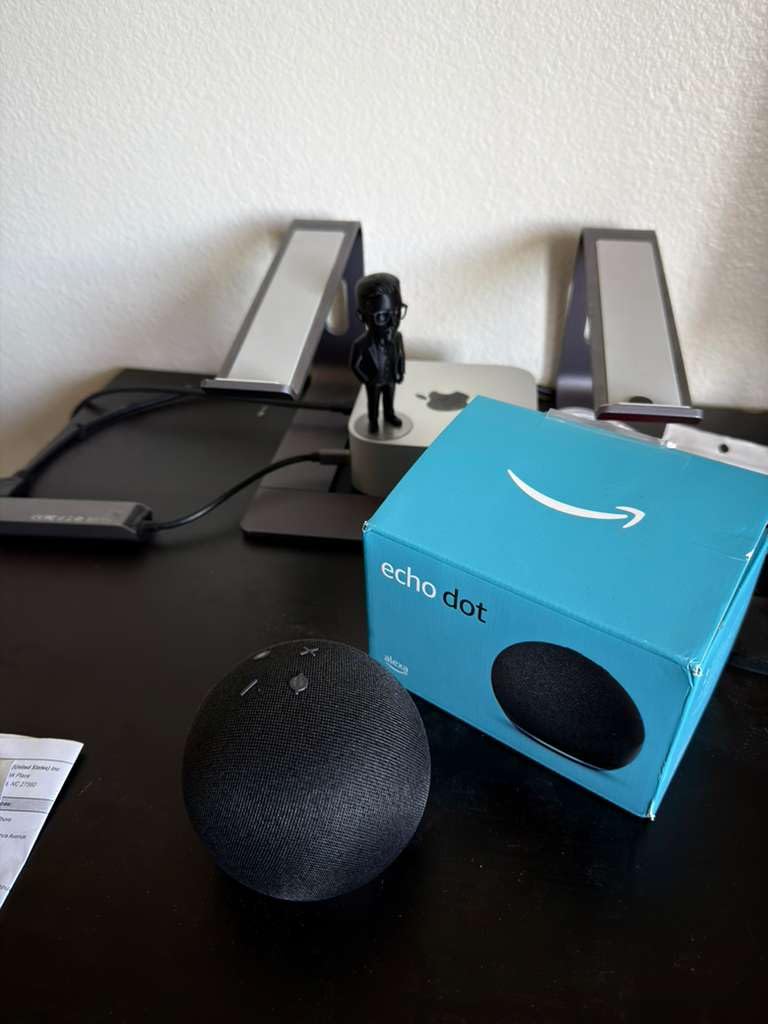
Pulling the Amazon Echo Dot out of its box, the first thing that stands out is just how small and unassuming it is. This isn’t a speaker designed to dominate a shelf or make a design statement in the middle of a living room; it’s built to disappear into a nightstand, a kitchen counter, or a home office desk while quietly doing a lot of work in the background. The fabric-wrapped exterior feels soft and premium for the price point, and the rounded, puck-like shape means it doesn’t have any sharp edges or awkward angles that clash with typical home decor.
Inside the box, Amazon keeps things simple: the speaker itself, a compact power adapter, and a quick-start guide that gets you through setup in a few minutes. There’s no clutter, no unnecessary accessories, and no confusing instructions. For a device meant to be a low-friction entry point into a smart home ecosystem, this minimalist packaging approach makes a lot of sense.
What immediately becomes clear after plugging it in is that this is a device designed around voice first. The light ring on top pulses to indicate it’s booting up, and within a minute or two it’s ready to be configured through the Alexa app. There is no screen to squint at, no remote to lose, and no complicated menu system to navigate on the device itself. Everything happens either through voice or through the companion app on a phone.
Compared to bulkier smart speakers, the Echo Dot’s small footprint is genuinely one of its biggest selling points. It can be tucked into spaces where a larger speaker simply wouldn’t fit, and because it’s inexpensive relative to other smart speakers, it doesn’t feel like a huge investment to place one in every room. That’s actually central to how Amazon designed the broader Echo Dot lineup — as an affordable multi-room entry point rather than a single showpiece speaker.
It’s also worth pausing on just how much thought has gone into the out-of-box experience specifically for people who have never owned a smart speaker before. The quick-start card avoids technical jargon almost entirely, instead using simple numbered steps paired with icons that guide even a first-time user through downloading the app, connecting to WiFi, and completing setup. This matters more than it might seem, since smart home products historically had a reputation for being intimidating to configure, often requiring separate hubs, complicated pairing sequences, or manually entering long device codes. The Echo Dot’s setup process feels closer to setting up a pair of wireless earbuds than configuring a piece of home automation infrastructure, which goes a long way toward making the broader smart home category approachable for mainstream buyers rather than just hobbyists.
First impressions also extend to how quickly the device starts feeling useful. Within the first few minutes after setup completes, most new owners find themselves testing basic commands — asking about the weather, requesting a song, or setting a simple timer — and these early interactions tend to work correctly on the first try more often than not. That immediate sense of “it just works” is an important part of why the Echo Dot has become such a popular gift and starter product for people who might otherwise be hesitant to invest time in learning a new piece of technology.
Check Current Price on Amazon
See real-time pricing, colors, and bundle deals for the Amazon Echo Dot.
Check Price on Amazon →Design and Build Quality
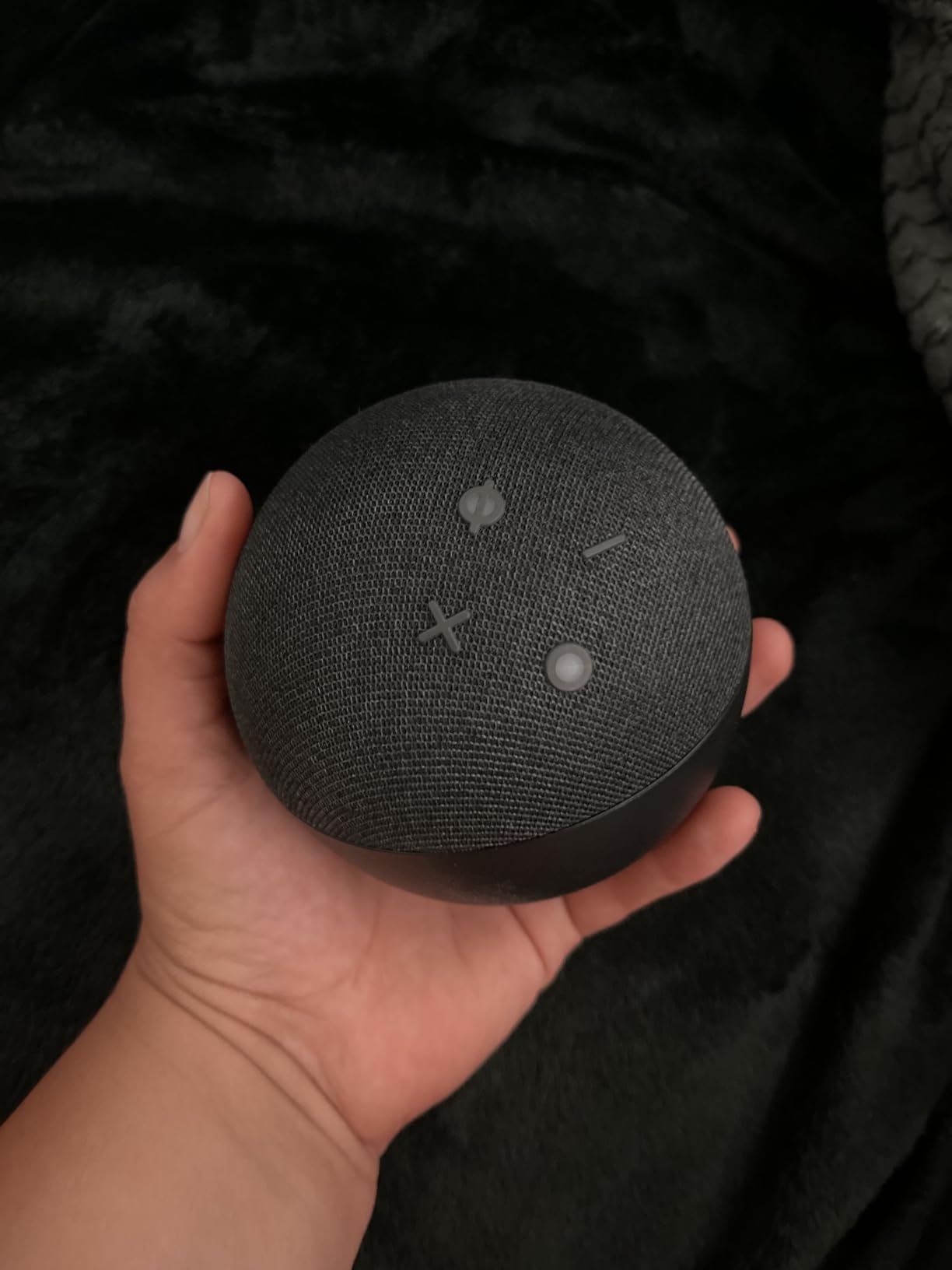
The Echo Dot uses a spherical, fabric-covered design that Amazon has refined across several generations. The mesh fabric isn’t just cosmetic — it plays a functional role in letting sound escape evenly in all directions from the internal driver, while also making the unit more resistant to scuffs and fingerprints than a hard plastic shell would be. Underneath the fabric sits a rigid plastic frame that keeps the speaker structurally sound despite its light weight.
On top, a ring of LED lights communicates status: blue for listening, red for muted, yellow for a notification, and other colors for various Alexa states. These visual cues are a small but thoughtful touch, since they let you glance at the device and immediately understand what it’s doing without needing to check your phone. Physical buttons for volume up, volume down, microphone mute, and an action button sit on the top surface, giving you manual control even if the app or voice recognition isn’t behaving as expected.
Build quality feels solid for the price category. There’s no creaking or flex when picking it up, and the rubberized base keeps it from sliding around on smooth surfaces like glass tables or laminate countertops. The single power cord runs out the back, and depending on the room, cable management can be a minor annoyance since there’s no built-in battery to make it fully wireless.
Color options typically include several muted tones designed to blend into different interior styles, from charcoal and slate to lighter neutral shades. None of the finishes feel flashy, which fits the device’s overall philosophy of being functional rather than a design centerpiece. If you’re looking for something with a bit more visual presence, it may be worth comparing against speakers built with a stronger design focus, like the Marshall Acton III, which leans into a retro aesthetic rather than minimalism.
The overall industrial design philosophy behind the Echo Dot reflects a broader trend in consumer electronics toward objects that recede into the background rather than demand attention. Unlike earlier generations of smart speakers that often looked distinctly “techy” with visible speaker grilles, exposed screws, or angular plastic housings, the current spherical fabric design was clearly intended to sit comfortably next to picture frames, plants, and other everyday home objects without looking out of place. This matters more than it might initially seem, since a device people are embarrassed to display tends to get tucked away in a drawer rather than actually used.
Weight distribution is another small but thoughtful design detail. Despite its light overall weight, the base is weighted just enough to prevent the unit from easily tipping over when bumped, and the rubberized bottom provides good grip on most household surfaces. This is a meaningful consideration for households with young children or pets, where a top-heavy or slippery device could become a hazard or a frequent annoyance from being knocked around.
Ventilation and heat management are handled entirely passively, with no fans or moving parts beyond the internal driver. In practice, this means completely silent operation when idle, and only a very faint hum under sustained heavy use, if noticeable at all. This silent-when-idle characteristic is important for bedroom placements, where any persistent electronic hum could otherwise become a mild irritation during quiet nighttime hours.
Setting Up the Echo Dot
Setup is one of the areas where the Echo Dot genuinely shines. After downloading the Alexa app and creating or signing into an Amazon account, the app automatically detects nearby Echo devices in setup mode and walks through connecting to home WiFi. The whole process typically takes less than five minutes from unboxing to having a fully functional smart speaker.
During setup, the app prompts you to link streaming services, set your default music provider, and configure your home address for local information like weather and traffic. It’s also where you’ll set up routines — automated sequences that trigger multiple actions from a single voice command or scheduled time, such as turning on lights, reading the news, and adjusting a thermostat all at once when you say “good morning.”
If you already own other Echo devices or smart home products, the app recognizes your existing account and automatically groups the new Echo Dot with your other devices, making it simple to build a multi-room audio setup or expand smart home coverage to a new part of the house. For readers setting up a smart home system for the first time, our guide on how to set up a home audio system covers many of the same principles that apply here, from network placement to speaker grouping.
One small but appreciated detail is that firmware updates happen automatically in the background, so there’s rarely a need to manually update the device. This keeps the Echo Dot current with new Alexa features without requiring any user intervention.
For anyone setting up multiple devices at once — say, furnishing an entire apartment or house with several Echo Dots simultaneously — the Alexa app supports batch setup, letting you configure one unit as a template and quickly replicate similar settings across additional devices rather than repeating every step from scratch each time. This is a meaningful time-saver for households or property managers deploying several units across different rooms in a single session.
Troubleshooting during setup is rare, but when connectivity issues do occur, they’re almost always related to WiFi band compatibility or router settings rather than the Echo Dot itself. Some older routers broadcast only a 5GHz network without a 2.4GHz option, which can cause pairing failures since many smart home devices, including the Echo Dot, rely on the more range-friendly 2.4GHz band for initial setup. Temporarily enabling a 2.4GHz network, even if you plan to primarily use 5GHz afterward, resolves the vast majority of setup difficulties people encounter.
Voice training is optional but worth doing for households with several regular users. Within the app, each person can complete a short voice enrollment process that helps Alexa distinguish between different speakers, which in turn powers personalized responses like individual calendars, music preferences, and shopping lists. This step is easy to skip during initial setup but pays off considerably in shared households once it’s been completed.
Finally, it’s worth exploring the “Routines” section of the app early rather than waiting weeks to discover it. Many new owners spend their first few days only using basic commands like checking the weather or playing music, not realizing how much more capable the device becomes once even two or three simple routines are configured. Something as small as a single routine that turns off all lights and confirms the door is locked at a set time each night can meaningfully change how the device feels to live with.
Sound Quality Deep Dive
Sound quality is where expectations need to be calibrated correctly. The Echo Dot uses a single compact driver, and while Amazon has improved the audio processing significantly across generations, it’s not designed to compete with dedicated bookshelf speakers or larger smart speakers when it comes to bass depth or maximum volume. What it does deliver is clear, well-balanced mid and high frequencies that make spoken word content, podcasts, and casual music listening sound pleasant rather than tinny.
In a small to medium-sized room, the Echo Dot fills the space comfortably at moderate volumes. Push it toward its upper volume limits and you’ll start to notice some compression and a loss of low-end presence, which is typical of speakers this size. For background music while cooking, working, or getting ready in the morning, it performs admirably. For anyone hosting a party or wanting to fill a large open-concept living space with rich, room-shaking bass, it will fall short of expectations.
| Frequency Range | Performance |
|---|---|
| Highs | Crisp and clear, good detail on vocals and instruments |
| Mids | Well balanced, natural for speech and most music genres |
| Bass | Noticeably limited, adequate but not impactful |
| Max Volume | Sufficient for small-medium rooms, distortion at extreme volumes |
If richer sound matters more to you than compact size, it’s worth looking at the step-up models in Amazon’s own lineup. The Amazon Echo Dot Max uses a larger driver specifically to address the bass limitations found here, while the Amazon Echo Studio goes even further with multi-driver spatial audio for a genuinely immersive listening experience. Both are worth comparing before you commit if audio quality is your primary concern rather than smart home convenience.
For stereo enthusiasts, pairing two Echo Dot units together through the Alexa app creates a left-right stereo pair, which noticeably improves the soundstage compared to a single unit, even though bass extension remains the same. This is a clever workaround if you already own two units or want a budget-friendly path to fuller sound without buying a larger speaker.
It’s worth digging a little deeper into why the Echo Dot sounds the way it does. Compact single-driver speakers face a fundamental physics challenge: reproducing low frequencies requires moving a large volume of air, and a small driver simply can’t displace as much air as a larger one, no matter how sophisticated the internal digital signal processing is. Amazon’s engineering team compensates with software-based tuning that boosts perceived bass slightly and smooths out harsh frequencies, which is why the Echo Dot sounds more balanced than its raw hardware specifications might suggest on paper.
Placement also has a surprisingly large impact on perceived sound quality. Because the driver fires primarily downward and outward through the fabric mesh, positioning the Echo Dot near a wall or in a corner can actually reinforce bass frequencies through boundary reinforcement, giving the impression of slightly more low-end than you’d get placing it in the open middle of a room. Conversely, placing it inside an enclosed cabinet or behind other objects will muffle the sound and reduce clarity, so a little experimentation with positioning goes a long way toward getting the best results.
Podcasts, audiobooks, and talk radio content tend to sound particularly strong on the Echo Dot, since spoken word content sits comfortably within the frequency ranges the driver handles best. Genres that lean heavily on sub-bass, like some electronic and hip-hop tracks, will sound noticeably thinner, which is the clearest signal that this speaker is designed around everyday convenience rather than critical listening.
See the Echo Dot’s Latest Price
Pricing and color availability change frequently — check the current listing.
View on Amazon →Living With Alexa Day to Day
Beyond the hardware, the real value of the Echo Dot comes from what it enables through Alexa. In daily use, it becomes a hands-free assistant for setting timers while cooking, checking the weather before heading out the door, adding items to a shopping list, and answering quick factual questions without needing to pull out a phone. Voice recognition has become impressively accurate, correctly parsing commands even with moderate background noise like running water or a TV playing nearby.
One of the more underrated features is how well Alexa handles follow-up questions within the same conversation, so you don’t need to repeat the wake word for every single request. Asking for the weather and then immediately asking “what about tomorrow?” works naturally, which makes interactions feel less robotic and more conversational over time.
Routines are where the Echo Dot really starts to feel indispensable once configured. A single phrase like “Alexa, good night” can lock smart locks, turn off lights, lower a thermostat, and set an alarm, all triggered from one sentence. Building these routines takes a bit of upfront effort in the app, but the payoff in daily convenience is significant, especially in households with several connected devices already in place.
Alexa’s skill library also extends functionality well beyond the basics, letting you play trivia games, control smart TVs, get news briefings tailored to specific sources, and even receive step-by-step cooking instructions read aloud while your hands are busy. It’s not a flawless assistant — occasional misheard commands and skill-specific quirks do happen — but for the price of the hardware, the software experience feels remarkably mature.
Another aspect worth highlighting is how Alexa handles ambiguity in requests. Rather than failing outright when a command isn’t perfectly phrased, it often makes a reasonable guess and asks a clarifying follow-up if genuinely uncertain, such as confirming which of two similarly named songs you meant. This graceful handling of imperfect speech is part of why voice assistants have become more trustworthy daily tools over time rather than novelty gadgets that frustrate users into abandoning them after a few weeks.
Accessibility is another area where the Echo Dot quietly excels. For users with limited mobility or vision impairments, voice control removes many of the physical barriers involved in operating lights, thermostats, and other devices that traditionally require reaching, pressing small buttons, or reading a screen. Features like adjustable speech rate, tap-to-Alexa options for those who prefer not to speak aloud, and compatibility with braille displays for supported apps make it a more inclusive product than its compact size might suggest at first glance.
Multi-tasking is where the assistant format really separates itself from screen-based alternatives. Because commands are spoken rather than typed or tapped, you can ask Alexa to add milk to your shopping list while simultaneously stirring a pot, folding laundry, or holding a sleeping child. This hands-free quality is easy to take for granted after a few weeks of ownership, but it’s genuinely one of the more transformative aspects of living with a well-integrated voice assistant.
Smart Home Control
For many buyers, smart home control is the actual reason to own an Echo Dot rather than music playback. The device supports a wide range of smart plugs, light bulbs, locks, thermostats, and sensors from major brands, and increasingly supports Matter-certified devices, which means broader compatibility across ecosystems without needing brand-specific hubs in many cases.
Setting up a new smart device typically takes just a couple of minutes: plug in the device, open the Alexa app, tap “Add Device,” and let the app search for and pair with it automatically. Once connected, devices can be grouped by room, allowing commands like “turn off all the lights in the bedroom” to control multiple products simultaneously.
| Device Type | Typical Use With Echo Dot |
|---|---|
| Smart Plugs | Voice-controlled power for lamps, fans, appliances |
| Smart Bulbs | Dimming, color changes, scheduled lighting |
| Smart Locks | Voice-based locking, status checks, routines |
| Thermostats | Temperature adjustments, scheduling, energy routines |
| Sensors | Motion and contact triggers for automated routines |
Because the Echo Dot is inexpensive enough to place in multiple rooms, it effectively becomes a distributed smart home hub, with each unit acting as both a voice control point and, for models with the required radio hardware, a local smart home hub. This is a meaningfully different approach than relying on a single central hub, since it reduces dead zones where voice commands might not reach.
Anyone building out a broader smart home setup around audio and automation might also find it useful to compare soundbar-based smart ecosystems, such as the Samsung B-Series soundbar or the Bose Smart Soundbar, both of which integrate voice assistants directly into home theater setups rather than standalone speakers.
One practical consideration that often gets overlooked is network stability. Since every smart home command routes through the Echo Dot’s WiFi connection to the cloud and back, a weak or congested home network can introduce noticeable lag between issuing a command and seeing the corresponding device respond. Placing your router centrally, using a mesh WiFi system in larger homes, or dedicating a separate WiFi band for smart home devices can meaningfully improve responsiveness, especially in households running a dozen or more connected devices simultaneously.
Local control is another nuance worth understanding. While many smart home actions require an internet connection to reach Alexa’s cloud servers, some newer Matter-enabled devices and certain routines can execute locally without needing to leave the home network, which reduces latency and adds a layer of resilience if internet service briefly drops. This is a meaningful architectural shift compared to earlier generations of smart home hubs that depended entirely on cloud round-trips for every single action, however small.
Group and room organization inside the Alexa app deserves special attention during setup, since a disorganized device list quickly becomes frustrating to manage as you add more products over time. Taking ten or fifteen minutes early on to properly label and group devices by room pays dividends every single day afterward, making voice commands faster and routines easier to build without needing to remember exact device names for every lamp or plug in the house.
Music Services and Streaming
The Echo Dot supports most major streaming services, including Amazon Music, Spotify, Apple Music, and several others depending on region and app updates. You can set a default music provider so that saying “Alexa, play some jazz” automatically pulls from your preferred service without needing to specify it every time.
Voice-based music discovery is genuinely convenient — asking for a mood, genre, artist, or even a decade of music (“play 90s R&B”) generally returns relevant results quickly. Where things get more nuanced is playlist and podcast management; the voice interface handles straightforward requests well but can become clunky for more granular controls like skipping to a specific track deep within an album, which is easier to do from the app or phone directly.
For higher-fidelity listening, some streaming tiers offer lossless or high-resolution audio, but it’s worth noting that the Echo Dot’s hardware limitations mean you likely won’t perceive much benefit from those higher bitrates compared to standard streaming quality, given the size of its internal driver. If audio fidelity is a top priority, pairing the Echo Dot with an external speaker via Bluetooth or aux can meaningfully improve the experience while still keeping Alexa’s voice control intact.
Multi-room music groups are another strong feature — grouping several Echo devices together lets you play the same song synchronized across a kitchen, living room, and bedroom, or even different songs in different rooms depending on how groups are configured. This works well for households where family members want independent control in different rooms.
Podcasts have become a particularly strong use case as voice-driven podcast apps have matured. Asking Alexa to resume a specific show, skip forward a set number of minutes, or queue up the next episode all work reliably, and the assistant remembers playback position across sessions so you can pick up a podcast in the kitchen and later finish it from a different Echo Dot in another room without losing your place.
Audiobook support through supported services is similarly well integrated, with voice commands for adjusting narration speed, jumping between chapters, and setting sleep timers that automatically pause playback after a set period — a particularly popular feature among people who like falling asleep to an audiobook without needing to leave it running all night.
Radio and live content also work well through the Echo Dot, whether that means tuning into a local radio station by name, asking for a specific sports broadcast, or requesting genre-based internet radio stations when you want variety without curating a specific playlist yourself. For anyone who grew up with traditional radio, this is one of the more immediately familiar and satisfying use cases the device offers.
It’s worth noting that not every streaming service offers full feature parity through voice control. Some platforms support only basic playback commands via Alexa, while reserving more advanced features like collaborative playlists or detailed music discovery tools for their own dedicated apps. If a specific streaming ecosystem is central to how you listen to music, it’s worth checking the current level of Alexa integration for that particular service before assuming full feature parity out of the box.

Ready to Bring Alexa Home?
Grab the Amazon Echo Dot and start building your smart home today.
Buy on Amazon →Privacy and Microphone Controls
Privacy is a common concern with any always-listening smart speaker, and it’s worth addressing directly. The Echo Dot processes wake-word detection locally on the device, meaning it isn’t continuously streaming audio to the cloud. Only after detecting its wake word does it begin sending audio for cloud-based processing, and even then, users have several layers of control over this behavior.
A physical microphone mute button on top of the device disables the mic entirely at a hardware level, indicated by a solid red light, which is useful for sensitive conversations or simply peace of mind. Within the Alexa app, users can also review, delete, and manage voice recordings, adjust how long recordings are retained, and opt out of having recordings used to improve Alexa’s algorithms.
For households with children, additional privacy and content controls are available, including filtering explicit music content and limiting certain skills or purchasing capabilities. These controls are somewhat buried in app settings, so it’s worth spending a few minutes exploring the privacy dashboard shortly after setup rather than leaving everything at default.
While no smart speaker is entirely without privacy tradeoffs, Amazon’s approach with local wake-word detection, a physical mute switch, and granular data controls in the app represents a reasonably transparent system compared to some competitors, provided users take the time to actually configure the settings to their comfort level.
Beyond the built-in controls, it’s worth understanding how voice data is actually used behind the scenes. Recordings sent to the cloud after a wake word is detected are primarily used to process the specific request being made — for example, understanding a song request well enough to queue up the right track. Some of that data may also be used, with user consent, to improve speech recognition accuracy over time across the broader user base, though this can be disabled entirely in privacy settings for anyone who prefers not to contribute to that improvement process.
For families concerned about children interacting with the device, Amazon offers a dedicated kids’ profile system that layers in content filtering, screen time limits for compatible show-and-tell devices, and simplified interaction modes designed around younger users. Setting this up takes a bit of extra configuration in the app but provides meaningfully more oversight than treating a child’s usage identically to an adult account.
It’s also worth periodically reviewing connected third-party skills, since each skill you enable is granted a certain level of access to interact with your Alexa account. Removing skills you no longer use is a simple bit of digital housekeeping that reduces the overall surface area of data shared with outside developers, similar to periodically reviewing app permissions on a smartphone.
How the Echo Dot Compares to Other Echo Devices
Amazon’s Echo lineup spans several tiers, and understanding where the Echo Dot sits helps clarify whether it’s the right choice or whether a different model better fits your needs.
| Model | Best For | Sound Quality | Price Tier |
|---|---|---|---|
| Echo Dot | Compact rooms, budget smart home entry | Good, limited bass | Budget |
| Echo Dot Max | Slightly larger rooms, better bass on a budget | Improved bass and volume | Mid |
| Echo Studio | Home audio enthusiasts, spatial audio | Premium, multi-driver | Premium |
Choosing between these largely comes down to how much you value sound quality versus price and footprint. If the Echo Dot is your first smart speaker and you’re mainly interested in voice assistant convenience and smart home control, it’s the most sensible starting point. If music listening is a bigger priority, stepping up to the Echo Dot Max or the Echo Studio will feel like a meaningful upgrade.
It’s also worth comparing against non-Amazon options if you’re not committed to the Alexa ecosystem specifically. Speakers like the Marshall Acton III emphasize design and sound signature over smart assistant depth, while dedicated soundbar solutions like the Vizio 5.1 Soundbar SE or the Sony HT-S2000 are built more around home theater performance than voice assistant features.
Echo Dot vs Echo Dot Max in Practice
The gap between the standard Echo Dot and the Echo Dot Max is smaller in physical size than it is in listening experience. Side by side, the Max’s larger driver becomes obvious the moment you play anything with meaningful bass content — a hip-hop track, a movie soundtrack, or even just a podcast intro with a musical sting will sound noticeably fuller and more three-dimensional on the Max. For pure smart home control and voice assistant tasks, the two perform virtually identically, since the underlying Alexa software experience is shared across the lineup. The decision essentially comes down to whether the extra cost for improved audio matters more than keeping the absolute smallest footprint and lowest price.
Echo Dot vs Echo Studio
The jump to the Echo Studio represents a much larger leap, both in price and in capability. Where the Echo Dot and Echo Dot Max are single-driver designs optimized primarily for voice and casual listening, the Echo Studio uses multiple drivers arranged to create genuine spatial audio, adapting its output to the specific room it’s placed in through built-in room-tuning technology. For anyone whose primary use case is high-quality music playback rather than smart home convenience, the Echo Studio is a fundamentally different class of product, and comparing it directly to the Echo Dot is somewhat like comparing a compact car to a mid-size sedan — both get you where you’re going, but the experience along the way differs substantially.
Echo Dot vs Third-Party Smart Speakers
Outside the Amazon ecosystem, competing smart speakers generally fall into similar tiers based on driver size and assistant sophistication. Some competitors emphasize a more premium build with real fabric and metal accents at a higher price point, while others compete more directly with the Echo Dot on price but with a less mature voice assistant or smaller third-party device compatibility list. The Echo Dot’s biggest structural advantage over most competitors is simply the breadth of its ecosystem — the sheer number of smart home brands that build Alexa compatibility directly into their products gives it a practical edge that’s hard for smaller competing ecosystems to match, regardless of how good their individual hardware might be.
When a Soundbar Might Be the Better Choice
For anyone whose primary listening happens in front of a television, it’s worth stepping back and considering whether a smart speaker is even the right category of product in the first place. Soundbars like the Samsung B-Series or Bose Smart Soundbar are purpose-built for dialogue clarity and movie soundtracks in ways a compact smart speaker simply isn’t designed to match, even though many modern soundbars now include voice assistant integration of their own. If your household’s main listening scenario is watching shows and movies rather than casual background music or smart home control, a soundbar-first approach — potentially supplemented by an Echo Dot elsewhere in the house — may serve you better than relying on the Echo Dot as a primary audio source.
How Different Households Get the Most Out of It
Because the Echo Dot is priced low enough to be deployed in bulk, the way different types of households actually use it varies more than you might expect from a single small speaker. Looking at a few common household profiles helps illustrate just how flexible the device turns out to be in practice.
Young Professionals and Apartment Dwellers
In smaller living spaces, a single Echo Dot often ends up serving as the entire smart home hub, controlling a handful of smart plugs, a smart lock, and perhaps a couple of light bulbs, all managed from one compact device that doesn’t take up meaningful space on an already limited countertop or shelf. The low price point also fits naturally with renters who may not want to invest heavily in permanent smart home infrastructure they can’t take with them when they move.
Families With Young Children
Households with kids tend to deploy multiple units throughout the house — one in a shared living area, one in a kids’ bedroom or playroom, and often one in the kitchen. Parental controls, homework help features, and the ability to set timers for screen time or chores make it a genuinely useful tool for managing the chaos of a busy family schedule, beyond simply playing music or answering trivia questions.
Empty Nesters and Downsizers
For households transitioning to smaller living spaces later in life, the combination of simple voice control, medication and appointment reminders, and easy hands-free calling to family members makes the Echo Dot a popular choice, often set up by an adult child on behalf of an aging parent specifically because of how little technical maintenance it requires afterward.
Renters and Frequent Movers
Because there’s no installation, wiring, or permanent modification involved, the Echo Dot travels easily between homes. Unplugging one unit, packing it in a box, and setting it back up in a new location takes only a few minutes, making it a low-friction addition for anyone who relocates frequently for work or personal reasons and doesn’t want to rebuild an entire smart home setup from scratch each time.
Multi-Generational Households
In homes where several generations live under one roof, voice profile recognition becomes especially valuable, allowing grandparents, parents, and children to each receive personalized responses, calendars, and music recommendations from what is functionally a shared piece of household infrastructure rather than a single person’s personal device.
Pros and Cons
Pros
- Very affordable entry point into the Alexa ecosystem
- Compact design fits almost anywhere
- Simple, fast setup process
- Reliable voice recognition, even with background noise
- Strong smart home compatibility, including Matter support
- Physical mute button for privacy peace of mind
- Easy to pair for stereo or multi-room audio
Cons
- Limited bass and max volume compared to larger speakers
- No internal battery, requires constant power
- Requires WiFi to function, no fully offline mode
- Granular music controls better suited to app than voice
- Some premium features benefit from a paid subscription
Who Should (and Shouldn’t) Buy the Echo Dot
The Echo Dot is best suited for people who want a low-cost, low-commitment way to add voice assistance and smart home control to a room. It’s an excellent fit for bedrooms, home offices, kitchens, and secondary living spaces where a large speaker would feel excessive or out of place. First-time smart home adopters will also appreciate how approachable the setup and daily use experience is compared to more complex systems.
It’s also a smart pick for anyone building a multi-room audio setup on a budget, since the low per-unit cost makes it realistic to place several units throughout a home without a huge financial commitment. Renters and anyone who moves frequently will also appreciate how easy the Echo Dot is to unplug, pack, and set up again elsewhere.
On the other hand, if your primary goal is high-fidelity music listening, home theater-grade audio, or filling a large room with powerful sound, the Echo Dot will likely leave you wanting more. In those cases, it’s worth exploring options like the best home theater systems under $10,000 or the best home stereo systems under $500, both of which are built around audio performance rather than compact convenience.
Buyers who are hesitant about voice assistants generally, or who have significant privacy concerns about always-listening devices, may also want to research Amazon’s privacy controls more closely before purchasing, even though the mute switch and local wake-word processing address many common concerns.
Families with school-age children often find the Echo Dot particularly valuable for homework help, since Alexa can answer quick factual questions, define vocabulary words, or run basic math practice through supported skills, all without a child needing access to an open internet browser. Combined with parental controls, this makes it a reasonably safe first “assistant” for kids to interact with directly, compared to handing over an unrestricted phone or tablet.
Elderly users and those living independently also represent a strong use case, particularly when paired with routines for medication reminders, emergency contact calling, or simple check-in features that family members can configure remotely. The lack of a complex interface — no apps to navigate, no small text to read — makes voice control especially approachable for users who might otherwise struggle with smartphone-based smart home apps.
On the other end of the spectrum, serious audiophiles and home theater enthusiasts who already own a dedicated, carefully tuned sound system may find the Echo Dot redundant for actual listening, though even in these cases many still end up buying one purely for its smart home and voice assistant capabilities, using a separate high-quality speaker system for critical listening.
Price and Value
Value is arguably the Echo Dot’s strongest selling point. At its typical price point, it undercuts most dedicated smart speakers while still delivering a genuinely useful voice assistant, respectable sound for casual listening, and full smart home integration. Frequent sales and bundle deals — often pairing the Echo Dot with smart plugs or bulbs — can push the effective price down even further, making it one of the more accessible ways to start automating a home.
When comparing cost against features, few competitors match the combination of price, ecosystem maturity, and third-party device compatibility that the Echo Dot offers. Its main “cost” isn’t monetary so much as an implicit commitment to the Alexa ecosystem and, by extension, an Amazon account tied into your daily routines.
For budget-conscious shoppers who still want quality audio hardware in other parts of their setup, our guide on the best Bluetooth speakers for home is a useful companion resource, since pairing a dedicated Bluetooth speaker with the Echo Dot’s voice control can offer the best of both worlds.
It also helps to think about value in terms of what the Echo Dot replaces rather than only what it costs on its own. A standalone kitchen timer, a basic alarm clock, a small radio, and a simple intercom system together can easily add up to more than the price of one Echo Dot, and yet the Echo Dot performs all of those roles simultaneously while adding voice control and smart home automation on top. When you tally up the individual gadgets it can consolidate, the actual cost-per-function drops dramatically, which is part of why so many households end up owning more than one unit rather than treating it as a single-purchase novelty.
Resale and long-term durability also factor into the value equation, even though they’re easy to overlook at the point of purchase. Because the hardware itself is relatively simple — a driver, a microphone array, some LEDs, and a WiFi radio — there isn’t much to fail mechanically compared to speakers with more moving parts, like those with retractable antennas or physical dials. Software support has also historically extended for several years after a given generation’s release, meaning an Echo Dot bought today is likely to keep receiving feature updates well into the future rather than becoming obsolete shortly after purchase.
One more angle worth considering is the opportunity cost of the time saved through automation. Voice-activated routines that used to require several manual steps — walking to a light switch, adjusting a thermostat dial, manually setting multiple alarms — get collapsed into a single spoken sentence. While it’s hard to put a precise dollar figure on convenience, anyone who has lived with a well-configured Echo Dot routine for a few months tends to describe it as one of those small quality-of-life upgrades that’s difficult to go back from once you’re used to it.
Real-World Daily Use Scenarios
Specs and feature lists only tell part of the story. What actually matters is how the Echo Dot performs across the kinds of everyday situations most households encounter. Below are some of the most common ways people end up relying on it once the initial novelty wears off and it becomes part of the daily routine.
Mornings
For many owners, the day starts with a single voice command that triggers a cascade of small conveniences: lights gradually brightening, a weather and traffic briefing, and perhaps a favorite morning playlist or news podcast starting automatically. Because this all happens hands-free, it fits naturally into a morning routine that might otherwise involve getting dressed, making coffee, or getting kids ready for school — tasks where reaching for a phone or a light switch adds unnecessary friction.
Cooking and Meal Prep
The kitchen is one of the most popular rooms for an Echo Dot, largely because hands are frequently messy or full while cooking. Setting multiple simultaneous timers for different dishes, converting measurements on the fly, or asking for a substitution when you’re missing an ingredient are all tasks that voice control handles more gracefully than trying to operate a phone with flour-covered hands.
Working From Home
In a home office setting, the Echo Dot often becomes a background utility — quick calendar checks, setting reminders for meetings, or playing focus-friendly background music without needing to break concentration by opening a laptop tab. Because it responds instantly to voice, it tends to fade into the background of a workday rather than becoming another distracting screen.
Evenings and Bedtime
At night, routines built around “good night” or similar phrases handle the last few chores before sleep: locking doors, turning off lights throughout the house, setting an alarm for the next morning, and optionally playing calming sounds or a sleep timer. Because the Echo Dot doesn’t have a bright screen the way a phone or tablet does, it tends to be less disruptive to fall-asleep routines than reaching for a backlit device right before bed.
Guests and Shared Households
In households with multiple residents or frequent guests, voice profiles allow Alexa to recognize different speakers and tailor responses accordingly, such as pulling up a specific person’s calendar or music preferences. This becomes particularly useful in shared living situations, roommates, or multi-generational households where several people interact with the same device throughout the day.
Related Reading
- Amazon Echo Dot Max Review
- Amazon Echo Studio Review
- Marshall Acton III Review
- Best Home Audio Systems
- Best Home Theater System Under $10,000
- Best Home Stereo System Under $500
- How to Set Up a Home Audio System
- Polk MagniFi Mini Review
- Samsung B-Series Soundbar Review
- Sony HT-S2000 Review
- Bose Smart Soundbar Review
- Vizio 5.1 Soundbar SE Review
- Best Bluetooth Speakers for Home
- Do Wireless Speakers Lose Quality?
- Are Wireless Speakers Any Good?
Troubleshooting, Longevity, and Accessories
Even well-designed smart home devices occasionally run into hiccups, and understanding the most common issues ahead of time can save a lot of frustration. Fortunately, the Echo Dot’s issues tend to fall into a handful of predictable categories, most of which have straightforward fixes.
Common Connectivity Issues
The most frequent complaint among smart speaker owners generally involves WiFi dropouts, and the Echo Dot is no exception. In most cases, this stems from router placement, network congestion from too many connected devices, or interference from other 2.4GHz electronics like microwaves and older cordless phones. Restarting the router, moving the Echo Dot away from thick walls or metal objects, and ensuring firmware on both the router and the Echo Dot itself are up to date typically resolves the vast majority of these situations.
Voice Recognition Hiccups
Occasionally, especially in noisy environments like a kitchen with a running exhaust fan or a living room with a loud TV, Alexa may mishear a wake word or fail to catch a full command. Speaking slightly more clearly, reducing background noise where possible, or physically repositioning the Echo Dot closer to where commands are typically given can noticeably improve recognition accuracy over time.
Unresponsive Skills or Routines
Third-party skills occasionally break when the underlying service changes its API, which is outside Amazon’s direct control. If a previously working skill suddenly stops responding correctly, checking for an update in the skill’s settings or briefly disabling and re-enabling it within the Alexa app usually restores normal function. Routines themselves rarely break on their own, but adding a new device to the house without updating an existing routine to include it is a common oversight that gives the impression something is malfunctioning when it’s actually just an incomplete configuration.
Physical Reset
For more persistent issues, a factory reset is available through a small recessed button or a specific button-hold combination depending on the generation, which returns the device to its out-of-box state and allows for a fresh setup. This is rarely necessary but provides a reliable fallback if software-level troubleshooting doesn’t resolve a persistent problem.
Longevity and Software Support
In terms of long-term ownership, the Echo Dot has generally proven to be a durable, low-maintenance device. There are no moving parts beyond the internal speaker driver, no fans that can accumulate dust and fail, and no battery to degrade over time since it runs on constant external power. Software support has historically extended for multiple years past a given generation’s release, meaning units purchased today should continue receiving feature updates and security patches well into the future, similar to how a modern smartphone receives ongoing software support after its initial release.
Useful Accessories
While the Echo Dot works perfectly well on its own, a few accessories can enhance the experience. A dedicated smart plug is a natural first add-on for anyone new to the ecosystem, letting you add voice control to an existing lamp or appliance without needing to buy a smart-specific replacement. Wall-mount adapters or small stands are popular for keeping the Echo Dot off cluttered counters, particularly in kitchens where counter space is at a premium. For anyone wanting to extend battery-free portability around the house, some third-party battery base accessories exist, though these aren’t officially made by Amazon and vary in build quality.
Cleaning and Maintenance
Because the exterior is wrapped in fabric, the Echo Dot can accumulate dust over time, particularly around the top vents. A soft, dry cloth or a gentle vacuum brush attachment on a low setting is usually sufficient for regular cleaning. Liquids should be kept well away from the device, since neither the fabric nor the internal electronics are designed to be water-resistant, and any accidental exposure to spills should be addressed immediately by unplugging the unit and allowing it to fully dry before reconnecting power.
The Broader Ecosystem and What’s Coming Next
Owning an Echo Dot means buying into more than a single piece of hardware — it’s an entry point into an ecosystem that has been expanding steadily for years and shows no signs of slowing down. Understanding this bigger picture helps set realistic expectations for how the device will continue to evolve after you bring it home.
Generative AI and Alexa
Amazon has been steadily layering more advanced conversational AI capabilities into Alexa, moving beyond rigid command-and-response patterns toward more natural, flexible conversations that can handle multi-step requests and follow-up questions with greater nuance. Because much of this intelligence lives in the cloud rather than on the device itself, Echo Dot owners generally receive these improvements automatically through software updates, without needing to purchase new hardware to benefit from smarter, more capable responses over time.
Expanding Matter and Smart Home Standards
The broader smart home industry has been converging around shared standards like Matter, designed to reduce the fragmentation that has historically made smart home shopping confusing, where a bulb compatible with one ecosystem might not work with another. As more manufacturers adopt these shared standards, the Echo Dot’s role as a universal voice control point for an increasingly wide range of third-party devices only becomes more valuable, since compatibility concerns that once required careful research before every purchase are steadily becoming less of a barrier.
Environmental and Sustainability Considerations
Amazon has made incremental improvements to the sustainability profile of Echo devices over successive generations, including recycled materials in fabric and internal components, along with reduced packaging waste. While the Echo Dot is far from a zero-impact product, these gradual improvements are worth noting for environmentally conscious shoppers weighing the tradeoffs of adding another electronic device to their home.
Trade-In and Upgrade Paths
For owners of older Echo Dot generations, Amazon periodically offers trade-in programs that provide a discount toward a newer model, which is a reasonable way to upgrade to improved microphones, better sound, or new features without the older unit simply ending up in a landfill. Even without a formal trade-in program active at any given time, older units remain fully functional as secondary devices in less critical rooms, since Alexa’s cloud-based intelligence means even several-year-old hardware continues to benefit from many software-side improvements.
Setting Realistic Long-Term Expectations
Anyone considering the Echo Dot as a long-term addition to their home should think of it less as a static purchase and more as a subscription to an evolving service layered on top of relatively simple, durable hardware. The core experience today — voice commands, smart home control, music playback, and routines — is likely to remain the foundation, while new capabilities continue to be added around the edges as Amazon refines the underlying Alexa platform over time.
Frequently Asked Questions
Is the Amazon Echo Dot worth buying?
For most people who want an affordable entry point into the Alexa smart home ecosystem, yes. It handles voice commands, music, and smart home control well for its price, though it isn’t meant to be a primary music speaker.
Does the Echo Dot need a subscription?
No subscription is required to use core Alexa features. Some music services and premium Alexa features benefit from a subscription, but the Echo Dot itself works fully out of the box.
Can the Echo Dot control smart home devices?
Yes, the Echo Dot works as a hub for compatible smart plugs, lights, locks, and thermostats, and it supports many Matter-enabled devices.
How loud is the Echo Dot?
The Echo Dot fills a small to medium room comfortably, but its compact driver means bass and volume are limited compared to larger speakers.
Does the Echo Dot work without WiFi?
No, the Echo Dot requires a WiFi connection to process voice commands and stream content, since it relies on cloud-based Alexa processing.
Can multiple Echo Dots be linked together?
Yes, multiple Echo Dot units can be grouped for multi-room audio or paired together for stereo sound using the Alexa app.
Is the Echo Dot good for bedrooms?
It’s a popular bedroom choice thanks to its compact size and features like alarms and sleep sounds.
Does the Echo Dot have a battery?
No, the standard Echo Dot must remain plugged in and does not include an internal battery.
How does the Echo Dot compare to the Echo Dot Max?
The Echo Dot Max offers a larger driver and improved bass response, making it a better fit for those who want fuller sound without stepping up to a full-size speaker. Read our full Echo Dot Max review for details.
Can I use the Echo Dot to make phone calls?
Yes, the Echo Dot supports hands-free calling and messaging through the Alexa app to other Echo devices or contacts who have the app installed.
Is the Echo Dot’s microphone always listening?
The Echo Dot listens locally for its wake word only; audio is not sent to the cloud until the wake word is detected, and users can mute the microphone at any time.
A Quick Buying Checklist Before You Order
Before adding the Echo Dot to your cart, it helps to run through a short mental checklist to make sure it actually matches your specific situation, rather than assuming one smart speaker fits every household equally well.
Confirm Your WiFi Coverage
Since the Echo Dot depends entirely on a stable WiFi connection, it’s worth confirming that the room where you intend to place it actually gets reliable signal strength. Dead zones caused by thick walls, distance from the router, or interference from other electronics can undermine even the best smart speaker, regardless of brand.
Decide How Many Units You Actually Need
Rather than buying a single unit and hoping it covers an entire home, think room by room about where voice control would genuinely add value — bedrooms, kitchens, home offices, and living rooms are the most common starting points. Multi-packs are often discounted compared to buying units individually, so if you already know you’ll want more than one, it’s worth checking for bundle pricing before purchasing separately.
Check Existing Smart Home Compatibility
If you already own smart bulbs, plugs, locks, or other connected devices, quickly verifying Alexa compatibility for each one avoids any unpleasant surprises after your Echo Dot arrives. Most mainstream smart home brands support Alexa, but it’s a five-minute check worth doing rather than assuming universal compatibility.
Consider Color and Placement Together
Since the Echo Dot’s exterior is fairly visible wherever it’s placed, choosing a color that matches its intended room can make it feel more like an intentional design choice than an obviously “added” gadget. This is a small detail, but one that affects how comfortable a device feels sitting out in a shared living space long-term.
Think About Whether You Need the Max or Studio Instead
If you already suspect that audio quality will matter more than price and footprint, it may be worth spending a bit more upfront on the Echo Dot Max or even the Echo Studio rather than starting with the base Echo Dot and feeling the urge to upgrade shortly after purchase. Buying the right tier the first time often ends up being more cost-effective than upgrading twice.
Final Verdict
The Amazon Echo Dot succeeds at exactly what it sets out to do: deliver an affordable, compact, and genuinely useful smart speaker that makes voice control and smart home automation accessible to nearly anyone. It won’t replace a dedicated hi-fi setup, but for everyday convenience, hands-free assistance, and easy smart home integration, it remains one of the best value picks in its category.
Whether you’re setting up your very first smart home device or adding another voice-controlled point to an already connected house, the Echo Dot delivers dependable performance without asking for a significant financial or technical commitment in return. Weighed against its price, it’s hard to find another product that packs in as much genuine day-to-day usefulness into such a small package.
Check Today’s Price on Amazon →