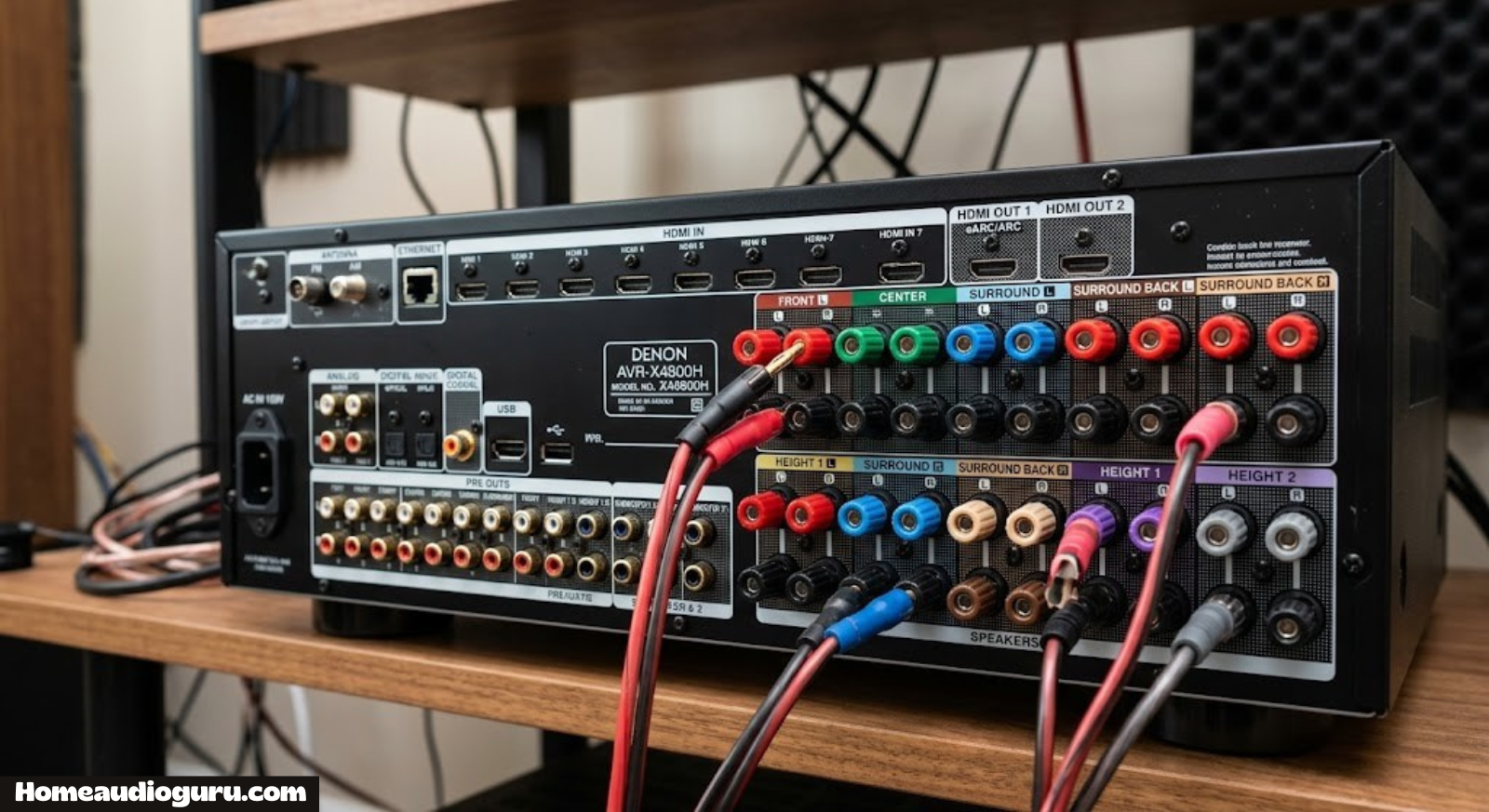
Receiver Channels Explained: What 2.1, 5.1, 7.1 and 9.2 Actually Mean
Confused by the “2.1,” “5.1,” or “7.2.4” numbers stamped on every AV receiver box? Here’s a plain-English breakdown of what a channel actually is, how many you need, and how to avoid overspending on power you’ll never use.
1. What Is a “Channel,” Exactly?
Every time you see a receiver described as “5.1,” “7.2,” or “9.1.4,” that number cluster is describing channels — and a channel, in the simplest possible terms, is one independent audio signal routed to one speaker (or one subwoofer output). If a receiver has five channels, it can send five completely separate streams of sound to five separate speakers at the same time, each carrying different information depending on where a sound is supposed to originate from in a movie or song.
Think of a two-channel stereo system first, since it’s the easiest to picture. A left speaker and a right speaker each receive their own dedicated signal, which is why a guitar can sound like it’s coming from the left side of a room while vocals sit in the middle. Add more channels, and you add more positions in the room where sound can originate — behind you, to your sides, even above your head. That’s the entire point of a home audio receiver: it decodes a soundtrack and hands each piece of it to the right speaker, in the right channel, at the right time.
It helps to separate two ideas that people often blur together: the number of channels a receiver can process, and the number of channels it can amplify. Processing means the receiver’s internal decoder can split an incoming signal (say, a Blu-ray’s Dolby Digital track) into that many discrete streams. Amplifying means it has a physical power amplifier built in for each of those streams, strong enough to actually drive a speaker. Most receivers do both for their full channel count, but as you’ll see in section 8, higher-end models sometimes process more channels than they physically amplify, relying on external amps or “pre-outs” to fill the gap.
Channel count is arguably the single most important spec on a receiver’s box, more so than wattage or brand name, because it dictates the physical speaker layout your room is capable of supporting. Buy a 5.1 receiver and you’re capped at five speakers plus a sub, full stop, no matter how good your ceiling speakers are. Buy an 11.2 receiver and you have the headroom for a genuinely immersive, object-based surround setup — assuming your room and budget can handle that many speakers.
Why Channel Count Grew Over Time
Home audio didn’t jump straight from stereo to twelve-channel Atmos overnight. Early home theater setups in the 1990s standardized on 5.1 because that matched what movie theaters were already delivering through Dolby Digital and DTS soundtracks on early DVDs. As broadcast and disc formats matured, studios started mixing in 7.1 to give sound designers more granular control over rear-channel placement, and receiver manufacturers followed by adding the extra amplifier channels needed to reproduce it. The more recent jump to object-based formats like Atmos and DTS:X reflects a similar pattern: content came first, and receiver hardware caught up to support it.
Understanding this history matters practically, because it explains why channel counts cluster around specific numbers instead of climbing steadily. You’ll rarely see a “6.1” or “8.1” receiver marketed heavily, because those configurations don’t map cleanly onto how movie studios actually mix soundtracks. Sticking close to the standard notations — 5.1, 7.1, 5.1.2, 7.1.4 — keeps your setup compatible with the vast majority of commercially available content without any guesswork about how a non-standard channel gets used.
Discrete Channels vs. Matrixed or Virtual Channels
Not all “surround” experiences use genuinely discrete channels. Some soundbars and budget receivers advertise virtual surround processing that uses psychoacoustic tricks — phase manipulation and reflected sound — to simulate extra channels from only two or three physical speakers. This can sound impressively spacious in the right room, but it’s fundamentally different from a receiver with true discrete amplifier channels feeding physically separate speakers in different locations. If you see a “virtual 7.1” or “simulated surround” claim on a two-speaker product, know that you’re getting a processing trick, not additional independent channels.

2. How to Read Receiver Numbers (2.1, 5.1, 7.1.4)
The dot-separated numbers on a receiver’s spec sheet follow a simple, consistent grammar once you know the pattern. Reading left to right:
- First number — the count of full-range speaker channels (front left/right, center, surrounds, back surrounds).
- Second number — the count of subwoofer channels, almost always 1 or 2.
- Third number (if present) — the count of height or overhead channels used for Dolby Atmos or DTS:X, either dedicated ceiling speakers or upward-firing modules.
So a “5.1” system is five full-range speakers plus one subwoofer, for six amplified channels total. A “7.2.4” system is seven full-range speakers, two subwoofers, and four height channels — thirteen channels total, which is why flagship receivers with that spec tend to be large, heavy, and expensive. This numbering convention is standardized across the industry, so it works the same whether you’re comparing a Denon, a Yamaha, or a Marantz unit.
| Notation | Full-Range Speakers | Subwoofers | Height Channels | Total Amplified Channels |
|---|---|---|---|---|
| 2.0 | 2 | 0 | 0 | 2 |
| 2.1 | 2 | 1 | 0 | 2 (+1 sub, unpowered) |
| 5.1 | 5 | 1 | 0 | 6 |
| 7.1 | 7 | 1 | 0 | 8 |
| 7.2 | 7 | 2 | 0 | 9 |
| 5.1.2 | 5 | 1 | 2 | 8 |
| 7.1.4 | 7 | 1 | 4 | 12 |
| 9.2.4 | 9 | 2 | 4 | 15 |
Note: subwoofers are almost always unpowered by the receiver’s internal amplifier since nearly every modern sub has its own built-in amp, so the “0.1” doesn’t take up an amplifier channel the way a full-range speaker does — but it still counts in the naming convention.
3. Stereo (2.0 / 2.1) Receivers
A 2-channel receiver is the simplest configuration and the one most people grew up with: left speaker, right speaker, nothing else. Add a subwoofer output and it becomes 2.1. Stereo receivers are enjoying a genuine resurgence among music listeners and vinyl enthusiasts because a well-tuned two-speaker system, positioned correctly, can produce a more focused, coherent soundstage for music than a cluttered multi-speaker surround rig ever will.
Two-channel receivers also tend to prioritize amplifier quality over raw channel count, since manufacturers only need to design and tune one stereo amplifier stage rather than splitting engineering effort and cost across five, seven, or nine separate channels. That focus often shows up as cleaner sound at a given price point, particularly for detail-oriented listening on higher-resolution recordings.
The tradeoff is obvious: no surround effects. Movies and games designed for 5.1 or 7.1 soundtracks will be downmixed to two channels, which works fine but loses the sense of sounds moving around the room. If your primary use case is music — turntables, streaming, CDs — a 2.1 setup paired with a stereo-focused amp is often the smarter buy than stretching your budget across seven channels you’ll rarely fill. For a broader look at how these systems compare to bigger rigs, see our guide on home stereo systems under $500.
It’s also worth noting that most AV receivers with five, seven, or nine channels still function perfectly well as stereo systems when you only connect two speakers — the extra channels simply sit idle. That means choosing a larger receiver doesn’t lock you out of a pure two-channel listening mode; many models even include a dedicated “pure direct” or “stereo” input mode that bypasses extra processing for a cleaner signal path during music playback, giving you flexibility without sacrificing anything on movie night.
Pros
- Simpler setup, fewer cables and speakers to place
- Often better price-to-performance for music
- More amplifier power per channel at a given price point
Cons
- No surround immersion for movies or games
- Dialogue can sound less centered without a dedicated center channel
- Not compatible with Atmos height effects
4. 5.1 Channel Receivers
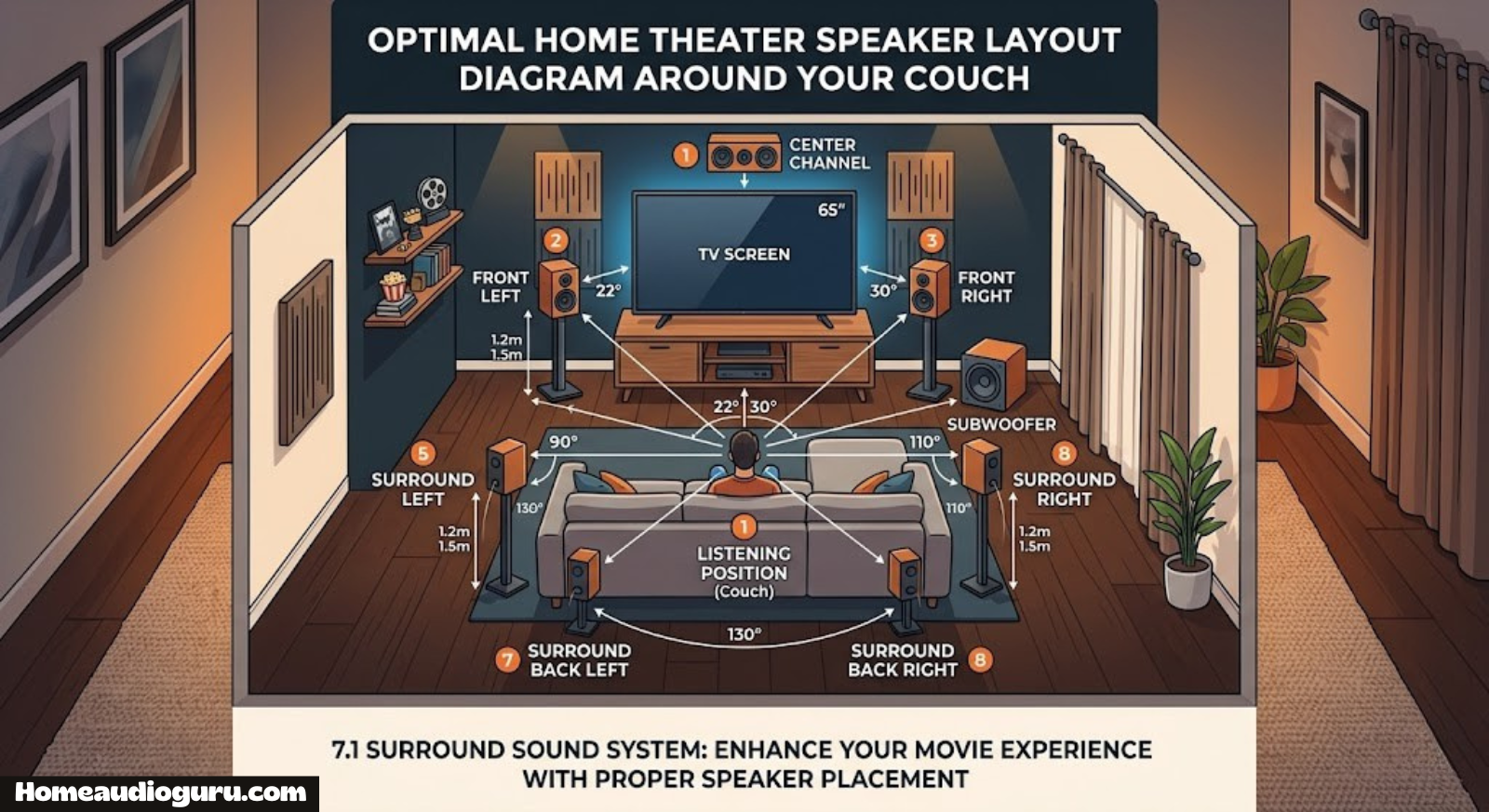
5.1 is the baseline “real” home theater configuration and remains the most common surround format on Blu-rays, streaming platforms, and broadcast TV. The five full-range speakers are front left, front right, center, and two surrounds (left and right, typically placed beside or slightly behind the listening position), plus one subwoofer for low frequencies.
The center channel does most of the heavy lifting in a 5.1 setup — it’s responsible for the majority of on-screen dialogue, so its placement and quality matter more than people expect. The two surround channels handle ambient effects: rain, crowd noise, a car passing behind you. For most living rooms with a single couch or small sectional, 5.1 delivers noticeably more immersion than stereo without requiring the wiring complexity of larger setups. If you’re setting one up for the first time, our home theater receiver setup guide walks through speaker placement and channel assignment step by step.
Who 5.1 Is Best For
Apartment dwellers, first-time home theater buyers, and anyone with a single-row seating arrangement tend to get the most value from 5.1. It’s also the format most affordable receivers are tuned around, so you’ll find stronger per-channel power at this tier than you will once you climb to 7 or 9 channels on a similar budget.
It’s also the format most streaming services default to when a title doesn’t have a dedicated Atmos mix, and the one nearly every physical Blu-ray release supports at minimum, which means a 5.1 setup is essentially guaranteed to be fully utilized by whatever you’re watching, rather than leaving channels unused because the content itself wasn’t mixed for them.

5. 7.1 and 7.2 Channel Receivers
Step up to 7.1 and you add two rear surround channels behind the main surrounds, giving sound effects a smoother path as they travel from front to back — instead of a helicopter effect jumping abruptly from front to side, it can pan continuously through six discrete positions around you. 7.2 simply adds a second subwoofer output, which is less about “more bass” and more about smoother, more even low-frequency response across different seats in the room.
7-channel setups make the most sense in wider or deeper rooms, or rooms with multi-row seating, where the extra rear channels actually have room to do their job. In a small square room where the rear surrounds end up only a couple feet from the main surrounds, the audible difference over 5.1 shrinks considerably. Many owners of 7-channel receivers actually run them as 5.1.2, redirecting the two “extra” amplifier channels to a pair of Atmos height speakers instead of rear surrounds — a tradeoff worth knowing about before you shop. To understand how these units connect to your display, see how to connect a receiver to your TV.
7.1 vs 7.2: Is a Second Subwoofer Worth It?
The step from 7.1 to 7.2 is often the cheapest, most overlooked upgrade in this entire size range, because it doesn’t require any new full-range speakers or additional wiring runs to new positions — just a second subwoofer, placed on the opposite side of the room from the first. Bass response varies enormously by seating position due to room modes, and a single subwoofer inevitably produces stronger bass in some seats than others. Two subwoofers, driven by the receiver’s dual sub outputs and positioned asymmetrically, smooth this out considerably, which matters most in rooms with multiple seating positions or an open floor plan where one listening spot’s ideal sub placement is another’s dead zone.
6. 9.1, 9.2, and 11-Channel Receivers
Beyond seven channels, receivers start splitting their extra capacity between two directions: more surround positions (front-wide channels, additional rear channels) or more height channels for Atmos. A 9.2 receiver, for example, commonly supports either a 7.2.2 layout (seven surround speakers plus two height speakers) or a 9.1 layout with front-wide speakers added to a standard 7.1 base, depending on how you configure it in the setup menu.
These larger receivers target dedicated home theater rooms, not casual living-room setups. They’re heavier, run hotter, and cost meaningfully more — both for the unit itself and for the additional speakers and wiring runs needed to actually use every channel. Buying an 11-channel receiver and only ever connecting five speakers to it is a common and expensive mistake covered in more detail in section 11.
Front-wide channels deserve a specific mention because they’re less intuitive than surround or height channels. Rather than sitting to the side or above the listener, front-wide speakers sit further out to the left and right of the main front pair, widening the soundstage for large rooms where the standard front left/right spacing feels too narrow relative to the seating distance. They’re most useful in rooms wider than about sixteen feet, and largely wasted in anything smaller — another example of channel count needing to match room geometry rather than being chosen by budget alone.
| Configuration | Typical Room Size | Best Use Case |
|---|---|---|
| 5.1 | Small–medium living room | General movies, casual viewing |
| 7.1 / 7.2 | Medium–large room, multi-row seating | Smoother surround panning |
| 7.1.4 / 9.2.4 | Dedicated theater room | Full Atmos/DTS:X immersion |
| 9.1 / 11.1 | Large or wide room | Front-wide imaging, large-scale setups |
7. Dolby Atmos, DTS:X and Height Channels
Height channels are the newest layer added to the channel-count conversation, and they work differently from every channel that came before them. Traditional 5.1/7.1 surround is “channel-based” — a sound is assigned to a specific speaker and stays there. Dolby Atmos and DTS:X are “object-based” — a sound (say, a helicopter) is treated as an object with a position in 3D space, and the receiver’s processor calculates in real time which combination of speakers, including overhead ones, should reproduce it as that object moves.
That’s why the third number in a notation like 5.1.2 or 7.1.4 specifically refers to height channels: they add the vertical dimension that channel-based surround never had. You can create height channels two ways — in-ceiling speakers wired directly into the ceiling, or upward-firing Atmos modules that sit on top of your existing front and surround speakers and bounce sound off the ceiling to simulate the same effect. If you’re unfamiliar with the format itself, our explainer on what Dolby Atmos actually means breaks down the technology in more depth.
Do You Need Atmos Channels?
Not everyone does. Atmos content is widely available on major streaming platforms and most modern Blu-rays, but the improvement is subtlest in smaller rooms and most dramatic in larger, acoustically treated spaces. If your budget forces a choice between a 7.1 receiver with strong per-channel power or a 5.1.2 receiver spreading the same power thinner across more channels, the honest answer depends on room size more than personal preference — bigger rooms benefit more from the extra channels.
In-Ceiling Speakers vs. Upward-Firing Modules
Dedicated in-ceiling speakers, wired directly and aimed straight down at the listening position, generally produce more precise and consistent height imaging because the receiver’s processor knows exactly where that sound is originating from. The tradeoff is installation complexity — cutting into drywall, running wire through an attic or between floors, and in many rental situations, simply not being an option at all.
Upward-firing modules solve the installation problem by sitting on top of existing front or surround speaker cabinets and bouncing sound off the ceiling to simulate an overhead position. They’re far easier to add to an existing setup and require no construction work, but their effectiveness depends heavily on ceiling height and material — a flat, hard, moderately low ceiling reflects sound predictably, while a vaulted, angled, or acoustically absorbent ceiling can blunt or scatter the effect considerably. If your ceiling isn’t a good candidate for upward-firing modules, that’s a strong signal to either commit to proper in-ceiling wiring or skip height channels for now rather than paying for an Atmos-capable receiver that can’t deliver a convincing overhead effect in your specific room.
8. Amplified Channels vs. Pre-Outs vs. Zone 2
Not every channel a receiver “supports” is actually powered by its internal amplifier. This is one of the most misunderstood specs in the entire category. Manufacturers frequently advertise a receiver as “9.2 channel processing” while it only has seven built-in amplifiers — the remaining two channels are available as pre-outs, meaning you can send that signal to an external power amplifier if you want to actually use it, but out of the box, those channels are silent.
Pre-outs aren’t a scam or a downside by default — they’re a deliberate design choice that keeps receivers smaller, cooler-running, and cheaper while still giving enthusiasts a growth path. But if you assume “9.2” means nine powered speakers and it actually means seven powered plus two pre-out, you’ll end up with silent speaker terminals and a confusing troubleshooting session. Always check the spec sheet for “amplified channels” specifically, not just the total channel notation.
Separately, some receivers dedicate one or two channels to a Zone 2 (or Zone 3) output, letting you play a different audio source in another room entirely — useful for a kitchen or patio speaker pair, but it also eats into your total available channels for the main room. Before buying based on channel count alone, confirm how many of those channels are actually available for your primary room’s speaker layout, and see our guide on connecting speakers to a receiver for the physical wiring side of things.
Bi-Amping: Another Use for “Extra” Channels
Some receivers let you redirect unused rear-surround amplifier channels toward bi-amping the front left/right speakers instead — sending separate amplifier channels to a speaker’s high-frequency and low-frequency drivers if that speaker supports bi-wiring. This isn’t adding new speaker positions the way rear surrounds or height channels do; it’s using extra amplifier headroom to reduce distortion and improve clarity on your two most important speakers. It’s a genuinely useful option for owners who bought a 7-channel receiver but only run a 5.1 layout, since it puts those “spare” channels to work rather than leaving them idle.
Reading the Fine Print on “Assignable” Channels
Spec sheets frequently list channels as “assignable,” meaning the receiver ships with a fixed number of physical amplifiers that can be routed to different jobs depending on a menu setting — but not all of those jobs simultaneously. A receiver might let you choose between 7.1 with two rear surrounds, 5.1.2 with two height speakers, or 5.1 plus Zone 2, using the same physical amplifier channels for whichever option you pick. Understanding this distinction prevents the common disappointment of expecting to run rear surrounds, height speakers, and a second zone all at once on a receiver that only ever intended for you to choose one.

9. How Many Channels Do You Actually Need?
Rather than chasing the highest number on the box, it helps to work backward from your room and habits. A few honest questions determine the right channel count far more reliably than marketing copy does:
- How many speakers are you realistically willing to mount and wire? If the answer is “two, maybe a sub,” a 9-channel receiver is wasted money.
- Is this mainly for movies, mainly for music, or a genuine mix? Music-first listeners often get more value from fewer, better-powered channels.
- What’s the room shape? Small square rooms see diminishing returns above 5.1; wide or long rooms benefit more from 7+ channels.
- Do you want overhead Atmos effects, or is that a “someday” upgrade? If it’s a someday upgrade, a receiver with pre-outs or unused amplifier channels for height speakers is worth prioritizing now.
For most households, 5.1 remains the sweet spot of cost, complexity, and noticeable improvement over stereo or soundbar setups — a point covered in more detail in our receiver vs. soundbar comparison. Enthusiasts with a dedicated media room, multi-row seating, or a genuine interest in Atmos should look at 7.1.4 or larger.
Real-World Examples by Room Type
It’s easier to reason about channel count with concrete examples rather than abstract room dimensions, so here’s how the recommendation typically plays out in practice:
Studio or one-bedroom apartment: A single couch a few feet from the TV, with no room for rear surrounds without running speaker wire across a doorway. A 2.1 or compact 5.1 setup — or even a well-placed soundbar with a sub — usually outperforms a crammed 7-channel install where the rear speakers end up practically on top of the listener.
Standard living room, single couch: The classic 5.1 use case. Front left/right flanking the TV, a center channel above or below the screen, two surrounds beside or slightly behind the seating position, and a sub placed to avoid corner boom. This is the configuration the majority of streaming and disc content is mixed for by default.
Larger living room with a sectional or multi-row seating: This is where 7.1 starts to earn its keep, since the extra rear channels give sound effects somewhere meaningful to go as they pan from front to back across a wider listening area. It’s also a reasonable point to start considering a pair of height channels if ceiling access is available.
Dedicated home theater room: Purpose-built rooms with acoustic treatment, tiered or multi-row seating, and no compromise on speaker placement are where 7.1.4 and larger configurations genuinely shine. The extra investment in channels, amplifiers, and speakers pays off because every channel has a clear, unobstructed job to do.
Open-plan or L-shaped room: Irregular room shapes complicate surround placement more than square footage does. In these layouts, front-wide channels (available on some 9-channel receivers) can sometimes do more for imaging than adding rear surrounds, since they widen the front soundstage in a room where traditional side/rear speaker placement isn’t practical.
10. Channel Count and Power Per Channel
Total wattage numbers on a receiver’s box are usually measured under conditions where only one or two channels are driven at once — not realistic for actual multi-channel movie playback. As you add channels, the receiver’s shared power supply and heat budget get split more ways, which is why a 9-channel receiver and a 5-channel receiver at the same price point often deliver noticeably different per-channel wattage when all channels are driven simultaneously.
This matters because underpowered channels compress dynamics and can sound strained at higher volumes, especially on the center channel carrying dialogue or the front pair carrying music. If you’re deciding between a higher channel count and stronger per-channel power at a fixed budget, our guide on how many watts you actually need is worth reading before you commit, and pairing that with a proper speaker calibration pass afterward ensures every channel is balanced correctly for your specific room.
| Channel Count | Typical Watts/Channel (mid-range receiver) | Notes |
|---|---|---|
| 2 channels | 80–120W | Power concentrated on fewer channels |
| 5 channels | 60–100W | Balanced, widely available |
| 7 channels | 50–90W | Power spread thinner at same price tier |
| 9+ channels | 40–80W | Often relies on pre-outs for full spec |
It’s worth reading published wattage specs skeptically rather than at face value. A figure like “100 watts x 7 channels” is almost always measured with only one or two channels driven, at a single frequency (often 1kHz), and sometimes at a distortion threshold most listeners would find audible. The more useful number, when manufacturers publish it, is “all channels driven” power, which reflects what actually happens during a busy action scene when every speaker is working simultaneously. If a spec sheet only lists the optimistic single-channel figure, it’s reasonable to assume real-world all-channel power will run meaningfully lower.
Impedance also interacts with channel count in ways that catch buyers off guard. Many receivers are rated into 8-ohm speakers but see their effective power and thermal headroom shrink when driving harder 6-ohm or 4-ohm speaker loads across every channel at once — a bigger concern the more channels you’re asking the receiver’s shared power supply to support simultaneously. Pairing a high channel count with power-hungry, low-impedance speakers is one of the fastest ways to push a receiver into thermal protection shutdown during a loud movie.
11. Common Channel-Count Mistakes
What Works
- Matching channel count to actual room size and seating
- Checking “amplified” vs “processed” channel specs before buying
- Leaving 1–2 channels free for a future Atmos upgrade
What to Avoid
- Buying a 9+ channel receiver and only connecting five speakers
- Assuming every advertised channel is powered out of the box
- Ignoring per-channel wattage in favor of total channel count
- Placing rear surrounds too close to main surrounds in small rooms
The single most expensive mistake buyers make is paying for channels they’ll never wire up. A high channel count only pays off once every one of those channels is actually connected to a speaker positioned correctly — an unused amplifier channel adds nothing to your sound but adds plenty to the price tag.
Mismatched Speaker Sizes Across Channels
Another frequent mistake is mixing wildly different speaker sizes or brands across the front, center, and surround positions without accounting for the tonal mismatch it creates. Dialogue moving from the center channel to the front left speaker, for instance, can shift noticeably in tone if those two speakers use different driver materials or crossover designs. It’s not strictly necessary to buy every speaker from the same product line, but matching timbre — especially between the front three channels — makes pans and dialogue transitions sound far more natural than chasing the cheapest option for each individual position.
Ignoring Subwoofer Placement
Because the “.1” in every notation is easy to treat as an afterthought, subwoofer placement often gets far less attention than the full-range channels around it — despite bass being some of the hardest content in a room to get right. A sub jammed into a corner “because there was space there” frequently produces boomy, uneven bass that no amount of channel count elsewhere in the system can compensate for. The “subwoofer crawl” technique — placing the sub at your listening position temporarily and crawling around the room to find where bass sounds tightest — remains one of the simplest, lowest-cost fixes available regardless of how many channels the rest of your system has.
12. Future-Proofing Your Channel Count
If you’re on the fence between two channel counts, lean toward the receiver that gives you room to grow rather than the one that exactly matches today’s speaker count. A 7.2-channel receiver run today as a 5.1 setup, with two channels held in reserve for future height speakers, is a more sensible long-term buy than a 5.1-only receiver you’ll need to fully replace the moment you want Atmos.
Also weigh how the receiver fits into a broader system. If you already own — or plan to add — smart speakers, a secondary Bluetooth speaker, or a multi-room setup, confirm the receiver’s app and zone support align with what you’re building rather than buying channel count in isolation. And if your budget genuinely can’t stretch to more channels right now, a well-reviewed all-in-one home audio system or soundbar can be a smarter interim step than an underpowered multi-channel receiver.
13. How Channel Layouts Differ Across Brands
The core channel math — five speakers plus a sub for 5.1, seven plus a sub for 7.1, and so on — is identical no matter whose logo is on the front panel. What actually differs from brand to brand is how each manufacturer implements auto-calibration, how flexible the amplifier assignment menu is, and how many “bonus” configurations a given channel count unlocks. Denon and Marantz, for instance, share the same parent company and largely the same amplifier platform, so their channel-assignment flexibility tends to track closely between the two. Yamaha has historically leaned into flexible “Zone” and bi-amp configurations even on mid-range models, while Sony and Onkyo have each taken turns emphasizing either raw channel count or per-channel power at a given price point, depending on the generation.
Rather than assuming any one brand is inherently “better” at a given channel count, it’s worth comparing the specific model’s amplified-channel spec, pre-out count, and auto-calibration system side by side. Our brand-specific breakdowns cover this in detail for Sony, Onkyo, and the Denon/Marantz lineup linked earlier in this guide, which is a faster way to compare real-world channel flexibility than reading spec sheets alone.
Auto-Calibration and Channel Assignment
Nearly every modern receiver ships with a room-correction microphone and automatic calibration routine — Audyssey, YPAO, DIRAC, or a manufacturer’s proprietary system. These tools don’t add channels, but they do determine how effectively the channels you already have get used: they measure distance, level, and crossover point for every connected speaker, then adjust the receiver’s output accordingly so that, for example, a center channel closer to your seating position doesn’t overpower more distant surrounds. Skipping this step after wiring up a multi-channel system is one of the most common reasons people feel underwhelmed by a channel count that should sound noticeably better than what they’re hearing.
14. Troubleshooting Common Channel Problems
A handful of channel-related issues account for the majority of “my surround sound isn’t working right” support questions, and most trace back to setup rather than hardware failure.
No Sound From One or More Speakers
Check the receiver’s speaker configuration menu first — it’s common to accidentally set a connected speaker to “none” or the wrong size during initial setup, which silences that channel entirely even though the wiring is correct. Re-running auto-calibration usually resolves this, since most systems will detect and flag a connected-but-unassigned speaker.
Center Channel Too Quiet or Too Loud
Because the center channel carries most dialogue, small level mismatches are the most noticeable of any channel. This is almost always a calibration issue rather than a hardware one — manually nudging the center channel level up by 1–2 dB in the receiver’s speaker level menu fixes the vast majority of complaints about muddy or buried dialogue.
Height Channels Not Engaging on Atmos Content
If ceiling or upward-firing height speakers are wired correctly but never seem to activate, confirm the receiver’s audio output setting is actually passing the object-based Atmos or DTS:X bitstream rather than downmixing to standard PCM — this setting lives on both the source device (streaming box, Blu-ray player) and the receiver, and both need to agree for height channels to engage.
Frequently Asked Questions
What does “5.1” mean on a receiver?
It means five full-range speaker channels (front left, front right, center, and two surrounds) plus one subwoofer channel, for six total amplified channels.
Is more channels always better?
Not necessarily. More channels only help if your room and speaker layout can actually use them; in small rooms, going beyond 5.1 or 7.1 often produces diminishing returns while adding cost and complexity, and the power budget shared across more channels can even leave each individual speaker with less punch than a simpler, well-powered setup.
What’s the difference between amplified channels and processed channels?
Amplified channels have a built-in power amplifier and can drive a speaker directly. Processed channels are decoded by the receiver but may only be available as a pre-out signal, requiring an external amplifier to actually power a speaker.
Can I run a 7-channel receiver with only five speakers?
Yes. Most receivers let you reassign unused rear-surround channels to other uses, such as a second zone, bi-amping the front speakers, or Atmos height speakers, through the setup menu.
Do I need extra channels for Dolby Atmos?
Yes, height channels are separate from the standard surround channel count and are represented by the third number in notations like 5.1.2 or 7.1.4.
What is Zone 2 on a receiver?
Zone 2 lets a receiver send a separate audio source to speakers in another room, using one or two of its amplifier channels that would otherwise be available for your main room’s speaker setup.
Is a 7.1 receiver better than 5.1 for music?
Not typically. Music is mostly mixed in stereo, so extra surround channels add little for music listening; a well-powered 2.1 or 5.1 setup is often a better fit for music-focused listeners.
What are pre-outs used for?
Pre-outs send a line-level signal for a specific channel to an external amplifier, letting you power additional speakers beyond what the receiver’s internal amplifiers can drive.
How do I know how many channels I actually need?
Start with your room size and how many speakers you’re realistically willing to install; most living rooms are well served by 5.1, while larger or dedicated theater rooms benefit from 7.1 or more with height channels. If you’re unsure, it’s usually safer to pick a receiver with a couple of spare or pre-out channels rather than one that exactly matches your current speaker count, since it leaves room to expand without buying a whole new unit later.
Does a higher channel count mean more power?
Not directly — total power is often spread across more channels, so per-channel wattage can actually be lower on a high-channel-count receiver than on a simpler model at the same price.
Can I add more channels later by buying an external amplifier?
Yes, as long as the receiver has pre-outs for the channels you want to add; check the spec sheet for pre-out availability before buying if future expansion is a priority.
What’s the minimum channel count for real surround sound?
5.1 is generally considered the minimum configuration for a genuine surround sound experience, since it’s the first tier that includes dedicated side/rear channels in addition to the front stereo pair and center.
Final Takeaway
Channel count isn’t a vanity number — it’s the single spec that determines how many speakers you can physically use and how immersive your setup can become. The right answer isn’t “the highest number you can afford,” it’s the number that matches your room, your speaker ambitions, and how you actually watch and listen. A well-powered 5.1 setup in the right room will outperform an underpowered 9-channel receiver every time.
Whatever configuration you land on, remember that the channel number on the box is a ceiling, not a promise — it only translates into a better experience once every channel is wired to a correctly placed speaker, calibrated, and driven with enough clean power to keep up during a loud scene. A modest, fully-utilized 5.1 system will always beat a half-connected, underpowered nine-channel setup.
Once you’ve settled on a channel count, the next steps are picking the receiver itself and getting it wired correctly — our best home audio receivers roundup and home audio system setup guide cover both in detail.
