JBL Bar 500 Review: Is This 5.1 Dolby Atmos Soundbar Worth Your Money?
A 5.1-channel soundbar with a wireless 10-inch subwoofer, Dolby Atmos, DTS:X, and a full set of streaming features. We went through how it sounds, how it connects, and where it falls short, so you can decide if it belongs under your TV.

Disclosure: this page contains Amazon affiliate links. If you buy through them, we may earn a small commission at no extra cost to you. It never changes our opinion of a product.
JBL Bar 500 Quick Verdict and Overview
Strong all-rounder for mid-size rooms
The JBL Bar 500 gives you a big, clear soundstage, real low-end weight from the wireless subwoofer, and genuine Dolby Atmos support without needing rear speakers. It is not the most precise soundbar at its price, and its overhead effects are more subtle than the marketing suggests, but it is one of the easiest ways to upgrade a TV that sounds thin.
Most modern televisions sound the way they look: slim, flat, and a little hollow. The speakers have almost no room to move air, so voices get nasal and explosions turn into a papery rumble. A soundbar fixes that by giving you real drivers in a real enclosure. The JBL Bar 500 goes a step further and adds a separate wireless subwoofer plus upward-firing speakers for height effects.
This is a 5.1-channel design, which means left, center, right, two surround channels created from the bar, and a dedicated low-frequency channel. JBL rates the system at 590 watts, a headline figure that is useful mostly as a comparison point against other JBL models. What matters in a living room is how it behaves at normal volume, and that is where the Bar 500 earns its keep. It stays composed when you push it, and it does not buzz or boom the way many budget bars do.
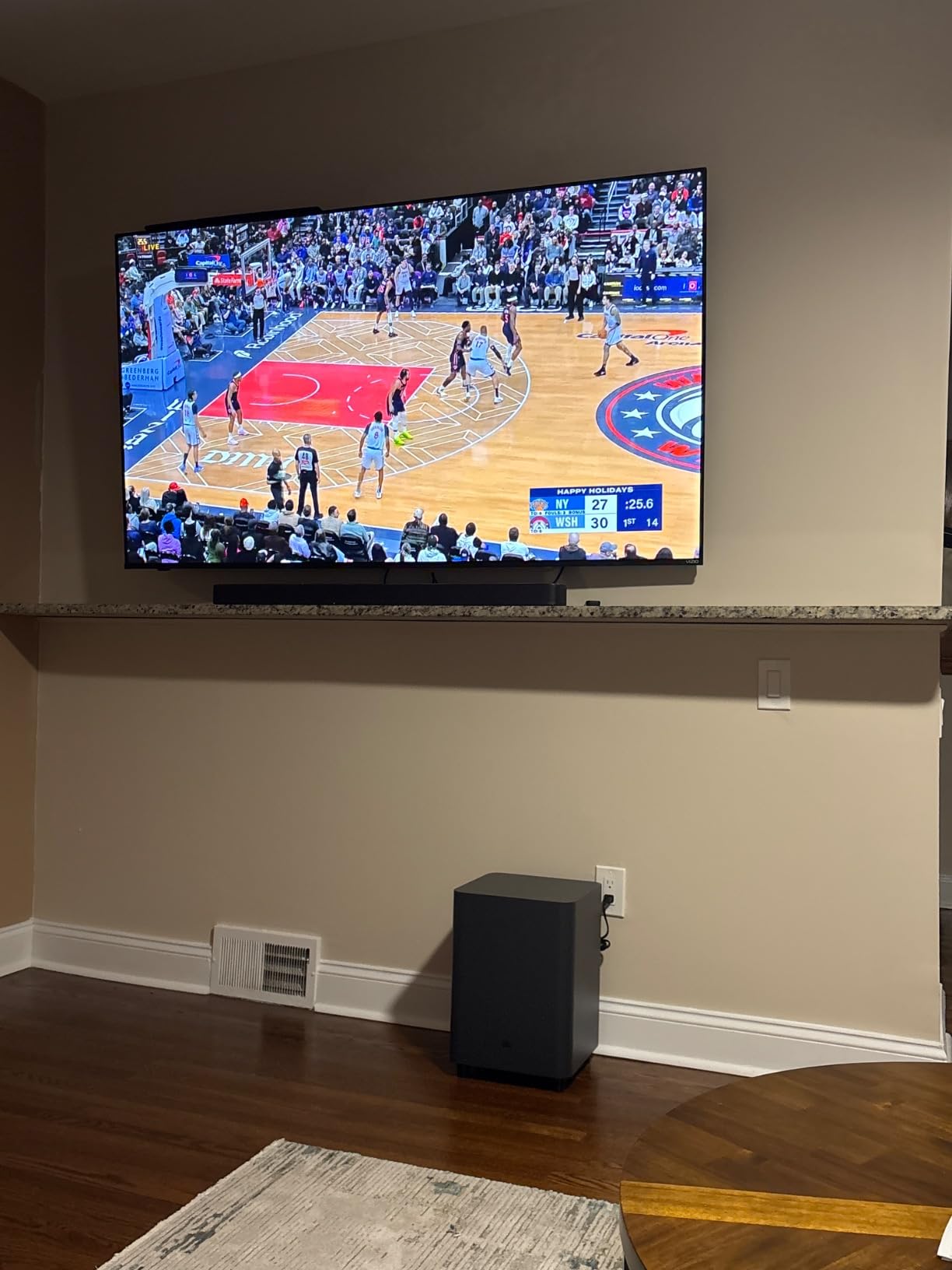
If you are still deciding between formats, our guide on receiver vs soundbar explains when a simple bar makes more sense than a full component system. For most apartments and shared living rooms, a bar like this wins on simplicity alone. One HDMI cable, one power cord for the bar, one for the subwoofer, and you are done.
Below, we break down each part of the experience in detail. If you already know you want it, you can jump straight to the current price using the button below.
JBL Bar 500 5.1ch SoundbarSee the latest price and availability.
Check Price on AmazonJBL Bar 500 Specs at a Glance
Specs rarely tell the whole story, but they do tell you what the hardware is capable of and which TV or setup it will play nicely with. Here is the practical summary of what the Bar 500 offers.
| Feature | Details |
|---|---|
| Channel layout | 5.1 with Dolby Atmos height processing |
| Rated power | 590W total system output |
| Subwoofer | 10-inch wireless subwoofer, pairs automatically |
| Surround formats | Dolby Atmos, DTS:X, Dolby Digital, DTS |
| Surround technology | JBL MultiBeam sound steering |
| HDMI | HDMI eARC output to TV and an HDMI input for a source device, with 4K and HDR passthrough |
| Other inputs | Optical digital, USB, Ethernet |
| Wireless | Wi-Fi, Bluetooth, Apple AirPlay, Chromecast built-in |
| Voice and multi-room | Alexa multi-room music support, Google Home app for setup |
| Remote | Included remote with EQ presets and a night mode |
A few of these deserve a short explanation. The eARC connection is the most important one for TV owners, because it carries high-quality audio back from the TV, including Atmos from streaming apps, over a single cable. The extra HDMI input lets you plug one source, such as a game console or streaming box, directly into the bar. Both are covered more in the setup section.
It is also worth checking the exact connectivity list on the product page before you buy, since JBL occasionally refreshes hardware revisions and bundles. If anything on the listing differs from the table above, trust the listing.
Want the full spec sheet?View the current listing and bundle options.
View on AmazonDesign and Build Quality
The Bar 500 is a plain, handsome piece of kit. The bar itself is wrapped in a dark fabric grille with a slightly curved profile, and the top has a small cluster of touch controls for power, volume, source, and Bluetooth pairing. Nothing about it screams for attention, which is exactly what you want from something that sits under a television for years.
Size and placement
At roughly 40 inches long, the bar suits TVs from about 50 inches upward. On a smaller set it will look oversized. Height is the more important number: at around four inches tall, it can block the lower edge of some TVs or the infrared sensor, especially on sets with a center stand. Measure the gap between your tabletop and the bottom of the screen before ordering. If the gap is tight, wall mounting the bar below the TV or using a low-profile TV stand solves it.
The subwoofer
The subwoofer is a boxy, matte-black cube with a front-firing 10-inch driver. It is bigger and heavier than the subs that ship with budget bars, which is part of why the bass feels solid rather than inflated. Because it connects wirelessly, you can place it almost anywhere in the room, as long as it has power nearby. A corner will give you the loudest bass. Along a side wall tends to be more balanced.
Build feel
The plastics are decent rather than premium, and the grille does not rattle at higher volumes. The remote is simple and a little light, but it covers the essentials: volume, mute, input, surround level, and subwoofer level. Controls on the bar itself are fine as a backup, but you will use the remote and the app daily.

Looks good under your TV?Check today’s price on Amazon.
Check Price on AmazonSetup and Connectivity
Setup is quick if you have a TV with an HDMI eARC port, and still straightforward if you do not. Plug in the bar and the subwoofer, connect the bar to your TV, and the subwoofer pairs on its own within a minute or so. There is no wiring between the two.
Best way to connect: HDMI eARC
Look for the HDMI port on your TV labeled eARC or ARC. Run the included HDMI cable from that port to the bar’s HDMI output. In your TV’s sound settings, switch the output to the external speaker or HDMI ARC option. Turn on HDMI-CEC in the TV settings, which may be called Anynet+, Simplink, Bravia Sync, or something similar, so the TV remote controls volume. If you want a refresher on the cabling side, our walkthrough on how to connect a receiver to a TV covers the same ARC logic and applies here too.
Using the extra HDMI input
The input on the bar lets you connect one source device and pass its video through to the TV. That is useful if your TV only has a single eARC port that is already taken, or if you want a game console to feed audio directly. Check that your TV and source support the same resolution and HDR type, since passthrough behavior can vary by model.
Wi-Fi and the app
To use AirPlay, Chromecast, and multi-room features, connect the bar to your Wi-Fi through the Google Home app or JBL’s own setup flow. It takes a few minutes. If you plan to run it over a wired network, the Ethernet port is there, and it is the most stable option for streaming lossless audio.
Optical and USB
If your TV is older and lacks eARC, the optical input still works, but it cannot carry Dolby Atmos. You will get standard Dolby Digital or stereo PCM, which sounds good but misses the height effects. For a deeper look at building a whole system around the TV, see how to set up a home audio system.
First-hour tuning checklist
Once everything is connected, spend ten minutes on tuning, because the default settings are rarely ideal for your room. Play a familiar movie scene with both quiet dialogue and a loud effect, and sit where you normally sit. Adjust the subwoofer level first, since most rooms need it lower than you would guess. Then set the surround level so side effects are noticeable but never distract from the screen. Finally, switch between the standard and movie modes and pick the one you can live with for a long evening. Small changes here often matter more than the hardware itself, and they cost nothing.
If you hear a slight delay between lips and voices, open your TV’s audio settings and look for a lip-sync or audio delay option. Most modern sets handle this automatically over eARC, but older TVs may need a nudge. A fresh firmware update on both the TV and the bar is also worth doing before you start judging the sound.
Easy setup, big sound.See the latest Bar 500 deals.
Check Price on AmazonDolby Atmos and DTS:X Performance
Dolby Atmos is the feature that gets most buyers interested in a soundbar like this, and it is also the one most likely to be oversold. If you are new to the format, our explainer on what Dolby Atmos means covers the basics. In short, Atmos treats sounds as objects that can sit anywhere in a three-dimensional space, including above you, rather than as signals locked to specific speakers.
How the Bar 500 delivers height
The bar uses upward-firing drivers that bounce sound off the ceiling, plus processing to shape the result. When it works, a helicopter passing overhead, rain on a roof, or a voice from above can seem to come from higher than the bar itself. The effect depends heavily on your room. A flat, standard-height ceiling, around eight to nine feet, in a plain material like drywall gives the best result. Vaulted, very high, or heavily textured ceilings reduce it sharply.
Realistic expectations
Here is the honest take. The Bar 500 widens and lifts the soundstage noticeably with Atmos content, and it adds a sense of space that stereo or basic 5.1 does not. It does not create the sharp, pinpoint overhead sound you get from a dedicated in-ceiling speaker setup. Think of it as an elevated, enveloping bubble rather than discrete speakers above your head.
DTS:X support is a practical bonus for people who buy discs, since many Blu-rays carry DTS:X tracks. Streaming rarely uses it, but having the format means you will not need a different device if you collect physical media.
Getting real Atmos
Content matters. Make sure your streaming app and your TV are both set to send Atmos out over eARC. Many TVs default to PCM stereo, which silently downgrades the experience. Once the bar’s display or app shows Atmos, you know you are getting the real thing.
Atmos without the rear speakers.Compare prices on Amazon.
Check Price on AmazonDialogue and Everyday TV
Most people spend far more time watching dialogue-heavy shows than blockbuster action, so voice clarity is the most important test. The Bar 500 has a dedicated center channel, and it makes a visible difference over the TV’s own speakers. Voices sit forward in the mix, sound natural rather than nasal, and stay understandable at lower volume.
What improves right away
- News anchors and talk shows have more body and less harshness.
- Whispered scenes in dramas are easier to follow without turning the volume up.
- Sports commentary is clear, and crowd noise adds atmosphere without swallowing the announcers.
Night listening
The night mode compresses the dynamic range so sudden loud scenes do not wake anyone up, while quiet dialogue stays audible. It is not perfect, but it is one of those features you end up using more than you expect, especially in apartments.
Where it can fall short
With some mixes, especially movies with heavy background music, dialogue can still slip a little. The remote lets you raise the center level, but the Bar 500 does not have a dedicated voice-boost button that is as aggressive as the ones on some Sony and Sonos models. If you mostly watch talk-heavy content in a small room and care only about speech, a cheaper bar may suffice. Our look at the Sonos Beam Gen 2 is a good reference for a compact, speech-focused alternative.
Clearer dialogue for everyday TV.See the Bar 500 on Amazon.
Check Price on AmazonMovies and Surround Effects
Movies are where the Bar 500 stretches its legs. The combination of a wide front soundstage, MultiBeam surround steering, and a powerful sub gives action sequences a sense of scale that small bars cannot match.
How MultiBeam works
JBL MultiBeam uses side-firing drivers and signal processing to send sound toward the side walls, where it bounces back toward you. That creates the impression of speakers to your left and right, and sometimes slightly behind. It is a clever trick, and it works best in rooms where the sofa is roughly centered on the TV and the side walls are within a reasonable distance, say 10 to 14 feet apart, and not covered with thick curtains or open to another room.
What you hear
In big scenes, effects extend noticeably beyond the edges of the bar, and moving sounds such as vehicles, gunfire ricochets, and flying objects pan across the room smoothly. Rear effects are present but gentler than from true rear speakers. If you want sharp, separated surrounds behind you, no bar can fully replace them. If you want an immersive upgrade without the cable run, the Bar 500 gets close.
Scale and dynamics
Where it shines is dynamics. Explosions have impact, orchestral swells fill the room, and quiet moments stay quiet. The system handles loud passages without audible strain at normal listening levels. Push it near maximum in a small room and you may start to hear the subwoofer working harder, but at typical levels it stays clean.
If you are curious how this stacks up against bigger systems, look at the best home theater systems under $10,000 to see what a full surround build costs, and our JBL Bar 1000 review for the step-up model with detachable rear speakers.
Room and seating tips for better surround
Because the surround effect depends on reflections, your room does more of the work than you might expect. Sitting about eight to twelve feet from the TV, centered on the bar, gives the most convincing result. If you sit far off to one side, the soundstage will lean toward the nearer wall. Hard surfaces such as bare walls reflect sound well, while thick drapes and large bookcases soak it up. If one side of your room is open to a hallway, you may notice the surround image becomes lopsided. Moving the sofa a little, or adding a small rug to calm echo, can make a real difference.
Also keep the area around the bar clear. Placing it inside a cabinet or pushing it right against a wall muffles the side-firing and upward-firing drivers, and the result is flatter and less spacious. A few inches of open space above and beside the bar is plenty.
Cinema-style sound at home.Grab the Bar 500 on Amazon.
Check Price on AmazonMusic Performance
Soundbars are built for movies first, and music often gets less attention. The Bar 500 is better than most at treating music seriously, partly because the subwoofer does not smear everything and partly because the tonal balance is reasonably neutral.
Tonal balance
The sound is warm and a little bass-forward, with a slight emphasis on the upper midrange that gives vocals presence. Acoustic guitar, piano, and female vocals sound natural. Dense electronic or rock tracks get a satisfying thump without losing the guitars. Very bright recordings can sound a touch forward, but nothing is harsh.
Stereo imaging
Stereo music creates a convincing wide image, though it will not match a pair of dedicated bookshelf speakers for pinpoint placement. If your priority is critical listening, a separate stereo system, such as those in our best home stereo systems under $500, will do better for the money. The Bar 500 is aiming at a different job: good-sounding music from every source in the room, without extra gear.
Streaming and wireless quality
Over Wi-Fi with AirPlay or Chromecast, music quality is excellent and stays stable. Bluetooth is more convenient but uses compression. If you are wondering how big that difference is, our article on whether wireless speakers lose quality explains it in plain terms. For casual listening, Bluetooth is fine. For focused listening, use Wi-Fi.
Using the EQ
The app and remote offer simple presets and bass and treble adjustments. Try the standard setting first, and only add bass if your room demands it. In smaller rooms, reducing the subwoofer level a notch often tightens the sound significantly.
One system for movies and music.See current pricing.
Check Price on AmazonSubwoofer and Bass Performance
The subwoofer is the single biggest reason the Bar 500 punches above many bars in its price range. A 10-inch driver in a proper enclosure produces deeper and more controlled bass than the 6 to 8-inch subs that come with cheaper models.
Depth and control
Bass reaches low enough to give film soundtracks real weight. Rumbles, engine growls, and low synth lines come through with a physical presence rather than a vague boom. The sub is quick enough to keep pace with drum hits, so kick drums sound tight instead of one-note.
Placement tips
- Start near the front of the room, close to the TV, then move it if the bass sounds uneven.
- Corners boost output, but can add boominess in smaller rooms.
- Keep it a few inches from walls to reduce muddiness.
- Try the crawl test: place the sub at your seat, play bass-heavy music, and crawl around the room to find where the bass sounds best, then put the sub there.
Neighbors and late nights
Strong bass travels through floors and walls. If you share walls, use the subwoofer level control or the night mode. Placing the sub on a thick rug or a small isolation pad also reduces vibrations.
Is it enough?
For rooms up to around 350 to 400 square feet, yes. In larger open spaces, the sub is capable but you may start wanting more. At that point it is worth looking at higher-end systems, like those in our best home audio systems roundup.
Gaming and sports
The same bass control that helps movies also helps games and live sport. Explosions in a shooter land with satisfying force, and footsteps and directional cues remain easy to follow because the center and side channels stay clean. For sports, the crowd ambience gives matches a stadium feel, and the dialogue-focused center channel keeps commentary clear even when the stadium roars. If you play competitively and want the lowest possible lag, check whether your TV has a game mode that also applies to the audio path, and keep the console on the bar’s HDMI input if your setup allows it.
Real bass from a 10-inch sub.Check availability on Amazon.
Check Price on AmazonSmart Features and Streaming
The Bar 500 is not just a speaker you plug into a TV. It is a networked audio device that plays music, joins a multi-room group, and responds to your phone.
Built-in streaming support
- Apple AirPlay: send audio from an iPhone, iPad, or Mac in one tap.
- Chromecast built-in: cast music and podcasts from supported apps on Android or iOS.
- Alexa multi-room music: group the bar with compatible Echo speakers for whole-home playback. If you own Echo gear, see our reviews of the Echo Studio and the Echo Dot.
- Bluetooth: a simple fallback for guests who do not use Wi-Fi.
The apps
Setup and control happen through the Google Home app and the JBL One app, depending on how you configure it. The apps are functional, with input switching, EQ, and firmware updates, but they are not the slickest on the market. The dedicated Sonos app is still smoother, though the Bar 500 gets most of what you need done.
Voice control
The bar does not include a built-in microphone array like some rivals, so voice control comes from connecting a smart speaker or using your phone. If hands-free voice control matters, factor that in.
Firmware and long-term support
JBL has shipped several updates that improved stability and added features, which is a good sign. It is wise to update the firmware right after setup, as early units can have minor connection quirks that updates resolve.
Everyday convenience
Small details make a soundbar pleasant to live with. The bar wakes automatically when the TV turns on, remembers its last volume, and switches inputs smoothly when HDMI-CEC is enabled. In practice that means you can use a single TV remote for most daily tasks and only reach for the JBL remote when you want to change surround or bass levels. If several people share the system, setting the preferred EQ once and leaving it alone avoids most arguments about volume and bass.
Streaming-ready out of the box.See the latest Bar 500 price.
Check Price on AmazonHow the JBL Bar 500 Compares to Rivals
The soundbar market is crowded, and the best choice depends on your room, your TV, and your budget. Here is a quick view of how the Bar 500 stacks up against popular alternatives we have covered. Prices change often, so use the tables for relative positioning rather than exact numbers.
| Model | Channels | Atmos | Subwoofer | Best for |
|---|---|---|---|---|
| JBL Bar 500 | 5.1 | Yes | 10-inch wireless | Mid-size rooms, movies and music |
| JBL Bar 1000 | 7.1.4 | Yes | 10-inch wireless, plus detachable rears | Larger rooms wanting real surrounds |
| Sonos Beam Gen 2 | Compact 5.0 | Yes | Optional add-on | Small rooms, speech clarity, app polish |
| Sonos Ray | Compact stereo | No | Optional add-on | Small budgets and small rooms |
| Bose Smart Soundbar | Varies by model | Varies | Optional add-on | Clean sound, simple design |
| Samsung B-Series | Varies by model | Varies | Often included | Value, Samsung TV owners |
| Sony HT-S2000 | 3.1.2 | Yes | Included | Compact Atmos for the price |
| Vizio 5.1 Soundbar SE | 5.1 | No | Included | Budget surround |
| Polk MagniFi Mini | Compact bar | Varies | Included | Small spaces |
Specs for competing models vary by version, so treat the table as a quick orientation and check each review for details.
Bar 500 vs Bar 1000
The Bar 1000 adds detachable wireless rear speakers and more height drivers, producing a much more convincing surround effect. It also costs significantly more. If you have a large living room and care about rear effects, it is worth the step-up. If you want a simpler, cheaper path into Atmos, the Bar 500 delivers most of the fun.
Bar 500 vs Sonos Beam Gen 2
The Beam is smaller and easier to place, with a polished app. But it has no included subwoofer, so the bass is more modest unless you add a Sonos Sub. The Bar 500 offers more power and weight out of the box, at the cost of a bigger footprint and less refined software.
Bar 500 vs a receiver system
A separate receiver and speakers will beat any soundbar for flexibility and accuracy, but cost more and take up more room. If you want to explore that route, start with the best home audio receivers.
Compare and decide.Check the Bar 500 price on Amazon.
Check Price on AmazonWho Should Buy the JBL Bar 500? Pros and Cons
After going through each part of the experience, here is the summary.
Pros
- Big, full sound with strong dialogue clarity
- Powerful 10-inch wireless subwoofer
- Real Dolby Atmos and DTS:X support
- MultiBeam adds wide, immersive surround
- HDMI eARC plus an extra HDMI input
- AirPlay, Chromecast, and Alexa multi-room
- Simple setup with one cable to the TV
Cons
- Overhead effects are subtle, not pinpoint
- Rear surround is gentler than true rear speakers
- Large for smaller TVs and tight shelves
- Apps are functional but not very polished
- No built-in voice assistant microphone
Buy it if
- You have a 55-inch or larger TV and a mid-size living room.
- You want Atmos and strong bass without running speaker wire.
- You watch a mix of movies, shows, and music.
- You value ease of setup over fine-tuning.
Skip it if
- You want true rear speakers and sharp surround effects. Look at the Bar 1000 or a receiver system.
- Your room is small or you live in a very tight apartment with thin walls.
- You want the most polished smart-home app experience.
- You mainly want speech clarity for a small bedroom TV, where a compact bar would do.
Value
Considering the included subwoofer, Atmos support, and wireless streaming, the Bar 500 is a strong value. It often drops in price during sales, which makes it a particularly good deal. Check the current price and compare it against bundles before buying.
Ready to upgrade your TV sound?See today’s best price.
Check Price on AmazonJBL Bar 500 FAQs
Is the JBL Bar 500 worth buying?
Yes, for most people with a mid-size room and a 50-inch or larger TV. It combines a strong center channel, a powerful 10-inch wireless subwoofer, Dolby Atmos, and good streaming support at a price that undercuts many rivals with similar features. It is less compelling if you want true rear speakers or a very compact bar.
Does the JBL Bar 500 support Dolby Atmos?
Yes. It supports Dolby Atmos and DTS:X, using upward-firing drivers and processing for height effects. To receive Atmos, connect the bar to your TV using HDMI eARC and make sure your streaming app and TV are set to pass Atmos through.
Does the Bar 500 come with a subwoofer?
Yes. It includes a 10-inch wireless subwoofer that pairs automatically with the bar. You only need to plug the subwoofer into a power outlet.
Does it have rear speakers?
No. The Bar 500 creates surround effects using MultiBeam sound steering, which bounces audio off your walls. It works well in suitable rooms, but it is not the same as physical rear speakers. The JBL Bar 1000 is the model with detachable rear speakers.
How do I connect the JBL Bar 500 to my TV?
Use the included HDMI cable to connect the bar’s HDMI output to your TV’s HDMI eARC or ARC port. Then switch your TV’s audio output to the external speaker or HDMI ARC option and enable HDMI-CEC so the TV remote can control volume. If your TV lacks HDMI ARC, you can use the optical input, though you will lose Dolby Atmos.
Can I stream music to the Bar 500 over Wi-Fi?
Yes. It supports Apple AirPlay and Chromecast built-in, and it can work with Alexa multi-room music. Connect it to your Wi-Fi network through the Google Home app and you can send music from your phone, tablet, or computer.
Does the Bar 500 work with Alexa or Google Assistant?
It works with Alexa multi-room music and uses the Google Home app for setup, but it does not include a built-in microphone for voice commands. If you want to control it by voice, pair it with a smart speaker or use your phone.
Is the Bar 500 good for music?
It is better than most soundbars for music, with warm, full sound and tidy bass. It will not match dedicated stereo speakers for fine detail and imaging, but for background and casual listening it is more than good enough. For critical listening, a stereo setup is a better choice.
What size TV is the Bar 500 best for?
It suits TVs from about 50 inches and up. On a smaller TV it will look too wide, and the height of the bar might block the bottom of the screen on certain stands, so measure your space first.
Can I use the Bar 500 without a TV?
Yes. You can use Bluetooth, AirPlay, Chromecast, or the USB input to play music with no TV connected. For everyday use as a music speaker, it is easiest to use it with a TV for source switching, but it works standalone.
How does the Bar 500 differ from the JBL Bar 1000?
The Bar 1000 is the larger, more expensive model. It adds detachable wireless rear speakers, more height drivers, and a more elaborate surround setup. The Bar 500 is simpler, cheaper, and easier to place, with a more subtle surround effect.
Will the Bar 500 work with a gaming console?
Yes. You can connect a console through the bar’s HDMI input or directly to the TV. Both work well, and Atmos is supported on consoles that offer it. If you need 4K at high refresh rates, check that your TV and console are compatible with the bar’s HDMI passthrough capabilities, since this can differ by model and setting.
Still have questions?Read the latest buyer feedback on Amazon.
See Reviews on AmazonFinal Verdict: Should You Buy the JBL Bar 500?
The JBL Bar 500 does the things that matter most in a soundbar. Dialogue is clear, bass is substantial and controlled, and the soundstage is wide enough to make a living room feel like a small cinema. Dolby Atmos support and the wireless 10-inch subwoofer lift it above basic soundbars, and the streaming features mean it works just as well on a quiet Sunday playlist as it does on movie night.
It is not perfect. Overhead effects are more of a gentle lift than a sharp ceiling, rear surrounds will never match actual rear speakers, and the app experience trails the best in the business. But those are trade-offs for a system that is straightforward to set up and sounds big without taking over your room.
If you want a simple, one-box upgrade for your TV that handles movies, shows, games, and music well, the Bar 500 is an easy recommendation. If you want to go further, consider the Bar 1000, or step into a full system with a receiver. Either way, check the current price, since this model is frequently discounted.
Bring home bigger sound.Get the JBL Bar 500 on Amazon.
Check Price on Amazon